

The GH-200: GitHub Actions Certification validates your ability to design, implement, and optimize automated workflows that accelerate software development and delivery. This exam assesses your proficiency in streamlining repetitive tasks, orchestrating CI/CD pipelines, and customizing GitHub Actions to fit diverse project needs. Achieving this certification demonstrates practical expertise in automation and workflow management, with the credential remaining valid for two years.
Key Focus Areas
- Workflow Automation: Building and customizing workflows to reduce manual tasks.
- CI/CD Pipelines: Configuring and managing continuous integration and delivery pipelines for efficient releases.
- Task Optimization: Leveraging GitHub Actions to optimize performance, reduce errors, and enhance team productivity.
- Scalability: Applying best practices to ensure workflows adapt to evolving project and organizational needs.
Who Should Take the Exam?
The GH-200 exam is ideal for professionals who already have intermediate-level experience with GitHub Actions, including:
- DevOps Engineers looking to strengthen automation and pipeline management skills.
- Software Developers seeking to integrate CI/CD practices directly into their development process.
- IT Professionals and System Administrators aiming to streamline operational workflows and boost efficiency.
Exam Details

- The GH-200: GitHub Actions Certification is designed for candidates at the intermediate level, targeting roles such as Administrators, Developers, DevOps Engineers, Solution Architects, and Students.
- The exam provides a comprehensive assessment of your ability to automate workflows and manage CI/CD pipelines within GitHub Actions.
- You will be allotted 100 minutes to complete the exam, which will be proctored to ensure integrity.
- In addition to knowledge-based questions, the assessment may also include interactive components that evaluate your practical skills.
- To support a global audience, the GH-200 exam is available in multiple languages, including English, Spanish, Portuguese (Brazil), Korean, and Japanese.
Course Outline
The exam covers the following topics:
Domain 1: Learn About Author and maintain workflows (40%)
Working with events that trigger workflows
- Configuring workflows to run for one or more events
- Configuring workflows to run for scheduled events
- Configure workflows to run for manual events
- Configuring workflows to run for webhook events (e.g., check_run, check_suite, deployment, etc.)
- Demonstrating a GitHub event to trigger a workflow based on a practical use case
Using the components of a workflow
- Identifying the correct syntax for workflow jobs (e.g., indentation and encapsulation of parts of the workflow)
- Using job steps for actions and shell commands
- Use conditional keywords for steps
- Describing how actions, workflows, jobs, steps, runs, and the marketplace work together
- Identify scenarios suited for using GitHub-hosted and self-hosted runners
- Implementing workflow commands as a run step to communicate with the runner
- Demonstrating the use of dependent jobs
Using encrypted secrets and environment variables as part of a workflow
- Using encrypted secrets to store sensitive information
- Identifying the available default environment variables during the construction of the workflow
- Identifying the location to set custom environment variables in a workflow
- Identifying when to use the GITHUB_TOKEN secret
- Demonstrate how to use workflow commands to set environment variables
Creating a workflow for a particular purpose
- Adding a script to a workflow
- Demonstrate how to publish to GitHub Packages using a workflow
- Demonstrating how to publish to GitHub Container Registry using a workflow
- Using database and service containers in a GitHub Actions workflow
- Using labels to route workflows to specific runners
- Using CodeQL as a step in a workflow
- Demonstrate how to publish a component as a GitHub release using GitHub Actions
- Deploying a release to a cloud provider using a GitHub Actions workflow
Domain 2: Understand Consume workflows (20%)
Interpreting the effects of a workflow
- Identifying the event that triggered a workflow from its effects in a repository, issue, or pull request
- Describing a workflow’s effects from reading its configuration file
- Diagnose a failed workflow run (e.g., using a workflow run history and its logs, determine why a workflow run may have failed)
- Identifying ways to access the workflow logs from the user interface
- Identify ways to access the workflow logs from GitHub’s REST API
- Enabling step debug logging in a workflow
- Demonstrate how to use default environment variables in a workflow
- Demonstrating the correct syntax for passing custom environment variables in a workflow step
- Configuring caching of workflow dependencies
- Identifying steps to pass data between jobs in a workflow
- Removing workflow artifacts from GitHub
- Adding a workflow status badge
- Add environment protections
- Defining a matrix of different job configurations
- Implement workflow approval gates
Locating a workflow, its logs, and artifacts
- Describing where to locate a workflow in a repository
- Explaining the difference between disabling and deleting of workflows
- Demonstrating how to download workflow artifacts from the user interface
- Describe how to use an organization’s templated workflow
Domain 3: Learn about Author and maintain actions (25%)
- Identify the type of action required for a given problem (e.g., JavaScript, Docker container, run step)
- Demonstrating how to troubleshoot JavaScript actions
- Demonstrating how to troubleshoot Docker container actions
Describing the components of an action
- Identifying the files and directory structure needed to create an action
- Identify the metadata and syntax needed to create an action
- Implementing workflow commands within an action to communicate with the runner (Note: this includes exit codes)

Domain 4: Managing GitHub Actions in the enterprise (15%)
Distributing actions and workflows to the enterprise
- Explain reuse templates for actions and workflows
- Defining an approach for managing and leveraging reusable components (e.g., repos for storage, naming conventions for files/folders, and plans for ongoing maintenance)
- Defining how to distribute actions for an enterprise
- Define how to control access to actions within the enterprise
- Configuring organizational use policies for GitHub Actions
Managing runners for the enterprise
- Describing the effects of configuring IP allow lists on GitHub-hosted and self-hosted runners
- Describe how to select appropriate runners to support workloads (e.g., using a self-hosted versus GitHub-hosted runner, choosing supported operating systems)
- Explain the difference between GitHub-hosted and self-hosted runners
- Configuring self-hosted runners for enterprise use (e.g., including proxies, labels, networking)
- Demonstrate how to manage self-hosted runners using groups (e.g., managing access, moving runners into and between groups)
- Demonstrating how to monitor, troubleshoot, and update self-hosted runners
Managing encrypted secrets in the enterprise
- Identify the scope of encrypted secrets
- Demonstrating how to access encrypted secrets within actions and workflows
- Explaining how to manage organization-level encrypted secrets
- Explain how to manage repository-level encrypted secrets
GH-200: GitHub Actions Exam FAQs

Exam Policies
To maintain a fair and consistent evaluation process, the GH-200: GitHub Actions Certification follows a set of structured exam policies. Candidates are encouraged to review these policies carefully before attempting the assessment.
– Proctoring and Assessment Format
The GH-200 exam is fully proctored, ensuring a secure and reliable testing environment. In addition to knowledge-based questions, the exam may include interactive, scenario-driven components that simulate real-world tasks. These elements are designed to assess both your theoretical knowledge and your ability to apply GitHub Actions in practical situations, such as automating workflows, managing CI/CD pipelines, and customizing environments.
– Exam Duration and Experience
The assessment is designed to be completed within the allotted 100 minutes. Candidates may encounter a combination of multiple-choice, scenario-based, and interactive task-based exercises. To ensure a smooth experience, it is recommended that candidates familiarize themselves with the official Exam Duration and Exam Experience guidelines, which provide detailed insights into time allocation, question types, and task expectations.
– Retake Policy
If a candidate does not pass the exam on the first attempt, a 24-hour waiting period applies before retaking. For subsequent attempts, the waiting period increases in accordance with the number of prior attempts. This approach ensures that candidates have sufficient time to review, strengthen their knowledge, and improve their practical skills before reattempting the exam.
GH-200: GitHub Actions Study Guide
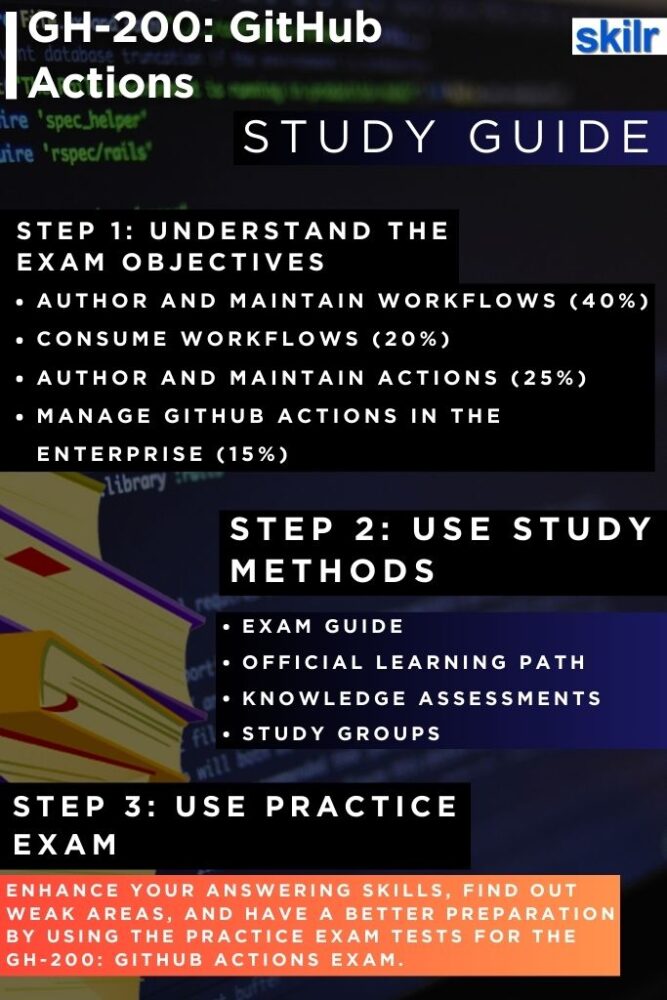
Step 1: Review the Exam Objectives
Start by carefully analyzing the official exam objectives. These outline the core skills measured in the GH-200 certification, such as automating workflows, designing and managing CI/CD pipelines, and customizing GitHub Actions environments. Having a clear map of what the exam covers will help you prioritize your preparation and focus on the most relevant topics.
Step 2: Follow the Microsoft Learning Path
Next, immerse yourself in the Microsoft Learning Path for GitHub Actions. This structured resource offers guided modules, tutorials, and hands-on labs that bridge theory with practical application. By completing these learning paths, you ensure that your preparation is aligned directly with the competencies tested in the exam, while gaining the practical experience needed to apply GitHub Actions in real-world scenarios. The training resources include:
– Automating your workflow with GitHub Actions
This course teaches you how GitHub Actions can streamline and automate your software development lifecycle. You will learn to design and implement automated workflows, use GitHub Actions to build applications seamlessly, and leverage GitHub Script to interact programmatically with the GitHub API. The course emphasizes practical skills that help accelerate development, reduce manual effort, and improve overall workflow efficiency.
This course is designed for students and professionals who want to harness GitHub to support developers and DevOps engineers in building, testing, and deploying applications more efficiently. Participants will also gain insights into the GitHub Actions features available in their enterprise environment and learn how to effectively apply them in real-world scenarios.
– Introduction to GitHub Actions
This will help you will gain a comprehensive understanding of GitHub Actions, including the workflow structure and its key components. You will explore events, examine how jobs and runners function, and learn how to interpret console output generated by actions. This module provides the foundational knowledge needed to effectively design, manage, and troubleshoot automated workflows.
By the end of this, you will be able to:
- Explain the concepts of GitHub Actions and workflows
- Create, configure, and manage GitHub Actions and workflows
- Describe the roles of events, jobs, and runners within a workflow
- Analyze console output and manage releases for actions
Step 3: Test Your Knowledge with Assessments
As you progress, regularly attempt the knowledge assessments included in the learning path. These short quizzes and checks serve as milestones to validate your understanding of key concepts. Treat them not just as tests, but as feedback tools—helping you identify weak areas early, so you can revisit and strengthen them before moving forward.
Step 4: Engage in Study Groups and Communities
Don’t prepare in isolation—join study groups, discussion forums, or professional communities dedicated to GitHub Actions, DevOps, or GitHub certifications. Engaging with peers gives you access to shared experiences, tips, and insights from those who have either taken the exam or work with GitHub Actions daily. These interactions often provide real-world scenarios that go beyond the standard study materials.
Step 5: Practice in a Simulated Exam Environment
Finally, build confidence by taking full-length practice tests that simulate the real exam conditions. This helps you familiarize yourself with the timing (100 minutes), question types, and interactive components you may encounter. After each practice attempt, carefully review your results to pinpoint weak areas, refine your strategy, and strengthen your problem-solving speed and accuracy.
