
The Salesforce Certified Slack Developer credential validates the expertise of professionals who design, build, and maintain custom applications on the Slack platform. This certification demonstrates an individual’s deep understanding of Slack’s Application Programming Interfaces (APIs) and their ability to plan, design, and implement scalable and efficient Slack apps that enhance team collaboration and workflow automation.
Key Competencies
Certified Slack Developers are proficient in leveraging Slack’s core features and APIs to deliver powerful, customized solutions. They are skilled in app architecture, event handling, API integrations, and automation, ensuring seamless collaboration experiences within the Slack environment.
Successful candidates are expected to have hands-on experience developing Slack applications and a strong grasp of the platform’s structure and best practices.
Recommended Experience
Before attempting the exam, it is recommended that candidates have:
- At least 6 months of hands-on experience working with Slack’s APIs.
- Practical experience building and deploying at least one custom Slack app.
- Proficiency in reading and creating JSON objects.
- Familiarity with Web APIs and event-based API protocols (such as JSON over HTTP and, to a lesser extent, WebSockets).
- Competence in at least one programming language — typically Node.js, Python, or Java (although any language capable of sending and receiving HTTP API calls is suitable).
- Experience developing and deploying web applications, ideally using a cloud service provider.
Core Knowledge Areas
Candidates should demonstrate a comprehensive understanding of the following domains:
- General Slack structure and workspace management.
- Slack apps and their core components, including app manifests, permissions, and event subscriptions.
- Integration with APIs and third-party services.
- App deployment and lifecycle management in production environments.
Who Should Take the Salesforce Certified Slack Developer Exam
This certification is ideal for:
- Developers and software engineers who design and build custom Slack integrations or apps.
- Automation and workflow specialists seeking to enhance productivity through Slack-based solutions.
- Salesforce developers or administrators aiming to extend their expertise into Slack’s ecosystem.
- Technical consultants or solution architects working on digital collaboration and integration projects.
Exam Details
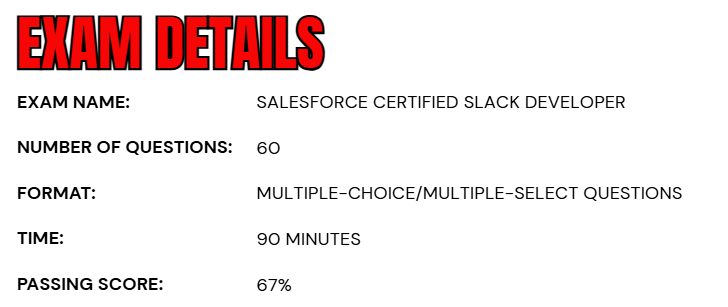
- The Salesforce Certified Slack Developer exam consists of 60 multiple-choice and multiple-select questions designed to assess a candidate’s knowledge and skills in building and managing Slack applications.
- Candidates are allotted 90 minutes to complete the exam, and a passing score of 67% is required to earn the certification.
- The exam can be delivered in a proctored environment, either onsite at a testing center or online, offering flexibility to candidates. For more information on scheduling, refer to the official Salesforce exam scheduling page.
- During the exam, no reference materials—either hard-copy or online—are permitted, emphasizing the need for thorough preparation and hands-on experience.
- There are no prerequisites required to attempt this certification, making it accessible to anyone with the recommended knowledge and experience in Slack app development.
Course Outline
The Salesforce Certified Slack Developer Exam assesses a candidate’s knowledge and skills across the essential domains of Slack application development.
1. Understand Apps in the Slack Platform 7%
- Recommending how to automate and enhance operations on a Slack workspace.
- Recommending when to use Slack’s different surfaces (user touchpoints including App home, modals, and messages) for a range of use cases.
- Identifying when to set up a team to collaborate on a Slack app.
2. Learn how to design the Interactive Flow of Your App 20%
- Building common workflows (business processes) and use cases for Slack apps.
- Recommending an app design that interacts effectively with Slack’s architecture.
- Handling possible user entry points for an app’s workflow.
- Recommending when to use different Slack components and features (such as incoming webhooks, slash commands, shortcuts, interactive components, and bots) for common use cases.
- Building a user interface (UI) for your app’s surfaces using Block Kit.
3. Understand about designing Your Workflows: Spotlight on Slack’s APIs 13%
- Recommending when to implement Slack’s different application programming interfaces (APIs) for different use cases.
- Implementing the Web API in your app.
- Implementing the Events API in your app.
- Discriminating between Socket Mode and HTTP-based event delivery.
- Differentiating between current Slack terms and legacy language in the APIs.
- Processing rate limits throughout the Slack platform.
4. Designing a Great User Experience 8%
- Building a great user experience that aligns with Slack’s commitment to make work life simpler, more pleasant, and more productive.
5. Understand Design for Security 19%
- Designing for security.
- Implementing the OAuth installation flow.
- Requesting the appropriate scopes for your app’s use case.
- Requesting the appropriate tokens for your app’s use case.
- Identifying the steps you could take to make your app communicate securely in Slack.
- Storing and retrieving data and tokens safely.

6. Designing for Scale 9%
- Designing your app to match the unique platform architecture, features, and roles of Enterprise Grid.
- Describing the characteristics of an Enterprise Grid Sandbox.
- Recommending when to add support for channels that are shared externally with Slack Connect.
7. Learn about Tools 5%
- Recommend when to use sample code and external resources.
- Recommending when to use the Bolt development framework to build Slack apps.
- Explaining the purpose and value of Block Kit Builder.
- List some use cases for Slack Developer Tools (SDT).
8. Understand APIs for Managing Your Slack 12%
- Recommending when to use an Admin API to automate a Slack workspace or org administration.
- Using the SCIM API to manage Slack users and user groups.
- Monitoring workspace events with the Audit Logs API.
- Recommend when to use the Discovery API for data-loss prevention, compliance archiving, or eDiscovery.
- Identifying the required user role to generate a token to use APIs to automate a Slack workspace or org administration.
9. Distributing Your App 7%
- Examining why you would want to contain an app to a single workspace.
- Share an app with other workspaces.
- Differentiating between a single workspace app, a distributed app, and a published App Directory app.
- Explaining the best practices, expectations, and processes to submit an app to the Slack Directory.
Salesforce Certified Slack Developer Exam FAQs

Salesforce Exam Candidate Code of Conduct
Salesforce certification candidates must follow the Credential and Certification Program Agreement to maintain exam integrity. Participants should use official study resources, engage with the Trailblazer Community, follow all exam policies, and report any suspicious activity.
Prohibited actions include sharing exam questions, seeking unauthorized assistance, or violating program rules. Violations can result in exam cancellations, suspension, revocation of certifications, or permanent removal from the program and community.
Testing Center and Online Exam Reschedule & Cancellation Policy
- Testing Center (Onsite) Exams: You can reschedule or cancel your exam with at least 48 hours’ notice before the scheduled start time. Changes made through your Pearson VUE account beyond this time may not be allowed. Failure to attend without prior notice will result in a no-show and the full exam fee being charged.
- Online Proctored Exams: You may reschedule or cancel your exam with at least 24 hours’ notice before the scheduled start time. Changes can be made through your Pearson VUE account free of charge if done in advance.
Salesforce Certified Slack Developer Exam Study Guide
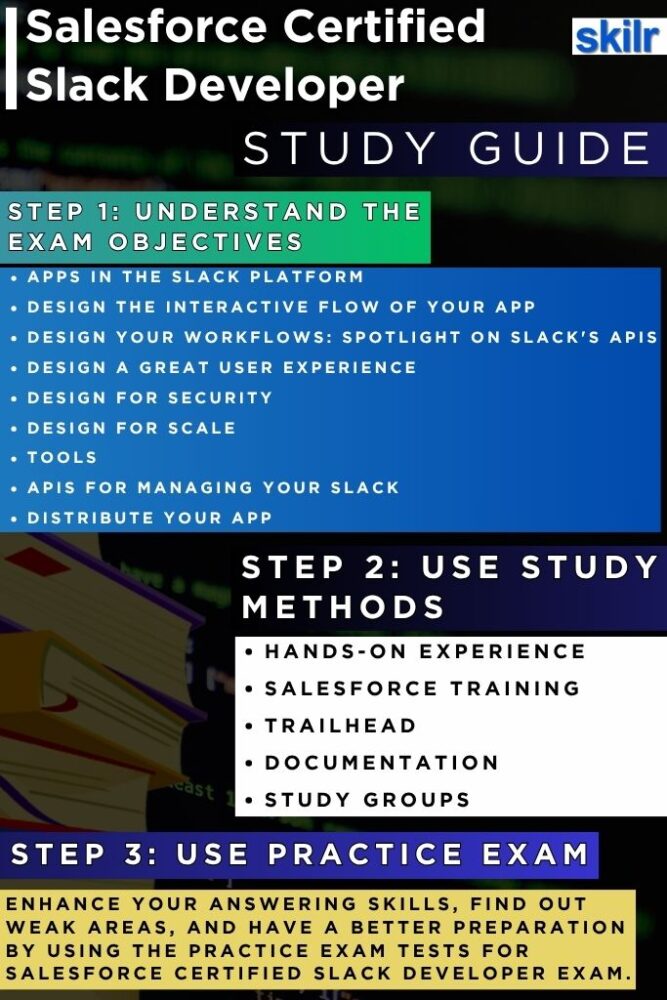
Step 1: Gain Hands-On Experience
Practical experience is the foundation for mastering Slack app development. Candidates should work on real-world projects or personal Slack integrations to understand how Slack apps are structured, how events are handled, and how APIs interact. Building and deploying apps in a live or sandbox environment allows candidates to encounter real-world challenges and develop problem-solving skills essential for both the exam and professional development.
Step 2: Complete Salesforce-Approved Training Courses
Structured learning through Salesforce-approved courses, including Trailhead Academy programs, provides a comprehensive understanding of Slack app development. These courses cover essential concepts, best practices, and advanced features, helping candidates develop the knowledge required to design, implement, and maintain Slack applications effectively. Recommended study resources for this exam include:
- Trailmix: Prepare for Your Salesforce Developer Credential
- This specialized learning path combines hands-on projects, essential modules, and key concept reviews that align closely with the exam objectives. Whether you aim to deepen your understanding of Slack APIs, app architecture, or integration best practices, this trailmix offers a structured, practical, and effective approach to preparing for the certification.
Step 3: Skill Up on Trailhead
Trailhead modules and trailmixes dedicated to Slack development offer interactive, self-paced learning. Candidates can reinforce their understanding through hands-on exercises, guided challenges, and assessments. Trailhead also helps track progress and ensures that learners cover all critical aspects of Slack app design and integration.
Step 4: Review Official Documentation
Studying official Slack and Salesforce documentation is crucial for understanding the platform’s latest features, API protocols, and development guidelines. Documentation provides detailed information about app components, permissions, event handling, and integration methods, ensuring that candidates are prepared for both scenario-based and conceptual exam questions.
Step 5: Engage with Study Groups and Communities
Active participation in the Trailblazer Community or other developer forums helps candidates learn collaboratively. Engaging with peers, mentors, and experienced developers provides exposure to practical insights, troubleshooting tips, and real-world use cases. Community engagement also fosters networking opportunities that can benefit professional growth beyond the exam.
Step 6: Practice with Mock Tests and Sample Questions
Taking practice exams and sample questions allows candidates to assess their readiness, identify knowledge gaps, and familiarize themselves with the exam format. Repeated practice helps reduce exam anxiety, reinforces key concepts, and ensures that candidates are well-prepared for both multiple-choice and multiple-select questions.
Step 7: Integrate Learning for Exam Success
A successful preparation strategy combines all the above steps: hands-on experience, structured courses, Trailhead learning, documentation review, community engagement, and practice testing. By integrating these approaches, candidates develop a well-rounded skill set that not only helps achieve certification but also equips them to design and deploy high-quality, functional Slack applications in professional environments.
