
The Exam AB-900: Copilot & Agent Administration Fundamentals validates foundational knowledge required to understand Microsoft 365 Copilot, agents, and the administrative environment that supports them. This exam is intended for individuals seeking to demonstrate awareness of how Copilot and agents function within the Microsoft 365 ecosystem, including security, governance, and identity fundamentals.
– Required Knowledge of Microsoft 365
Candidates should have a baseline understanding of Microsoft 365 core services and how they support organizational productivity and collaboration. This knowledge is essential because Copilot and agents operate within Microsoft 365 workloads and rely on existing services and permissions. You should be familiar with:
- Microsoft 365 core services
- Security features in Microsoft 365
- Identity and access management concepts
- Data protection and governance capabilities
– Microsoft 365 Copilot and Agent Fundamentals
The exam focuses on understanding Microsoft 365 Copilot and agents, including how they integrate with Microsoft 365 workloads and assist users using organizational data and permissions. While no development or configuration experience is required, candidates must understand how Copilot and agents are accessed, managed, and governed within the Microsoft 365 environment.
– Microsoft 365 Administration Centers
Candidates are expected to understand the purpose and role of key Microsoft 365 admin centers used to manage Copilot and agent-related workloads:
- Exchange Online Admin Center – Email and messaging management
- SharePoint Admin Center – Sites, content, and collaboration management
- Microsoft Teams Admin Center – Communication and collaboration settings
- Microsoft Entra Admin Center – Identity, authentication, and access control
- Microsoft Purview – Data protection and governance management
– Core Microsoft 365 Objects
The exam assesses knowledge of core Microsoft 365 objects that support access control, collaboration, and content management:
- Users
- Groups
- Teams
- Sites
- Libraries
– Identity and Access Fundamentals
Candidates must understand foundational identity and access concepts used to secure Microsoft 365 environments, including:
- Authentication methods
- Conditional access policies
- Single sign-on (SSO)
– Security, Data Protection, and Governance Basics
AB-900 also covers basic security and governance capabilities within Microsoft 365. This includes understanding how data is protected and how governance controls help organizations manage access, usage, and compliance.
– AI-Driven Productivity and IT Administration
The exam assumes familiarity with AI-driven productivity tools and modern cloud administration practices. Candidates should understand how administrators manage services through centralized portals and how AI solutions like Copilot fit into modern Microsoft 365 administration—without requiring advanced configuration skills.
Exam Details
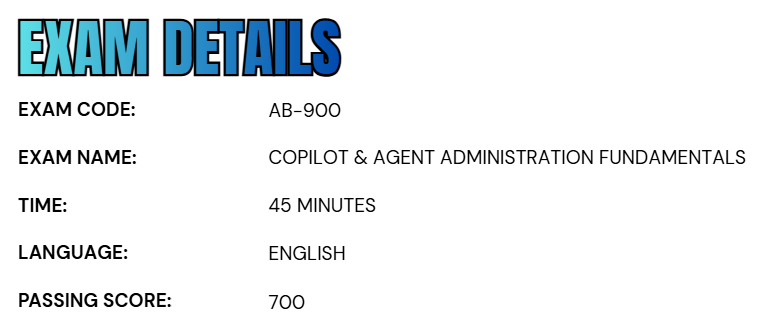
- The Exam AB-900: Copilot & Agent Administration Fundamentals is a beginner-level Microsoft certification intended for individuals in an Administrator role who want to validate their foundational knowledge of Copilot and agent administration within Microsoft 365.
- Candidates are allocated 45 minutes to complete the exam. The assessment is delivered as a proctored examination and may include interactive question formats as part of the testing experience.
- The exam is currently available in English.
- To earn the certification, candidates must achieve a minimum passing score of 700.
Course Outline
The Exam AB-900: Copilot & Agent Administration Fundamentals assesses the following topic areas:
1. Identifying the core features and objects of Microsoft 365 services (30–35%)
Identifying the core objects of Microsoft 365 services
- Explaining how license types assigned to users and groups affect access to Microsoft 365 features
- Exploring the organization configurations by using the Microsoft 365 admin center (domain names and org settings)
- Identifying the appropriate objects to configure by using the Exchange Online admin center (mailboxes and distribution lists)
- Identifying the appropriate objects to configure by using the SharePoint in Microsoft 365 admin center (sites, libraries, and folders)
- Identifying the appropriate roles and permissions for sites in SharePoint in Microsoft 365
- Identifying the appropriate objects to configure by using the Teams admin center (teams, channels, and policies)
Understanding the Microsoft 365 security principles
- Explaining the core Zero Trust principles
- Understanding authorization
- Understanding authentication methods
- Understanding threat protection and intelligence
- Understanding features and capabilities of Microsoft Defender XDR
Identifying the core security features of Microsoft 365 services
- Understanding features and capabilities of Microsoft Entra
- Understanding conditional access policies
- Understanding the purpose and benefits of SSO
- Identifying the appropriate security object to use in an organization (users and groups)
- Identifying the appropriate tools to troubleshoot common sign-in issues (multifactor authentication [MFA], conditional access, and risky sign-ins)
- Interpreting Identity Secure Score in Microsoft Entra ID
- Using the appropriate tools to review audit logs for user and admin activity
- Identifying the role of Privileged Identity Management (PIM) in an organization
- Understanding App registrations and Enterprise apps
2. Learn data protection and governance tasks for Microsoft 365 and Copilot (35–40%)
Understanding Microsoft Purview
- Understanding features and capabilities of Microsoft Purview Information Protection, Microsoft Purview Data Loss Prevention (DLP), Microsoft Purview Insider Risk Management, Microsoft Purview Communication Compliance, Microsoft Purview Data Security Posture Management (DSPM) for AI, and Microsoft Purview Data Lifecycle Management
- Identifying the use cases for sensitivity labels in Microsoft Purview
- Understanding data classification in Microsoft Purview
- Understanding retention
Understanding data security implications of Copilot
- Understand how Copilot accesses data
- Understanding how Microsoft Graph influences Copilot responses
- Understanding how Copilot uses permissions and other controls in Microsoft 365, Microsoft Purview, and Microsoft Defender to protect against risks
- Understand responsible AI principles
Identifying data protection and governance risks for Microsoft 365 and Copilot
- Identifying compliance risks and recommendations by using Microsoft Purview Compliance Manager
- Identify sensitive information by using Microsoft Purview Data Explorer
- Identifying risks by using Insider Risk Management
- Identifying and responding to alerts generated by Microsoft Purview DLP
- Identify policy violations generated by Communication Compliance
- Identifying user activities reported by Microsoft Purview activity explorer
- Discovering and managing AI activity by using DSPM for AI
- Searching for files and emails by using Content search in Microsoft Purview eDiscovery

Identifying and monitoring oversharing in SharePoint in Microsoft 365
- Identifying the tools to troubleshoot oversharing in an organization
- Running a data access governance report in SharePoint
- Understanding features and capabilities of SharePoint Advanced Management, including restricted site access
3. Understanding about performing basic administrative tasks for Copilot and agents (25–30%)
Understanding features and capabilities of Copilot and agents
- Comparing the built-in capabilities of Copilot and agents
- Comparing Copilot monthly license model to pay-as-you-go, including SharePoint
- Identifying which Copilot features can be enabled or disabled
- Identifying use cases for Researcher
- Identifying use cases for Analyst
- Identifying use cases for custom agents
Performing basic administrative tasks for Copilot
- Assigning Copilot licenses
- Monitoring and managing Copilot pay-as-you-go billing policies
- Monitoring Copilot usage and adoption, including Copilot Analytics and the Microsoft 365 admin center
- Managing prompts, including saving, sharing, scheduling, and deleting
Performing basic administrative tasks for agents
- Identifying how to configure user access to agents
- Creating an agent
- Understanding approval process for agents
- Monitoring agents, including usage, operational insights, and agent lifecycle, by working with the Microsoft 365 admin center and the Microsoft Power Platform admin center
Exam AB-900: Copilot & Agent Administration Fundamentals FAQs
Microsoft Exam Policies
Microsoft maintains a comprehensive set of certification exam policies to ensure fairness, consistency, and integrity across all certification programs. These policies apply to fundamental, role-based, and specialty exams and are designed to support proper exam preparation and accurate validation of candidate skills.
– Exam Retake Policy
Microsoft’s retake policy is designed to encourage adequate preparation between exam attempts.
- If a candidate does not pass an exam on the first attempt, a 24-hour waiting period is required before the exam can be retaken.
- For each subsequent attempt, a 14-day waiting period applies.
Candidates are permitted a maximum of five attempts within a 12-month period, calculated from the date of the first exam attempt. If all five attempts are used without achieving a passing score, the candidate must wait 12 months from the initial attempt date before becoming eligible to retake the exam.
Once an exam has been successfully passed, it cannot be retaken unless the associated certification has expired. Retake fees may apply in accordance with Microsoft’s current pricing policies.
– Scoring Methodology
Microsoft certification exams use a scaled scoring system ranging from 1 to 1,000, with a minimum passing score of 700 for most technical certifications. Because scoring is scaled, the final score does not represent a fixed percentage of correct answers.
Instead, scores reflect a candidate’s overall proficiency by considering:
- Question difficulty
- Variations in exam forms
- Required competency levels
Microsoft Office certification exams also use the 1 to 1,000 scale, though passing scores may vary by exam. This standardized scoring approach ensures fair, consistent, and reliable evaluation of candidate skills across different exam versions.
Microsoft AB-900 Exam Study Guide
Step 1: Review the Exam Guide and Skills Measured
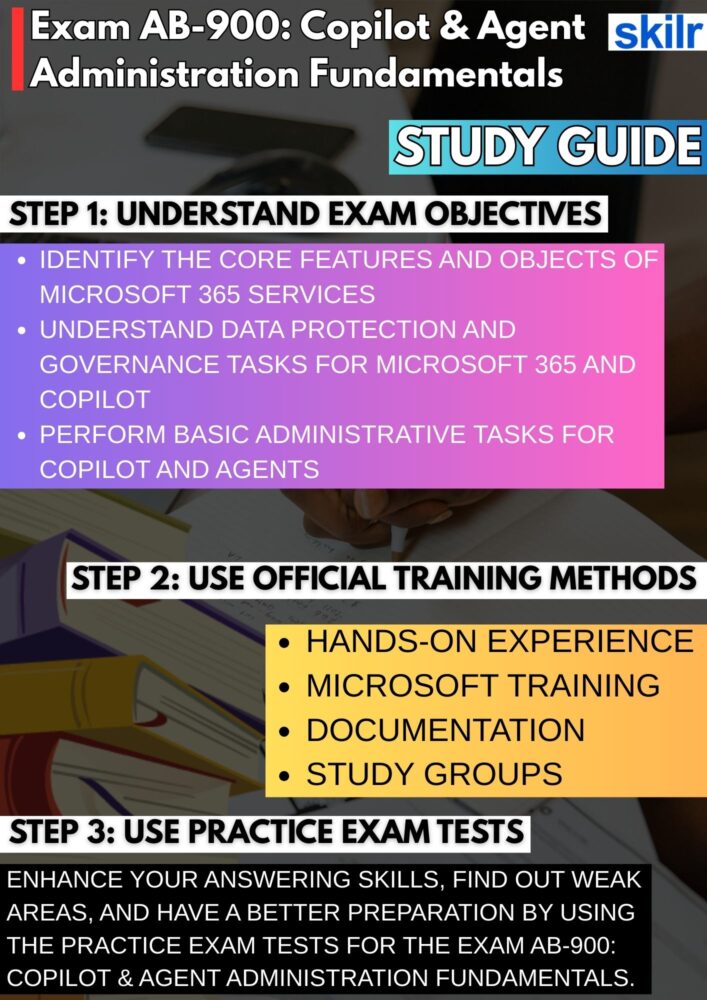
Effective preparation for Exam AB-900 begins with a careful review of the official exam guide. This document defines the exam scope, structure, and evaluation criteria, clearly outlining the knowledge areas and skills candidates are expected to understand. By studying the skills measured, you can prioritize high-impact topics and align your preparation with the exam’s objectives. This approach ensures your study plan remains focused, organized, and directly relevant to the assessment.
Step 2: Develop a Strong Conceptual Foundation
AB-900 places a strong emphasis on conceptual understanding rather than technical configuration. Candidates should focus on how Microsoft 365 Copilot and agents operate within the Microsoft 365 ecosystem, including the role of administrative services, security controls, and governance frameworks. Structured learning enables you to understand how these components work together to support AI-driven productivity, ensuring you can confidently interpret exam scenarios and terminology.
Step 3: Reinforce Learning with Practical Exploration
Although AB-900 is a foundational exam, hands-on exposure significantly enhances comprehension. Exploring Microsoft 365 admin centers helps you understand how services are structured and managed from an administrative perspective. Reviewing how users, groups, and workloads are organized allows you to connect theoretical concepts with real-world administrative environments, improving your ability to apply knowledge during the exam.
Step 4: Expand Administrative Awareness Through Hands-On Experience
Practical interaction with Microsoft 365 administration tools deepens your understanding of how Copilot and agents function within defined permissions and policies. Navigating admin portals, reviewing service configurations, and observing governance controls provide valuable insight into how administrative decisions influence Copilot availability, data access, and user experience. This broader perspective is essential for interpreting exam questions accurately.
Step 5: Use Microsoft Official Training for Structured Alignment
Microsoft’s official training resources are designed to align directly with certification objectives. These materials present exam-related topics using Microsoft’s terminology and administrative context, ensuring clarity and consistency. Official training reduces ambiguity and helps candidates understand both the purpose and behavior of Microsoft 365 services from an exam-focused perspective.
– Course: AB-900T00-A – Introduction to Microsoft 365 and AI Administration
The AB-900T00-A course provides a structured introduction to Microsoft 365, Microsoft 365 Copilot, and AI-powered agents. It begins by establishing a foundational understanding of Microsoft 365 services and administrative principles, helping learners understand how the platform supports secure collaboration and productivity.
The course then explores how Copilot and agents leverage artificial intelligence to assist users across Microsoft 365 workloads. Learners gain insight into how AI enhances efficiency, supports collaboration, and improves user experiences—while operating within established security, identity, and governance controls.
Designed for beginner-level IT professionals and new administrators, this course introduces key concepts in a clear and accessible manner, without assuming prior hands-on experience. Upon completion, learners will be prepared to understand the administrative context in which Copilot and agents are deployed and managed.
Step 6: Refer to Microsoft Documentation for Accuracy
Microsoft’s official documentation serves as the authoritative reference for Microsoft 365 and Copilot administration. Regularly consulting documentation helps clarify definitions, service interactions, and administrative responsibilities. It also reinforces understanding of identity, access, and governance concepts, ensuring your knowledge remains accurate and aligned with Microsoft’s current guidance.
Step 7: Enhance Understanding Through Community Engagement
Participating in certification-focused study groups and professional communities can significantly strengthen learning. These environments allow candidates to exchange insights, discuss exam topics, and learn from shared experiences. Collaborative discussions often simplify complex concepts and provide practical context, leading to better retention and confidence.
Step 8: Assess Readiness with Practice Exams
Practice exams play a critical role in evaluating exam readiness. They familiarize candidates with question formats, difficulty levels, and time constraints. Reviewing practice results helps identify weak areas and refine study strategies. Regular practice improves confidence, sharpens exam technique, and ensures you are prepared to meet the AB-900 passing requirements.
