
The Microsoft MB-820: Dynamics 365 Business Central Developer certification validates your expertise in designing, developing, testing, and maintaining solutions within Dynamics 365 Business Central. As a certified Business Central developer, you will be responsible for creating and extending applications, integrating Business Central with other systems—such as Microsoft Power Platform—and ensuring smooth data transitions during system upgrades.
Key Responsibilities of a Business Central Developer
As a Business Central developer, your role goes beyond coding. You are expected to:
- Design and Develop Solutions: Build and extend Business Central apps to add new functionality or customize existing features.
- Integrate with Other Applications: Connect Business Central seamlessly with Microsoft Power Platform products and external services.
- Maintain Data Integrity: Ensure data remains accurate and up to date throughout upgrades and migrations.
- Troubleshoot and Debug: Identify root causes of system issues, fix bugs, and validate solutions through testing.
- Optimize Performance: Detect bottlenecks, enhance code efficiency, and ensure the system performs optimally.
Required Knowledge and Skills
To succeed in this role, you should have applied knowledge of:
- Business Central and AL Language: Proficiency in the AL programming language and familiarity with the Business Central development environment and tools.
- System Deployment and Upgrades: Understanding how to install, configure, and upgrade Business Central solutions.
- Industry and Platform Knowledge: Awareness of industry terminology and how Business Central aligns with Microsoft 365 and Dynamics 365 ecosystems.
- AppSource and Related Technologies: Knowledge of frameworks, services, and technologies related to Business Central app development.
- Application Lifecycle Management (ALM): Familiarity with source control management (SCM) and CI/CD processes to streamline development and deployment.
Who Should Take the MB-820 Exam?
This certification is ideal for:
- Developers who specialize in Microsoft Dynamics 365 Business Central and want to validate their technical expertise.
- Software Engineers and Solution Architects seeking to expand their career in the Dynamics 365 ecosystem.
- IT Professionals involved in customizing, integrating, or maintaining Business Central solutions.
- Consultants aiming to demonstrate advanced knowledge of Business Central development and deployment practices.
Exam Details

- The Microsoft MB-820: Dynamics 365 Business Central Developer exam is an intermediate-level certification aimed at professionals who design, develop, and maintain business solutions within the Dynamics 365 ecosystem.
- It assesses your ability to extend and customize Business Central, integrate it with other Microsoft services, and ensure optimal system performance.
- This exam is ideal for developers, business analysts, solution architects, business users, business owners, support engineers, and technology managers who work with Business Central or are looking to validate their technical expertise in business application development.
- The assessment lasts 100 minutes and is proctored, ensuring a secure and standardized testing environment. It may also include interactive components, such as practical tasks or scenario-based questions, to evaluate real-world problem-solving skills.
- The MB-820 exam is available in English, Chinese (Simplified), German, Spanish, French, Japanese, and Portuguese (Brazil). To pass, candidates must achieve a minimum score of 700.
- Successfully earning this certification demonstrates your proficiency in developing reliable, efficient, and scalable solutions using Microsoft Dynamics 365 Business Central.
Course Outline
The exam covers the following topics:
1. Describing Business Central (10–15%)
Understanding the Business Central architecture
- Describing the components and capabilities of Business Central (Microsoft Documentation: Components and capabilities)
- Explaining the core solution and extensions approach for Business Central (Microsoft Documentation: Development in AL)
- Describing the update lifecycle for customizations of Business Central (Microsoft Documentation: Update Lifecycle for Customizations of Business Central Online)
- Differentiating Business Central Online and Business Central on-premises features
Describing Business Central apps
- Differentiating between the base app and the system app (Microsoft Documentation: System and Base Application Reference for Dynamics 365 Business Central)
- Explaining the functionality of apps (Microsoft Documentation: What is Power Apps?)
- Describing the process of bringing an app to AppSource (Microsoft Documentation: Understand the process of bringing an app to AppSource in Business Central)
2. Learning how to Install, develop, and deploy for Business Central (10–15%)
Installing and configuring a Business Central development environment
- Describing the development environment for Business Central (Microsoft Documentation: AL development environment reference overview)
- Installing and configuring the development environment
- Manage configuration files for an AL extension
- Managing multiple AL extensions in one workspace (Microsoft Documentation: Work with multiple AL project folders within one workspace)
Creating, debugging, and deploying an extension in Business Central
- Debugging an extension with Visual Studio Code (Microsoft Documentation: Debug a Visual Studio extension)
- Deploying an extension
- Creating or modifying a Business Central extension in Visual Studio Code
- Managing multilanguage development (Microsoft Documentation: Manage multilanguage development in Dynamics 365 Business Central)
- Maintaining extensions (Microsoft Documentation: Maintain AppSource apps and Per-Tenant extensions in Business Central online)
3. Understand about developing using AL objects (35–40%)
Building and extending tables and pages in Business Central
- Developing Role Center pages (Microsoft Documentation: Designing Role Centers)
- Identifying different page types (Microsoft Documentation: Page types and layouts)
- Building and extending:
Building and extending reports
- Substituting a report (Microsoft Documentation: Substituting reports)
- Creating a report layout (Microsoft Documentation: Create and modify custom report layouts)
- Creating document reports
- Designing the data model of a report (Microsoft Documentation: Report Design Overview)
- Implementing multilanguage in reports
- Using report triggers, functions, and processing-only reports (Microsoft Documentation: Use report triggers, functions, and processing-only reports in Dynamics 365 Business Central)
- Developing the report request page (Microsoft Documentation: Reports overview)
Designing and creating an XMLport
- Configuring different XMLport properties (Microsoft Documentation: XMLport Properties)
- Defining nodes and their properties
- Using XMLports in AL code
Developing codeunits
- Creating and accessing codeunits (Microsoft Documentation: Codeunit object)
- Using events and triggers (Microsoft Documentation: Use events and triggers in Dynamics 365 Business Central)
- Implementing interfaces
- Creating installation and upgrade codeunits
Working with entitlement and permission set objects
- Creating and extending permission sets (Microsoft Documentation: Assign permissions to users and groups)
- Overriding entitlements with inherent permissions (Microsoft Documentation: Override entitlements with inherent permissions)
- Troubleshooting permission sets (Microsoft Documentation: Permission set object)
Creating queries in Business Central
- Linking and joining data items (Microsoft Documentation: Linking and Joining Data Items to Define the Query Dataset)
- Applying filters in query objects (Microsoft Documentation: Filtering in Query Objects)
- Using queries instead of record variables (Microsoft Documentation: Using Queries Instead of Record Variables)
- Aggregating data in query objects Aggregating data in query objects)
- Using a query to create a report

4. Learn developing by using AL (15–20%)
Customizing the UI experience and implementing onboarding techniques
- Creating profiles in AL (Microsoft Documentation: Using the Client to Create Profiles and Page Customizations)
- Using and creating views in AL (Microsoft Documentation: Views)
- Developing the UI by using the user assistance model (Microsoft Documentation: Dynamics 365 Business Central User assistance model)
- Integrating assisted setup (Microsoft Documentation: Build an Assisted Setup in Dynamics 365 Business Central)
- Creating teaching tips and in-app tours to onboard users (Microsoft Documentation: Teaching tips and in-app tours for onboarding users)
- Creating an onboarding checklist
Describing the essential development standards
- Implementing the data process model in Business Central (Microsoft Documentation: Implement the data process model in Dynamics 365 Business Central)
- Defining the different functional table types and characteristics (Microsoft Documentation: Identify functional table types and characteristics in Dynamics 365 Business Central)
- Using document standards in Business Central (Microsoft Documentation: Use document standards in Dynamics 365 Business Central)
- Implementing master data standards and design patterns
Using AL for extending Business Central
- Creating custom procedures (Microsoft Documentation: Create custom procedures in Dynamics 365 Business Central)
- Differentiating data types
- Manage files
- Manipulate data by using code (Microsoft Documentation: Manipulate data by using code in Dynamics 365 Business Central)
- Describing the basics of the AL (Microsoft Documentation: Introduction to the basics of AL programming in Dynamics 365 Business Central)
- Using the different types of expressions
- Using AL built-in functions and AL statements (Microsoft Documentation: Working with AL methods)
- Working with variables and defining them in AL code (Microsoft Documentation: AL simple statements)
- Managing errors
- Using access modifiers to limit access
5. Working with development tools (10–15%)
Implementing semiautomated test processes, and run standard Business Central tests
- Testing applications in Business Central (Microsoft Documentation: Testing the application overview)
- Installing and running the Test Toolkit (Microsoft Documentation: Test the advanced sample extension)
- Developing test codeunits and procedures (Microsoft Documentation: Create Test Codeunits and Test Methods)
Managing and analyzing telemetry
- Monitoring and analyzing telemetry (Microsoft Documentation: Monitoring and Analyzing Telemetry)
- Configuring telemetry
- Creating custom telemetry signals (Microsoft Documentation: Creating custom telemetry events for Azure Application Insights)
6. Learn about integrating Business Central with other applications (10–15%)
Accessing Representational State Transfer (REST) services from within Business Central
- Using the different HTTP classes and their functions
- Getting data from and sending data to an external REST service (Microsoft Documentation: REST API web services)
- Using and reading JSON (Microsoft Documentation: JSON files)
Implementing APIs
- Creating and working with APIs
- Creating and managing OData bound and unbound actions
- Using Read Scale-Out to improve performance
Microsoft MB-820 Exam FAQs

Microsoft Certification Exam Policies
Microsoft follows a well-defined and transparent set of certification exam policies designed to ensure fairness, consistency, and integrity across all certification programs. These policies apply uniformly to every mode of delivery — whether the exam is taken online under remote proctoring or at an authorized testing center.
– Exam Retake Policy
Candidates who do not pass an exam on their first attempt must wait at least 24 hours before retaking it. For any subsequent attempts, a 14-day waiting period applies between each try. A maximum of five attempts is allowed per exam within a 12-month period. Once a candidate passes the exam, further retakes are not permitted unless the certification expires and needs renewal. Each retake incurs the standard exam fee.
– Rescheduling and Cancellation Policy
Candidates may reschedule or cancel their exam appointments free of charge if the change is made at least six business days before the scheduled date. If changes are made within five business days, a rescheduling or cancellation fee may be applied. Cancellations made within 24 hours of the scheduled exam time or a no-show will result in the forfeiture of the full exam fee.
Microsoft MB-820 Exam Study Guide
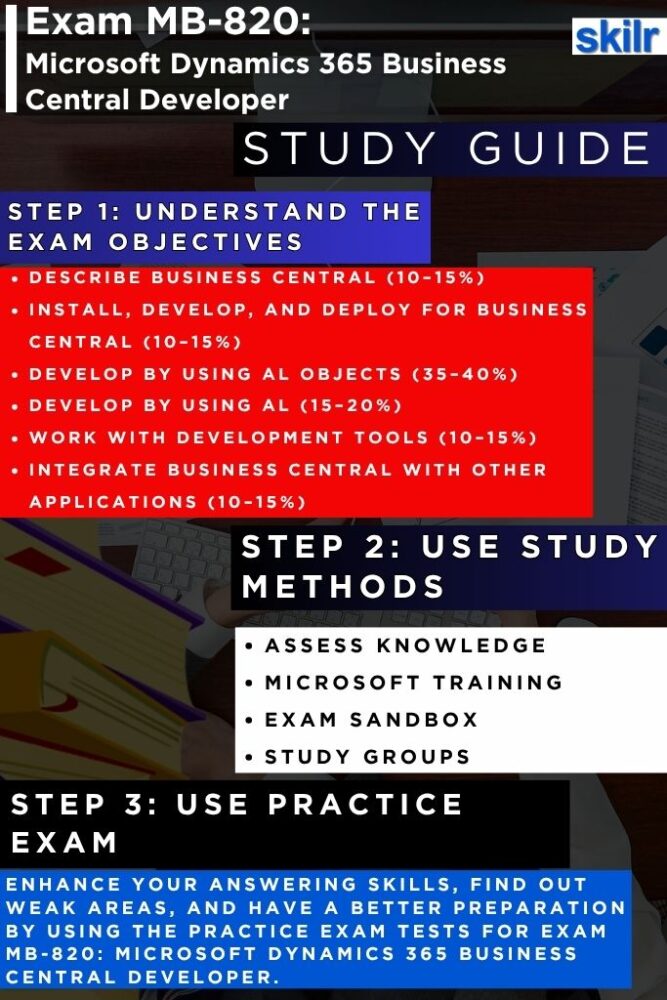
Preparing for the Microsoft MB-820: Dynamics 365 Business Central Developer exam requires a structured and strategic approach that combines theoretical learning with hands-on experience. The goal is not only to understand Business Central concepts but also to apply them effectively in real-world scenarios. Below is a comprehensive, step-by-step guide to help you prepare thoroughly and confidently.
1. Assess Your Knowledge and Real-World Experience
Start by evaluating your current expertise in Microsoft Dynamics 365 Business Central. Reflect on your professional experience with the platform — from designing and developing custom extensions to integrating Business Central with other Microsoft services such as Power Platform and Azure. Understanding your familiarity with AL programming, the Business Central development environment, and related tools is crucial. Identify your strong areas and the concepts where you need more depth, such as application lifecycle management (ALM), continuous integration and delivery (CI/CD), or system upgrades. Real-world exposure plays a vital role in building the confidence required for exam scenarios.
2. Understand the Exam Objectives and Measured Skills
A solid grasp of the official exam objectives is essential before you begin detailed preparation. The MB-820 exam evaluates your ability to design, develop, and maintain scalable solutions using Dynamics 365 Business Central. Review Microsoft’s published exam guide to understand which skills are measured and how they relate to your current experience. Focus on areas such as developing extensions using AL, configuring Business Central, managing data and performance, and integrating with other Microsoft technologies. Mapping each objective to your knowledge base helps ensure you study with purpose and precision.
3. Expand Your Skills with Microsoft Training Resources
Microsoft offers a rich collection of official training materials through Microsoft Learn and instructor-led courses. These resources are designed to help candidates strengthen both conceptual understanding and technical proficiency. Explore guided learning paths that cover Business Central development fundamentals, system architecture, and best practices for solution design. Microsoft’s official documentation, learning modules, and workshops include hands-on labs and scenario-based exercises that closely align with the actual exam format. Incorporating these resources into your study plan ensures a balance between theory and application. The training course for this exam include:
– Course MB-820T00-A: Dynamics 365 Business Central Developer
This course prepares you to design, develop, and extend Business Central solutions. You’ll learn to create and modify modules, implement business logic using events, and integrate Business Central with Microsoft Power Platform applications. The course also covers troubleshooting, debugging, performance optimization, system upgrades, and data migration to ensure efficient and secure solutions.
Furthermore, this course is designed for developers, software engineers, solution architects, technical consultants, and advisors seeking to master Business Central development. As one of Microsoft’s fastest-growing business applications, Business Central requires strong technical and domain expertise, making this course ideal for professionals aiming to build scalable, real-world solutions.
4. Get Familiar with the Microsoft Exam Sandbox
Before taking the actual test, it’s recommended to explore the Microsoft Exam Sandbox, an interactive environment that simulates the official exam interface. This tool helps you understand the structure and navigation of the online proctored exam, including how to move between questions, flag items for review, and manage your time effectively. Familiarity with the exam layout minimizes stress during the real test and helps you focus entirely on the content rather than the platform itself.
5. Join Study Groups and the Microsoft Community
Engaging with other candidates or certified professionals can significantly enhance your preparation. Join Microsoft community forums, LinkedIn groups, or study networks where you can exchange insights, discuss complex topics, and clarify doubts. Collaborative learning allows you to gain multiple perspectives on challenging areas such as debugging, performance optimization, and AL-based customization. Study groups also help you stay consistent, motivated, and updated with the latest exam-related discussions or changes.
6. Take Practice Tests and Review Your Progress
Practice exams are one of the most effective ways to measure your readiness. Take official or reputable practice tests to evaluate your understanding of key concepts, exam structure, and question patterns. Analyze the results to identify areas of improvement and revisit those topics using Microsoft Learn or real-world case studies. Regular testing helps improve your time management and ensures that your knowledge is not only theoretical but also application-ready.
7. Refine and Reinforce Before Exam Day
Try to focus on revising important topics, revisiting weaker areas, and reinforcing your practical understanding. Spend time reviewing Microsoft documentation, AL syntax references, and key integration patterns. Make sure to rest well before exam day and enter the test with confidence.
