



The GH-500: GitHub Advanced Security certification is a specialized credential that demonstrates your ability to implement strong security practices within the GitHub ecosystem. By earning this certification, you validate your skills in identifying vulnerabilities, securing development workflows, and enforcing robust security controls that enhance the overall integrity of software delivery.
This certification is valid for two years from the date of achievement, ensuring that your knowledge remains recognized and up to date in the ever-evolving security landscape. Key Skills Validated:
- Vulnerability Identification: Proficiency in detecting, analyzing, and mitigating potential risks in code and dependencies.
- Workflow Security: Ensuring CI/CD pipelines and GitHub workflows adhere to best security practices.
- Security Implementation: Applying advanced security features within GitHub to safeguard codebases and enforce organizational compliance.
Who Should Take the Exam?
The GH-500 exam is designed for professionals who are actively involved in software development and security. It is best suited for:
- Security Engineers looking to validate their expertise in securing GitHub workflows.
- DevSecOps Professionals who integrate security practices into the software development lifecycle.
- Software Developers with strong GitHub experience aiming to strengthen their security credentials.
- Technical Leads and Architects responsible for enforcing secure coding standards across teams.
Exam Details


- The GH-500: GitHub Advanced Security certification is designed at the intermediate level, targeting professionals such as administrators, developers, DevOps engineers, solution architects, and even students who want to demonstrate their expertise in GitHub security.
- Candidates are given 100 minutes to complete the exam, which is proctored to ensure integrity and may include interactive components requiring hands-on engagement.
- The certification assessment is available in multiple languages, including English, Spanish, Portuguese (Brazil), Korean, and Japanese, making it accessible to a global audience.
- While the majority of exam questions focus on features that are in general availability (GA), candidates should also be prepared for questions on widely adopted Preview features that are integral to GitHub’s security ecosystem.
Course Outline
The exam covers the following topics:
Domain 1: Describing the GHAS security features and functionality (15%)
Contrasting GHAS features and their role in the security ecosystem
- Differentiating the security features that come automatically for open source projects, and what features are available when GHAS is paired with GHEC or GHES
- Describing the features and benefits of Security Overview
- Describe the differences between secret scanning and code scanning
- Describing how secret scanning, code scanning, and Dependabot create a more secure software development life cycle
- Contrasting a security scenario with isolated security review and an advanced scenario, with security integrated into each step of the software development life cycle
Explaining and using specific GHAS features
- Describing how vulnerable dependencies are identified (by looking at the manifest files and comparing with databases of known vulnerabilities)
- Choose how to act on alerts from GHAS
- Explaining the implications of ignoring an alert
- Explain the role of a developer when they discover a security alert
- Describing the differences in access management to view alerts for different security features
- Identifying where to use Dependabot alerts in the software development lifecycle
Domain 2: Configuring and using secret scanning (15%)
Configuring and using Secret Scanning
- Describing secret scanning
- Describe push protection
- Describing validity checks
- Contrast secret scanning availability for public and private repositories
- Enabling secret scanning for private repositories
- Pick an appropriate response to a secret scanning alert
- Determining if an alert is generated for a given secret, pattern, or service provider
- Determining if a given user role will see secret scanning alerts and how they will be notified
Customizing default secret scanning behavior
- Configuring the recipients of a secret scanning alert (also includes how to provide access to members and teams other than admins)
- Exclude certain files from being scanned for secrets
- Enabling custom secret scanning for a repository
Domain 3: Configuring and using Dependabot and Dependency Review (35%)
Describing tools for managing vulnerabilities in dependencies
- Defining the dependency graph
- Describing how the dependency graph is generated
- Describing what a Software Bill of Materials (SBOM) is, and the SBOM format used by GitHub
- Defining a dependency vulnerability
- Describe Dependabot alerts
- Describing Dependabot security updates
- Describe Dependency Review
- Describing how alerts are generated for vulnerable dependencies (driven from the dependency graph, sourced from the GitHub Advisory Database)
- Describe the difference between Dependabot and Dependency Review
Enabling and configuring tools for managing vulnerable dependencies
- Identifying the default settings for Dependabot alerts in public and private repositories
- Identify the permissions and roles required to enable Dependabot alerts
- Identifying the permissions and roles required to view Dependabot alerts
- Enabling Dependabot alerts for private repositories
- Enabling Dependabot alerts for organizations
- Creating a valid Dependabot configuration file to group security updates
- Creating a Dependabot Rule to auto-dismiss low severity alerts until a patch is available
- Create a Dependency Review GitHub Actions workflow
- Configure license checks and custom severity thresholds in a Dependency Review workflow
- Configuring notifications for vulnerable dependencies


Identifying and remediating vulnerable dependencies
- Identifying a vulnerable dependency from a Dependabot alert
- Identify vulnerable dependencies from a pull request
- Enabling Dependabot security updates
- Remedy a vulnerability from a Dependabot alert in the Security tab (could include updating or removing the dependency)
- Remedy a vulnerability from a Dependabot alert in the context of a pull request (could include updating or removing the dependency)
- Take action on any Dependabot alerts by testing and merging pull requests
Domain 4: Configuring and using Code Scanning with CodeQL (25%)
Using code scanning with third-party tools
- Enabling code scanning for use with a third-party analysis
- Contrast the steps for using CodeQL versus third party analysis when enabling code scanning
- Contrasting how to implement CodeQL analysis in a GitHub Actions workflow versus a third-party CI tool
- Upload 3rd party SARIF results via the SARIF endpoint
Describing and enabling code scanning
- Describe how code scanning fits in the software development life cycle
- Contrasting the frequency of code scanning workflows (scheduled versus triggered by events)
- Choosing a triggering event for a given development pattern (for example, in a pull request and for specific files)
- Editing the default template for Actions workflow to fit an active, open source, production repository
- Describing how to view code scanning results from CodeQL analysis
- Troubleshooting a failing code scanning workflow using CodeQL, including creating or changing a custom configuration in the CodeQL workflow
- Follow the data flow through code using the show paths experience
- Explain the reason for a code scanning alert given documentation linked from the alert
- Determining if and why a code scanning alert needs to be dismissed
- Describe potential shortfalls in CodeQL via model of compilation and language support
- Explaining the purpose of defining a SARIF category
Domain 5: Describing GitHub Advanced Security best practices, results, and how to take corrective measures (10%)
GitHub Advanced Security results & best practices
- Using a Common Vulnerabilities and Exposures (CVE) and Common Weakness Enumeration (CWE) to describe a GitHub Advanced Security alert and list potential remediation
- Describe the decision-making process for closing and dismissing security alerts (documenting the dismissal, making a decision based on data)
- Describing the default CodeQL query suites
- Describe how CodeQL analyzes code and produces results, including differences between compiled and interpreted language
- Determining the roles and responsibilities of development and security teams on a software development workflow
- Describe how the severity threshold for code scanning pull request status checks can be changed
- Explaining how filters and sorting can be used to prioritize secret scanning remediation (validity:active)
- Explain how CodeQL & Dependency Review workflows can be enforced with Repository Rulesets
- Describing how code scanning can be configured to identify and remediate vulnerabilities earlier (scanning upon pull request)
- Describe how secret scanning can be configured to identify and remediate vulnerabilities earlier (enabling push protection)
- Describing how dependency analysis can be configured to identify and remediate vulnerabilities earlier (enable dependency review to scan upon pull request)
GH-500: GitHub Advanced Security Exam FAQs

Exam Policies
Microsoft offers various exam policies. Some of them are:
– Proctoring and Assessment Format
The GH-500: GitHub Advanced Security Exam is a fully proctored certification designed to uphold fairness, security, and consistency throughout the evaluation process. The assessment may feature interactive elements that simulate real-world GitHub security scenarios. Through these tasks, candidates demonstrate their ability to identify vulnerabilities, apply protective measures, configure secure workflows, and enforce compliance practices. This format ensures that both theoretical understanding and practical expertise in GitHub Advanced Security are thoroughly assessed.
– Exam Duration and Experience
Candidates are allocated 100 minutes to complete the exam. It is highly recommended to review the official guidelines on Exam Duration and Exam Experience beforehand. These resources provide essential details on time management, question styles, and the inclusion of task-based or interactive exercises, helping candidates gain familiarity with the exam’s flow and expectations.
– Retake Policy
In the event of an unsuccessful attempt, candidates may retake the exam following a 24-hour waiting period. Additional retakes will require longer waiting intervals, based on the number of previous attempts. This structured approach allows candidates sufficient time to revisit critical concepts, strengthen their skills, and enhance their performance before reattempting the exam.
GH-500: GitHub Advanced Security Exam Study Guide

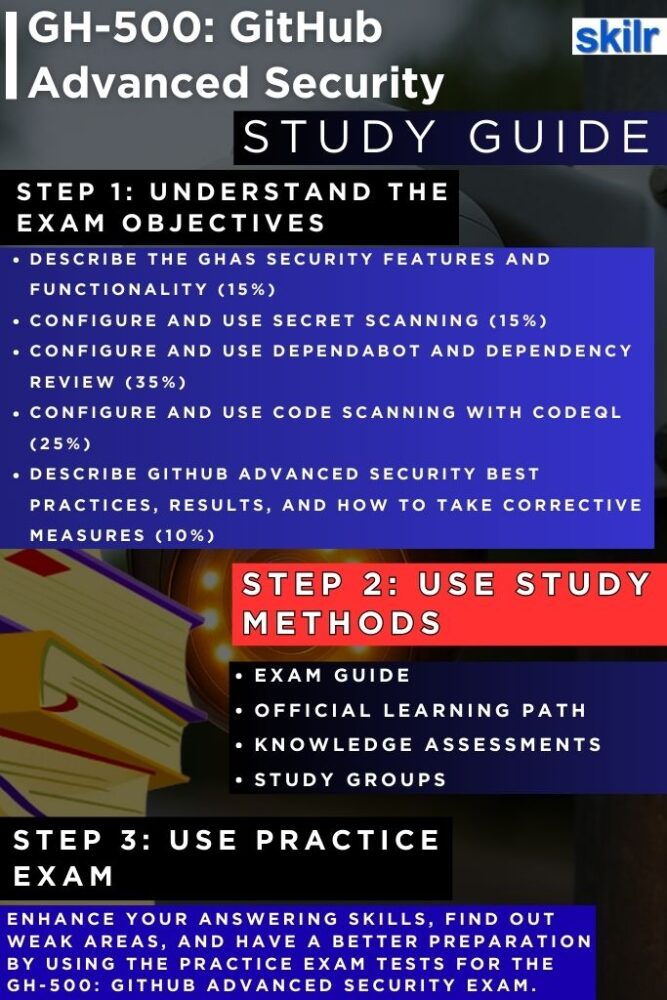
Step 1: Understand the Exam Objectives
Begin your preparation by thoroughly reviewing the official exam objectives. These outline the skills measured, including vulnerability identification, securing GitHub workflows, applying advanced security features, and enforcing compliance policies. Understanding these domains ensures that you focus your study efforts on the areas most relevant to the certification. Treat the objectives as your roadmap—each topic listed is a signal of what you will be evaluated on during the exam.
Step 2: Explore Microsoft Learning Paths
Microsoft provides curated Learning Paths tailored to the GH-500 exam. These structured modules combine theory and practical exercises, helping you gain both conceptual clarity and hands-on familiarity with GitHub Advanced Security features. Completing these modules not only strengthens your knowledge but also ensures alignment with Microsoft’s recommended study framework. However, the training resources are:
– Course GH-500T00-A: GitHub Advanced Security
GitHub Advanced Security equips teams with the tools needed to identify, address, and prevent vulnerabilities across the software development lifecycle. By embedding security directly into development workflows, this enables organizations to deliver more secure and reliable software. This course focuses on leveraging GHAS features to strengthen security practices and understand its role within the broader security ecosystem.
This course is designed for students and professionals who want to implement advanced security practices using GHAS. Participants will learn how to secure code, supply chains, and secrets before production, while providing security teams with greater visibility into organizational risks. The course also highlights how GHAS integrates developer-first solutions with curated security intelligence from the global GitHub community.
– Introduction to GitHub Advanced Security
This introduces GitHub Advanced Security features and best practices for closing security gaps in software development. Learners will explore key tools and approaches to strengthen security throughout the development process. By the end of this, you will be able to:
- Define GHAS and its core features, including secret scanning, code scanning, and Dependabot.
- Apply GHAS effectively to maximize security impact.
- Explain GHAS and its role in the broader security ecosystem.
Step 3: Reinforce Skills with Knowledge Assessments
After completing each learning module, engage with the knowledge assessments. These short quizzes help validate your understanding of key concepts and highlight areas that may require additional study. Consistently practicing these assessments allows you to monitor progress and build confidence in applying GitHub security principles.
Step 4: Join Study Groups and Communities
Collaboration is a powerful tool in exam preparation. Joining study groups or Microsoft Tech Community forums allows you to discuss difficult topics, share insights, and learn from peers who are also preparing for GH-500. Engaging with a community provides exposure to different perspectives and practical use cases, which can deepen your understanding of GitHub Advanced Security.
Step 5: Take Practice Tests
Once you feel confident with the material, attempt practice tests that mimic the format and difficulty of the actual exam. These tests help you gauge your readiness, improve time management skills, and reduce exam-day anxiety. Review your results carefully—identify weak areas and revisit the relevant learning paths or study materials before your final attempt.
