



The Google Associate Cloud Engineer certification validates your ability to deploy, manage, and secure applications, services, and infrastructure on Google Cloud Platform (GCP). Certified engineers monitor operations across multiple projects and ensure enterprise-grade performance and reliability of deployed solutions. This role suits professionals with experience in public cloud environments or on-premises systems, capable of performing essential platform-based tasks to maintain, scale, and optimize Google-managed or self-managed solutions. The exam evaluates your ability to:
- Setting up a cloud solution environment
- Planning and implementing cloud solutions
- Ensuring the smooth operation of cloud systems
- Configuring access and security policies
– Prerequisites
There are no formal prerequisites for the exam. However, foundational knowledge of IT infrastructure and cloud concepts is beneficial.
– Recommended Experience
Google recommends at least 6 months of hands-on experience working with Google Cloud technologies, including deploying and managing cloud resources.
– Who Should Take the Exam
This certification is ideal for:
- Cloud Engineers looking to validate their practical skills in GCP.
- System Administrators and DevOps Engineers transitioning to cloud-based operations.
- IT Professionals and Developers seeking to enhance their expertise in cloud infrastructure.
- Students or beginners who want to establish a solid foundation in Google Cloud before pursuing higher-level certifications.
Exam Details

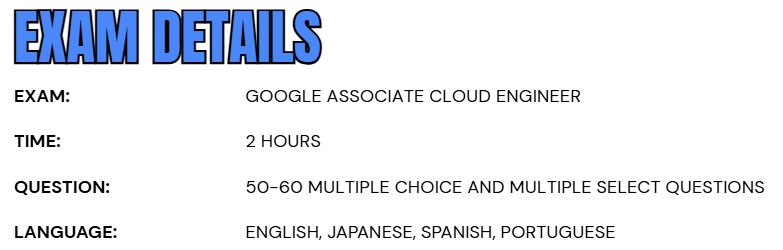
- The Google Associate Cloud Engineer exam is a 2-hour certification test designed to evaluate your practical understanding of Google Cloud technologies and services. The exam follows a standard content guide provided by Google Cloud, ensuring a balanced assessment across key domains such as deployment, configuration, and management of cloud solutions.
- It consists of 50 to 60 multiple-choice and multiple-select questions, carefully crafted to test both conceptual knowledge and hands-on experience. Candidates can take the exam either through an online-proctored environment, allowing remote participation, or at an onsite testing center under supervision.
- The exam is available in English, Japanese, Spanish, and Portuguese, catering to a global audience of cloud professionals.
- Upon successful completion, the certification remains valid for three years, after which renewal is required to maintain active status and stay aligned with evolving Google Cloud practices.
Course Outline
The exam covers the following topics:
Section 1: Setting up a cloud solution environment (23%)
1.1 Setting up cloud projects and accounts. Considerations include:
- Creating a resource hierarchy
- Applying organizational policies to the resource hierarchy
- Granting members Identity and Access Management (IAM) roles within a project
- Managing users and groups in Cloud Identity (manually and automated) (GCP Documentation: Cloud Identity)
- Enabling APIs within projects (GCP Documentation: Enabling an API in your Google Cloud project)
- Provisioning and seing up products in Google Cloud Observability
- Assessing quotas and requesting increases
- Setting up standalone organizations
- Setting up cloud networking
- Confirming availability of products in geographical locations (e.g., regional, global)
- Configuring Cloud Asset Inventory and using Gemini Cloud Assist to analyze resources
1.2 Managing billing conguration. Considerations include:
- Creating one or more billing accounts (GCP Documentation: Create, modify, or close your Cloud Billing account)
- Linking projects to a billing account (GCP Documentation: Modify a project’s billing settings)
- Establishing billing budgets and alerts (GCP Documentation: Set budgets and budget alerts)
- Setting up billing exports
Section 2: Planning and implementing a cloud solution (30%)
2.1 Planning and implementing compute resources. Considerations include:
- Selecting appropriate compute choices for a given workload (e.g., Compute Engine, Google Kubernetes Engine [GKE], Cloud Run, Cloud Run functions, Knative serving) (GCP Documentation: Choosing the right compute option in GCP: a decision tree)
- Launching a compute instance (e.g., availability policy, SSH keys)
- Choosing the appropriate storage for Compute Engine (e.g., zonal Persistent Disk, regional Persistent Disk, Google Cloud Hyperdisk)
- Creating an autoscaled managed instance group by using an instance template
- Configuring OS Login
- Configuring VM Manager
- Using Spot VM instances and custom machine types (GCP Documentation: Custom Machine Types)
- Installing and conguring the command-line interface (CLI) for Kubernetes (kubectl)
- Deploying a GKE cluster with dierent congurations (e.g., GKE Autopilot, regional clusters, private clusters)
- Deploying a containerized application to GKE
- Deploying an application to serverless compute plaorms, including for the processing of Google Cloud events (e.g., Pub/Sub events, Cloud Storage object change notication events, Eventarc)
2.2 Planning and implementing storage and data solutions. Considerations include:
- Choosing and deploying data products (e.g., Cloud SQL, BigQuery, Firestore, Spanner, Bigtable, AlloyDB, Dataow, Pub/Sub, Google Cloud Managed Service for Apache Kaa, Memorystore)
- Choosing and deploying storage products (e.g., Cloud Storage, Filestore, Google Cloud NetApp Volumes) and Cloud Storage options (e.g., Standard, Nearline, Coldline, Archive)
- Loading data (e.g., command-line upload, load data from Cloud Storage, Storage Transfer Service)
- Maintaining multi-region redundancy across data solutions
2.3 Planning and implementing networking resources. Considerations include:
- Creating a VPC with subnets (e.g., custom mode VPC, Shared VPC)
- Creating and applying Cloud Next Generation Firewall (Cloud NGFW) policies with ingress and egress rules and aributes (e.g., action, source, destination, targets, protocols, ports)
- Using Tags (e.g., secure Tags) and service accounts in Cloud NGFW policy rules
- Establishing network connectivity (e.g., Cloud VPN, VPC Network Peering, Cloud Interconnect)
- Choosing and deploying load balancers
- Differentiating Network Service Tiers
2.4 Planning and implementing resources through infrastructure as code. Considerations include:
- Infrastructure as code tooling (e.g., Fabric FAST, Cong Connector, Terraform, Helm)
- Planning and executing infrastructure as code deployments, including versioning, state management, and updates


Section 3: Ensuring successful operation of a cloud solution (27%)
3.1 Managing compute resources. Considerations include:
- Remotely connecting to a Compute Engine instance
- Viewing current running Compute Engine instances
- Working with snapshots and images (e.g., create, view, and delete images or snapshots; schedule a snapshot) (GCP Documentation: Creating persistent disk snapshots)
- Viewing current running GKE cluster inventory (e.g., nodes, Pods, Services)
- Configuring GKE to access Artifact Registry
- Working with GKE node pools (e.g., add, edit, or remove a node pool; autoscaling node pool)
- Working with Kubernetes resources (e.g., Pods, Services, StatefulSets)
- Managing horizontal and vertical Pod autoscaling congurations
- Managing GKE Autopilot Pod resource requests
- Deploying new versions of a Cloud Run application
- Adjusting application traffic splitting parameters (e.g., Cloud Run, Cloud Run functions, GKE)
- Configuring autoscaling for a Cloud Run application
3.2 Managing storage and data solutions. Considerations include:
- Managing and securing objects in Cloud Storage buckets
- Setting object lifecycle management policies for Cloud Storage buckets
- Executing queries to retrieve data from data instances (e.g., Cloud SQL, BigQuery, Bigtable, Spanner, Firestore, AlloyDB)
- Estimating costs of data storage resources
- Backing up and restoring database instances (e.g., Cloud SQL, Firestore, Spanner, AlloyDB, Bigtable)
- Reviewing job status (e.g., Dataow, BigQuery)
- Using Database Center to manage the Google Cloud database fleet
3.3 Managing networking resources. Considerations include:
- Adding a subnet to an existing VPC
- Expanding a subnet to have more IP addresses
- Reserving static external or internal IP addresses
- Adding custom static routes in a VPC
- Working with Cloud DNS and Cloud NAT
3.4 Monitoring and logging. Considerations include:
- Creating Cloud Monitoring alerts based on resource metrics
- Creating and ingesting Cloud Monitoring custom metrics (e.g., from applications or logs)
- Exporting logs to external systems (e.g., on-premises, BigQuery)
- Configuring log buckets, log analytics, and log routers
- Viewing and filtering logs in Cloud Logging
- Viewing specific log message details in Cloud Logging
- Using cloud diagnostics to research an application issue (e.g., Cloud Trace, Cloud Profiler, Query Insights, index advisor)
- Viewing the Personalized Service Health dashboard
- Configuring and deploying Ops Agent
- Deploying Google Cloud Managed Service for Prometheus
- Configuring audit logs
- Using Gemini Cloud Assist for Cloud Monitoring
- Using Active Assist to optimize resource utilization
Section 4: Conguring access and security (20%)
4.1 Managing Identity and Access Management (IAM). Considerations include:
- Viewing and creating IAM policies
- Managing the various role types and dening custom IAM roles (e.g., basic, predened, custom) (GCP Documentation: Basic concepts)
4.2 Managing service accounts. Considerations include:
- Creating service accounts
- Using service accounts in IAM policies with minimum permissions (GCP Documentation: Service accounts)
- Assigning service accounts to resources (GCP Documentation: Creating and enabling service accounts for instances)
- Managing IAM permissions of a service account
- Managing service account impersonation
- Creating and managing short-lived service account credentials
- Using a Google Cloud service account with a GKE application
Google Associate Cloud Engineer Exam FAQs

Exam Policies
Google Cloud upholds clear, standardized policies to ensure every candidate experiences a fair, secure, and consistent certification process. These guidelines cover certification validity, renewal procedures, and scoring practices to maintain the integrity of all Google Cloud credentials.
– Recertification
To keep your Google Cloud certification active, you must recertify every three years by successfully completing the relevant exam within the allowed timeframe. Candidates can begin the recertification process up to 60 days before their current certification expires, helping ensure continuous credential validity.
For first-time candidates or those whose certification has already expired, the standard exam must be taken. If you are renewing your certification, you may choose between a shorter renewal exam or the standard version, available up to 180 days before the expiration date. Once you select your preferred path, you will remain in that track until you either pass or your certification period ends.
– Exam Scoring
Google Cloud certification exams use a pass/fail scoring system based on defined competency standards. Numerical scores are not disclosed, as the exams are designed to measure proficiency rather than rank performance or serve as a diagnostic tool. This scoring approach ensures fairness and consistency, emphasizing skills validation over comparison among candidates.
Google Associate Cloud Engineer Exam Study Guide

1. Gain Real-World Experience
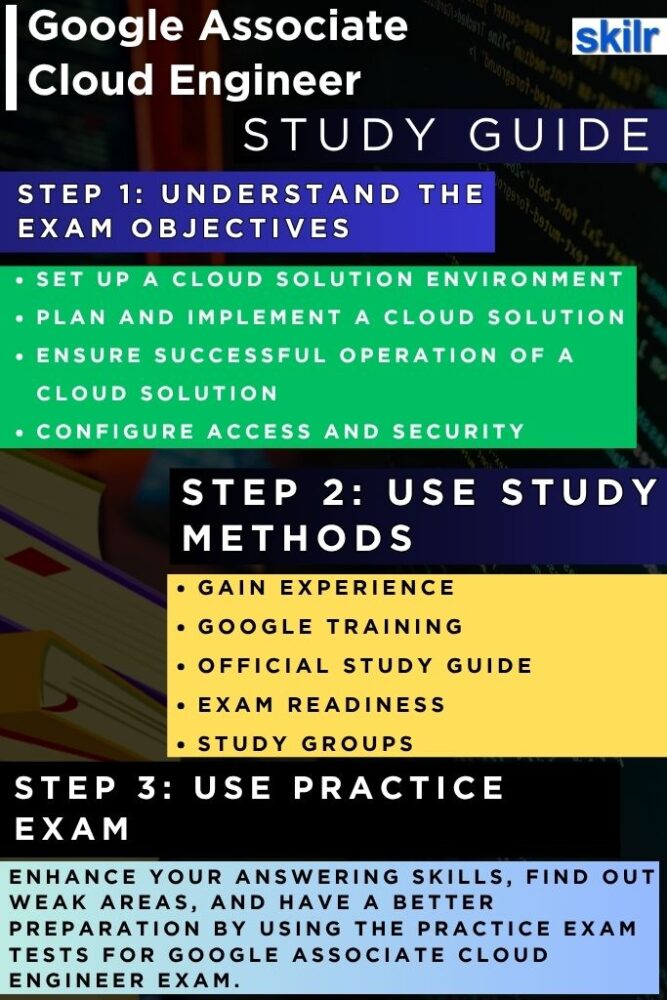
Hands-on practice is essential for mastering the skills tested in the Google Associate Cloud Engineer exam. Spend time actively working with Google Cloud Console, Cloud Shell, and command-line tools to deploy and manage real workloads. Focus on performing key tasks such as configuring IAM roles, setting up virtual machines, managing Cloud Storage, and automating infrastructure using deployment scripts. This experience ensures that you can confidently apply theoretical knowledge to real-world scenarios — a critical skill assessed in the exam.
2. Review the Exam Objectives Thoroughly
Begin your preparation by carefully reviewing the official exam guide on the Google Cloud website. The exam evaluates your proficiency across core domains, including:
- Setting up a cloud solution environment
- Planning and implementing cloud solutions
- Ensuring successful operations of deployed systems
- Configuring access and security
Understanding each objective helps you map your study plan effectively. Focus more time on areas where you feel less confident, and align your preparation to the practical competencies Google expects from a certified Associate Cloud Engineer.
3. Expand Your Skills and Knowledge with Training
Enhance your expertise with structured training resources designed by Google Cloud. Platforms like Cloud Skills Boost, Coursera, and Pluralsight offer official learning paths and labs that cover topics such as networking, compute, IAM, and storage in detail. Take advantage of Qwiklabs’ hands-on labs to simulate real-world cloud environments and practice core tasks step by step. Blending formal training with practical experimentation ensures a deeper, more applied understanding of GCP’s architecture and services. The learning path include:
– Cloud Engineer Learning Path
This learning path offers a carefully curated selection of on-demand courses, interactive labs, and skill badges designed to provide practical, hands-on experience with key Google Cloud technologies essential for the Cloud Engineering role. By completing this path, you will build the foundational skills required to deploy, manage, and operate cloud solutions effectively. Once finished, you’ll be well-prepared to pursue the Google Cloud Associate Cloud Engineer certification and advance your professional journey in cloud computing.
4. Assess and Build Exam Readiness
Exam readiness involves more than just content review—it’s about being mentally and strategically prepared. Begin by evaluating your knowledge gaps using practice quizzes and domain-specific assessments. Create a study schedule that balances theory, hands-on labs, and revision sessions. Closer to the exam date, simulate the test environment by practicing under timed conditions without external notes. This helps improve focus, accuracy, and time management. Additionally, familiarize yourself with the exam delivery format (online or onsite), technical requirements, and proctoring process to avoid last-minute surprises on exam day. To help better Google offers training course:
– Associate Cloud Engineer Journey Course
This course is designed to help you strategically organize your preparation for the Google Associate Cloud Engineer exam. It provides a structured overview of the core Google Cloud domains assessed in the certification and guides you in developing an effective study plan to strengthen your technical understanding and practical skills across each domain.
5. Join Study Groups and Community Discussions
Collaboration is a powerful way to enhance your preparation. Join Google Cloud community forums, Reddit groups, Slack channels, or Discord servers where professionals share study strategies, exam experiences, and troubleshooting tips. Engaging in group discussions helps clarify complex concepts, exposes you to real-world challenges, and keeps your motivation high throughout the preparation journey.
6. Take Practice Tests and Refine Your Strategy
Before attempting the official exam, take multiple mock exams and sample tests to measure your readiness. Focus on understanding the reasoning behind each correct and incorrect answer, rather than just memorizing them. After each practice session, analyze your performance to identify weak domains and revisit those topics. This iterative approach helps you strengthen your understanding and approach the real exam with confidence, composure, and a solid strategy for success.
