


The Google Professional Cloud Developer certification validates your expertise in building, deploying, and managing scalable, secure, and reliable applications on Google Cloud Platform (GCP). It demonstrates your ability to use Google-recommended tools, frameworks, and best practices to develop cloud-native solutions that meet modern performance and reliability standards.
– What Does a Professional Cloud Developer Do?
A Professional Cloud Developer designs and maintains cloud-based applications that leverage GCP’s managed services and modern development technologies. They are proficient in:
- Developing scalable, secure, and high-performance applications
- Working with cloud-native and containerized environments
- Using APIs, orchestration tools, and developer tools effectively
- Implementing CI/CD pipelines and test strategies
- Utilizing serverless platforms and next-generation databases
- Monitoring applications using logs, metrics, and traces
They also have hands-on experience with at least one general-purpose programming language such as Java, Python, Go, or Node.js.
– Skills Validated
The Professional Cloud Developer exam evaluates your ability to perform key development and deployment tasks within Google Cloud, including:
- Designing scalable, available, and reliable cloud-native applications
- Building and testing applications using modern DevOps practices
- Deploying applications securely and efficiently on GCP
- Integrating applications with Google Cloud services and APIs
– Prerequisites
There are no formal prerequisites for taking the exam. However, familiarity with Google Cloud tools, services, and development workflows is highly recommended.
– Recommended Experience
Google suggests having:
- 3+ years of industry experience in software development
- At least 1 year of experience designing and managing solutions on Google Cloud
This level of experience ensures a strong grasp of GCP services, CI/CD pipelines, and application performance optimization.
– Who Should Take the Exam?
The Google Professional Cloud Developer certification is ideal for:
- Software Developers and Engineers who design and deploy applications on Google Cloud.
- DevOps Engineers focusing on automation, CI/CD, and scalability.
- Cloud-Native Application Developers working with microservices, containers, or serverless architectures.
- Technical Leads or Solution Architects seeking to validate their expertise in GCP-based development.
- Developers transitioning to cloud technologies and aiming to build a career in Google Cloud application development.
Exam Details

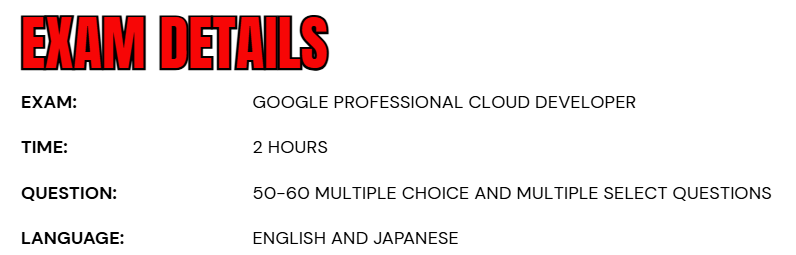
- The Google Professional Cloud Developer exam is a comprehensive two-hour assessment designed to evaluate your ability to design, build, deploy, and integrate applications on Google Cloud.
- The exam is available in English and Japanese, allowing candidates from different regions to take the test in their preferred language.
- It consists of 50–60 multiple-choice and multiple-select questions, each crafted to test your practical understanding of cloud-native application development and Google Cloud services.
- You can choose between two delivery options based on your convenience: take the online-proctored exam from a remote location, or opt for the onsite-proctored exam at an authorized testing center. This flexibility ensures that professionals across the globe can attempt the certification in a secure and accessible environment.
Course Outline
The exam covers the following topics:
Topic 1: Understand about designing highly scalable, available, and reliable cloud-native applications (36%)
1.1 Designing high-performing applications and APIs. Considerations include:
- Choosing the appropriate platform based on the use case and requirements (e.g., Compute Engine, GKE, Cloud Run)
- Building, refactoring, and deploying application containers to Cloud Run and GKE
- Understanding how Google Cloud services are geographically distributed (e.g., latency, regional services, zonal services) (Google Documentation: Geography and regions, Regions and Zones)
- Configuring load balancers and applications for session affinity and performant content delivery
- Implementing caching solutions (e.g., Memorystore)
- Creating and deploying APIs (e.g., HTTP REST, gRPC [Google Remote Procedure call])
- Using application rate limiting, authentication, and observability (e.g., Apigee, Cloud API Gateway)
- Integrating applications using asynchronous or event-driven approaches (e.g., Eventarc, Pub/Sub)
- Optimizing for cost and resource usage
- Understanding data replication to support zonal and regional failover models
- Using traffic splitting strategies (e.g., gradual rollouts, rollbacks, A/B testing) on a new service on Cloud Run or GKE
- Orchestrating application services with Workflows, Eventarc, Cloud Tasks. and Cloud Scheduler
1.2 Designing secure applications. Considerations include:
- Implementing data retention and organization policies (e.g., Cloud Storage
- Object Lifecycle Management, Cloud Storage use and lock retention policies)
- Using security mechanisms that identify vulnerabilities and protect services and resources (e.g., Identity-Aware Proxy [IAP], Web Security Scanner) (Google Documentation: Setting up custom scans using Web Security Scanner)
- Responding to and resolving vulnerabilities, including those identified by Artifact Analysis and Security Command Center
- Storing, accessing, and rotating application secrets, credentials, and encryption keys (e.g., Secret Manager, Cloud Key Management Service, Workload Identity Federation) (Google Documentation: Enable customer-managed encryption keys for Secret Manager)
- Authenticating to Google Cloud services (e.g., Application Default Credentials, JSON web Token [JWT], OAuth 2.0, Cloud SQL Auth Proxy, AlloyDB Auth Proxy) (Google Documentation: Authentication methods at Google)
- Managing and authenticating end-user accounts (e.g.. Identity Platform)
- End-user account management and authentication using Identity Platform
- Securing cloud resources using Identity and Access Management (IAM) roles for service accounts
- Securing service-to-service communications (e.g., Cloud Service Mesh, Kubernetes Network Policies)
- Running services with least privileged access
- Securing application artifacts using Binary Authorization
1.3 Storing and accessing data. Considerations include:
- Selecting the appropriate storage system based on the volume Of data and performance requirements
- Designing appropriate schemas for structured databases (e.g.. AlloyDB, Spanner) and unstructured databases (e.g., Bigtable, Datastore)
- Understanding the implications Of eventual and strongly consistent replication Of AlloyDB, Bigtable, Cloud SOL Spanner, and Cloud Storage
- Creating signed URLs to grant access to C cud Storage objects
- Writing data to BigQuery for analytics and AIML workloads
Topic 2: Learn about building and testing applications (23%)
2.1 Setting up your local development environment. Considerations include:
- Emulating Google Cloud services using the Google Cloud CLI for local application deve opment and local unit testing (Google Documentation: Using the Local Development Server)
- Using the Google Cloud console, Cloud SDK, Cloud Code, Gemini Cloud Assist, Gemini Code Assist. Cloud Shell, and Cloud Workstations
2.2 Building. Considerations include:
- Using Cloud Build and Artifact Registry to build and store containers from source code
- Configuring provenance in Cloud Build (e.g., Binary Authorization)
2.3 Testing. Considerations include:
- Writing unit tests with the help Of Gemini Code Assist
- Executing automated integration tests in Cloud Build


Topic 3: Understand about deploying applications (20%)
3.1 Deploying applications to Cloud Run. Considerations include:
- Deploying applications from source code (Google Documentation: Deploy from source code)
- Invoking C oud Run services using triggers (e.g., Eventarc, Pub/Sub)
- Configuring event receivers (e.g.. Eventarc, Pub/Sub)
- Exposing and securing APIs in applications (e.g., Apigee) (Google Documentation: Overview of Advanced API Security)
- Deploying a new API version in Cloud Endpoints considering backward compatibility
3.2 Deploying containers to GKE. Considerations include:
- Deploying containerized applications (Google Documentation: Deploying a containerized web application)
- Defining resource requirements for container workloads
- Implementing Kubernetes health checks to increase application availability
- Configuring the Horizontal Pod Autoscaler for cost optimization
Topic 4: Learn about integrating applications with Google Cloud services (21%)
4.1 Integrating an application with data and storage services. Considerations include:
- Managing connections to various Google Cloud datastores (e.g., Cloud SOL, Firestore, Cloud Storage)
- Reading and writing data to and from various Google Cloud datastores
- Writing applications that publish and consume data using Pub/Sub (Google Documentation: Writing and Responding to Pub/Sub Messages, Pub/Sub)
4.2 Consuming Google Cloud APIs. Considerations include:
- Enabling Google Cloud services
- Making API calls using supported options (e.g., Cloud Client Libraries, REST API, gRPC, API Explorer) taking into consideration:
- Batching requests (Google Documentation: Batching requests)
- Restricting return data (Google Documentation: Working with Quotas, Usage limits)
- Paginating results (Google Documentation: Paging through table data, Paginating data with query cursors)
- Caching results (Google Documentation: Using cached query results)
- Handling errors (e.g.. exponential backoff)
- Using service accounts to make Cloud API calls (Google Documentation: Service accounts)
4.3 Troubleshooting and observability. Considerations include:
- Instrumenting code to facilitate troubleshooting using metrics, logs, and traces in Google Cloud Observability
- Identifying and resolving issues using Google Cloud Observability
- Managing application issues using Error Reporting
- Using trace DS to correlate trace spans across services
- Using Gemini Cloud Assist
Google Professional Cloud Developer Exam FAQs

Exam Policies
Google Cloud maintains clear, standardized, and transparent exam policies to provide every candidate with a fair, consistent, and secure certification experience. These policies govern how exams are conducted, scored, and managed over time, ensuring the ongoing integrity and credibility of Google Cloud certifications.
– Recertification and Renewal
To keep your Google Cloud certification valid and up to date, you must recertify every three years by retaking and passing the relevant exam. This renewal process ensures that certified professionals stay aligned with the latest technologies, evolving best practices, and platform enhancements.
Candidates are allowed to begin the recertification process before their current credential expires, ensuring a seamless renewal experience without any lapse in certification validity. Upon successful renewal, you can maintain your existing Series ID as long as you complete recertification during the defined eligibility period.
Renewal Eligibility Periods:
- Foundational and Associate Certifications: Up to 180 days before the certification expiration date.
- Professional Certifications: Up to 60 days before the certification expiration date.
Any renewal attempts made before the eligibility period may be rejected, and the exam fees forfeited. Standard exam fees and retake policies also apply to all renewal attempts.
– Exam Scoring
Google Cloud certification exams are pass/fail assessments designed to verify whether candidates meet the established competency standards for their respective roles. To maintain fairness and consistency, numerical scores or detailed performance feedback are not disclosed. This approach reflects Google Cloud’s focus on objective evaluation, emphasizing the validation of genuine knowledge and professional capability — rather than relative ranking among candidates.
Google Professional Cloud Developer Exam Study Guide

1. Get Real-World Experience
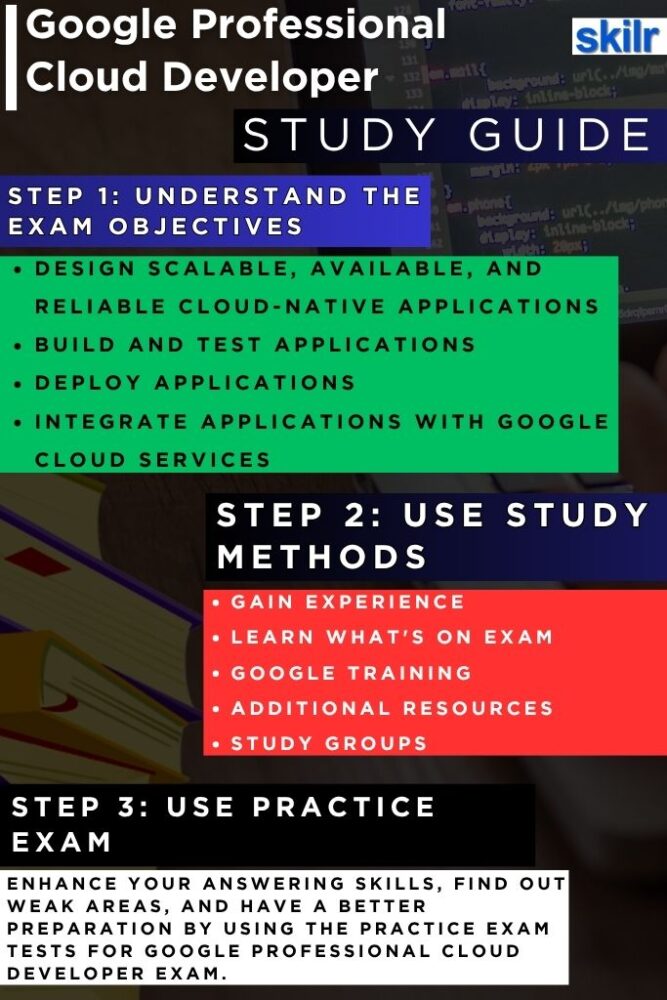
The most effective way to prepare for the Google Professional Cloud Developer exam is by gaining real, hands-on experience with Google Cloud technologies. Begin by building and deploying small-scale applications that mirror real-world business scenarios. Work with core services like Cloud Run, App Engine, Kubernetes Engine (GKE), and Cloud Functions to understand how applications behave in different environments.
Focus on containerization, automation, and scalability by integrating Cloud Build for CI/CD and using Artifact Registry for version control. Incorporate monitoring and observability using Cloud Logging, Cloud Monitoring, and Cloud Trace to track performance and troubleshoot efficiently. Practical, project-based learning helps you develop the problem-solving mindset that the exam expects.
2. Understand the Exam Objectives
Before you start studying, familiarize yourself with the exam domains and objectives outlined in the official exam guide. The certification assesses your ability to design, build, test, deploy, and integrate applications within Google Cloud. Break down each domain into actionable learning goals—such as designing resilient architectures, optimizing performance, implementing CI/CD, or integrating APIs. Create a checklist to track progress and identify weak areas early in your preparation. Understanding the scope of the exam not only structures your learning but also ensures you focus on areas that carry the most weight in scoring.
3. Expand Your Skills with Training
Structured training programs can help you build confidence and fill knowledge gaps. Enroll in Google Cloud’s official courses, online learning paths, or instructor-led classes tailored for cloud developers. Combine theory with practice by completing hands-on labs that simulate real-world use cases like serverless deployments, secure API integration, and multi-environment releases. Interactive labs reinforce your learning through guided, practical exercises. These experiences help bridge the gap between conceptual understanding and real implementation, which is crucial for success in both the exam and your professional role. However, the learning path includes:
– Cloud Developer Learning Path
This learning path offers a structured collection of on-demand courses, interactive labs, and skill badges designed to help you gain practical, hands-on experience with key Google Cloud technologies. It equips you with the essential skills required for the Cloud Developer role through real-world application and guided practice. Upon completing the path, you can advance your professional journey by pursuing the Google Professional Cloud Developer certification to validate your expertise and showcase your cloud development proficiency.
4. Learn Collaboratively: Study Groups and Practice Tests
Studying alone can limit your perspective. Join or form study groups with other professionals preparing for Google Cloud certifications. Group discussions encourage knowledge sharing, peer review, and deeper understanding of complex topics such as scalability, load balancing, or service orchestration. Complement this with practice exams and mock tests to get familiar with the question format and time constraints. After each test, review incorrect answers and revisit relevant topics to strengthen your foundation. This cycle of discussion, testing, and review sharpens your analytical thinking and improves recall under pressure.
5. Explore Additional Resources
Beyond structured courses, leverage Google’s own official documentation and solution guides for in-depth learning. The documentation provides comprehensive insights into service capabilities, configurations, and limitations—essential for understanding how to design production-ready applications. The Google Cloud Solutions library, on the other hand, presents reference architectures that demonstrate best practices for deploying cloud-native systems. Studying these examples helps you grasp the interconnections between services like Cloud SQL, Pub/Sub, Firestore, and Cloud Storage. Engage with community forums such as Google Cloud Community or Stack Overflow to learn from real implementation challenges faced by developers worldwide.
6. Stay Updated and Continue Practicing
Google Cloud evolves rapidly, with new services and updates rolling out frequently. Stay informed by following Google Cloud release notes, technical blogs, and developer updates to ensure your knowledge aligns with the latest exam coverage. Continue experimenting with new tools and services, even after completing your study plan. Revisiting your projects periodically and refining them with new features—like improved security controls or performance tuning—keeps your skills current and sharp. Consistent practice, combined with continuous learning, ensures long-term success not only in the certification exam but also in your professional cloud development journey.
