
The Google Professional Cloud Network Engineer certification validates your ability to design, implement, and manage secure and efficient network infrastructures on Google Cloud Platform (GCP). It is ideal for professionals seeking to demonstrate advanced networking expertise in cloud environments that require scalability, security, and reliability.
– Role of a Professional Cloud Network Engineer
A Professional Cloud Network Engineer is responsible for architecting, deploying, and maintaining Google Cloud network solutions. This role involves designing network architectures optimized for high availability, scalability, resiliency, and security. Key responsibilities include:
- Configuring and managing Virtual Private Clouds (VPCs), subnets, and routing.
- Setting up network security components such as firewalls and IAM-based access controls.
- Implementing load balancing, Cloud DNS, and hybrid connectivity through Cloud Interconnect and Cloud VPN.
- Monitoring and troubleshooting using Google Cloud Observability tools and the Network Intelligence Center to ensure optimal network performance.
– Skills Validated
The exam measures your ability to effectively apply networking principles and Google Cloud tools to real-world scenarios. You’ll be tested on your skills to:
- Design and plan a Google Cloud network aligned with organizational needs.
- Implement and manage Virtual Private Cloud (VPC) configurations, including subnets, routes, and firewalls.
- Configure managed network services, such as Cloud DNS, Cloud CDN, and load balancers.
- Implement hybrid network connectivity through VPNs, Direct Peering, and Cloud Interconnect.
- Manage, monitor, and troubleshoot network operations to ensure security, compliance, and efficiency.
– Exam Prerequisites
There are no formal prerequisites for this certification. However, candidates should have a foundational understanding of networking concepts and cloud computing principles.
– Recommended Experience
Google recommends candidates have:
- 3+ years of industry experience, including 1+ year of hands-on experience in designing and managing solutions using Google Cloud.
- Practical exposure to GCP networking services and real-world infrastructure management will be highly beneficial for success in the exam.
– Who Should Take the Exam
This certification is ideal for professionals such as:
- Cloud Network Engineers and Network Architects aiming to validate their GCP networking expertise.
- Cloud Infrastructure Engineers responsible for designing secure, scalable network solutions.
- System Administrators transitioning into cloud-focused networking roles.
- IT Professionals seeking to enhance their credibility in Google Cloud networking and hybrid connectivity management.
Exam Details
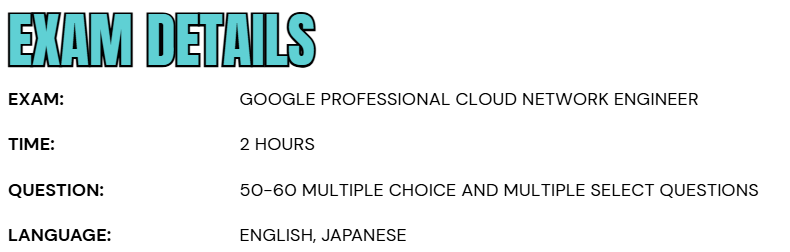
- The Google Professional Cloud Network Engineer exam is a 2-hour assessment available in English and Japanese, consisting of 50–60 multiple-choice and multiple-select questions.
- Candidates can choose to take the test online with remote proctoring (after meeting system requirements) or onsite at a certified testing center.
- This flexible format ensures that professionals can complete the exam in a setting that best suits their convenience and comfort.
Course Outline
The exam covers the following topics:
Topic 1: Understand about designing and planning a Google Cloud Virtual Private Cloud (VPC) network (24%)
1.1 Designing the overall network architecture. Considerations include:
- Designing for high availability, failover, disaster recovery, and scale.
- Designing the DNS topology (e.g., on-premises, Cloud DNS). (Google Documentation: Cloud DNS)
- Choosing a load balancer for an application or solution.
- Designing for hybrid connectivity (e.g., Private Google Access for hybrid connectivity).
- Planning for Google Kubernetes Engine (GKE) networking (e.g., secondary ranges, scale potential based on IP address space, access to GKE control plane).
- Planning Identity and Access Management (IAM) roles, including managing IAM roles in a Shared VPC environment.
- Planning for connectivity to managed services (e.g., private services access, Private Service Connect, Serverless VPC Access).
- Differentiating between network tiers (e.g., Premium and Standard).
1.2 Designing VPC networks. Considerations include:
- Choosing the VPC type and quantity (e.g., standalone or Shared VPC, number of VPC environments).
- Determining how the networks interconnect based on requirements (e.g., VPC Network
- Peering, network connectivity (Mesh and Star topology) with Network Connectivity Center, Private Service Connect).
- Planning the IP address management strategy (e.g., subnets, IPv6, bring your own IP (public advertised prefix (PAP) and public delegated prefix (PDP)), Private NAT, non-RFC 1918 addresses, managed services).
- Planning a global, regional network environment (or variations of these).
- Determining the correct MTU sizing for VPC for workloads.
- Planning third-party device insertion (e.g., network virtual appliance) with custom routes (static or policy-based) and load balancing.
1.3 Designing a resilient and performant hybrid and multi-cloud network. Considerations include:
- Designing for hybrid (e.g., on-premises and cloud, branch office) connectivity including bandwidth and security constraints (e.g., Dedicated Interconnect, Partner Interconnect, Cloud VPN, SD-WAN appliances).
- Designing for multi-cloud connectivity (e.g., Cloud VPN, Cross-Cloud Interconnect).
- Choosing when to use Direct Peering or Verified Peering Provider.
- Designing high-availability and disaster recovery connectivity strategies for multiple regions (e.g., regional or global dynamic routing mode).
- Accessing multiple VPCs from on-premises locations (e.g., Shared VPC, multi-VPC peering, and Network Connectivity Center topologies).
- Accessing Google services like Vertex AI and APIs privately from on-premises locations (e.g., Private Service Connect for Google APIs).
- Accessing managed services through Private Service Connect (PSC) or VPC Network Peering connections (e.g., private services access, Service Networking).
- Designing the IP address space across on-premises locations and cloud environments (e.g., internal ranges, planning to avoid overlaps).
- Designing the DNS peering and forwarding strategy (e.g., DNS forwarding path).
- Determine the correct MTU sizing for hybrid connections (Cloud Interconnect and HA VPN) for workloads.
- Understanding interconnect encryption options such as MACsec and HA VPN over Cloud Interconnect.
1.4 Designing for Google Kubernetes Engine (GKE). Considerations include:
- Choosing between public or private cluster nodes and node pools. (Google Documentation: About private clusters)
- Choosing between public or private control plane endpoints.
- Planning subnets: primary and secondary ranges.
- Selecting RFC 1918, non-RFC 1918, or privately used public IP (PUPI) addresses. (Google Documentation: Configuring privately used public IPs for GKE)
- Planning for IPv6.
- Designing load balancing for GKE networking.
- Adding and managing node pool configuration.
Topic 2: Understand implementing a VPC network (19%)
2.1 Configuring VPCs. Considerations include:
- Creating Google Cloud VPC resources (e.g., networks, subnets, firewall rules or policies, private services access subnet, private pools). (Google Documentation: VPC networks)
- Configuring VPC Network Peering. (Google Documentation: VPC Network Peering overview)
- Creating a Shared VPC network and sharing subnets with other projects.
- Configuring access to Google APIs and Google-managed services (e.g., Private Google Access, public interfaces). (Google Documentation: Overview of API access)
- Configuring access to Vertex AI services.
- Expanding VPC subnet ranges after creation. (Google Documentation: Create and manage VPC networks)
- Configuring restricted Google Cloud services with VPC Service Controls perimeters.
2.2 Configuring VPC routing. Tasks include:
- Setting up static and dynamic routing (e.g. Cloud Router).
- Configuring global or regional dynamic routing. (Google Documentation: Set the dynamic routing mode)
- Implementing routing using network tags and priority.
- Designing route priorities with global dynamic routing.
- Implementing an internal load balancer as a next hop.
- Configuring custom route import/export over VPC Network Peering. (Google Documentation: VPC Network Peering)
- Configuring Policy-based Routing.
2.3 Configuring Network Connectivity Center. Considerations include:
- Differentiating between spoke types (VPC Spoke, Hybrid Spoke and Producer Spoke).
- Managing VPC topology (e.g., star topology, hub and spokes, mesh topology).
- Configuring Private NAT and Private Service Connect propagation.
- Configuring IP/CIDR range filters for NCC spokes.
- Monitoring and troubleshooting NCC.
2.4 Configuring and maintaining Google Kubernetes Engine clusters. Considerations include:
- Creating VPC-native clusters using alias IPs.
- Setting up clusters with Shared VPC.
- Configuring private clusters and private control plane endpoints.
- Adding authorized networks for cluster control plane endpoints.
- Enabling GKE Dataplane V2.
- Configuring source NAT (SNAT) and IP Masquerade policies.
- Creating GKE network policies.
- Configuring Pod ranges and service ranges.
- Deploying additional Pod ranges for GKE clusters
Topic 3: Learn About configuring managed network services (16%)
3.1 Configuring load balancing. Considerations include:
- Determining the load balancing solution for your network (internal/external, regional/global, application/proxy/passthrough, etc.).
- Configuring backend services (e.g., network endpoint groups (NEGs), managed instance groups).
- Configuring various load balancers and backend settings such as the balancing method, session affinity, serving capacity, URL maps, health checks, and global access.
- Optimizing for traffic scalability by using autoscaling or manual scaling features.
- Understanding load balancers in GKE (e.g., GKE Gateway controller, GKE Ingress controller, NEG).
- Setting up traffic management on Application Load Balancers (e.g., traffic splitting,traffic mirroring, URL rewrites).
3.2 Configuring Cloud CDN. Considerations include:
- Setting up Cloud CDN for supported origins (e.g., managed instance groups, Cloud Storage buckets, Cloud Run).
- Setting up Cloud CDN for external backends (internet NEGs) and third-party object storage. (Google Documentation: Cloud CDN)
- Invalidating cached content. (Google Documentation: Invalidate cached content)
- Configuring signed URLs. (Google Documentation: Signed URLs)
3.3 Configuring Cloud DNS. Considerations include:
- Managing Cloud DNS zones and records. (Google Documentation: Managing Zones)
- Migrating to Cloud DNS. (Google Documentation: Migrating to Cloud DNS)
- Configuring Cloud DNS routing policies such as geolocation and failover policies.
- Enabling DNS Security Extensions (DNSSEC). (Google Documentation: DNS Security (DNSSEC))
- Setting up self-hosted DNS integration with Cloud DNS, including configuring DNS forwarding and DNS server policies.
- Understanding DNS private and public zones and setting up split-horizon DNS.
- Setting up DNS cross-project binding and DNS peering.
- Configuring Cloud DNS and external-DNS operator for GKE.

Topic 4: Configuring and implementing hybrid and multi-cloud network interconnectivity (15%)
4.1 Configuring Cloud interconnect. Considerations include:
- Creating Dedicated Interconnect connections and configuring VLAN attachments. (Google Documentation: Create VLAN attachments)
- Creating Partner Interconnect connections, configuring VLAN attachments, and differentiating between Layer2 and Layer3 type Interconnects.
- Creating Cross-Cloud Interconnect connections and configuring VLAN attachments.
- Configuring HA VPN over Cloud Interconnect.
- Implementing 99.9% SLA and 99.99% SLA for Interconnect topologies.
4.2 Configuring a site-to-site IPsec VPN. Considerations include:
- Configuring HA VPN towards on-premise VPN gateways.
- Configuring HA VPN towards other Google Cloud VPCs.
- Configuring Classic VPN (e.g., route-based, policy-based). (Google Documentation: Networks and tunnel routing)
4.3 Configuring Cloud Router. Considerations include:
- Implementing Border Gateway Protocol (BGP) attributes (e.g., ASN, route priority/MED, link-local addresses, authentication). (Google Documentation: Cloud Router Overview, Establish BGP sessions)
- Configuring Bidirectional Forwarding Detection (BFD).
- Creating custom advertised routes and custom learned routes.
- Selecting between legacy and standard best path selection at the VPC.
4.4 Configuring Network Connectivity Center. Considerations include:
- Creating hybrid spokes (e.g., VPN, VLAN attachment).
- Establishing site-to-site data transfer.
- Creating Router appliances (RAs).
- Solving common transitivity networking issues.
Topic 5: Learn About managing, monitoring, and troubleshooting network operations (12%)
5.1 Logging and monitoring with Google Cloud Observability. Considerations include:
- Enabling and reviewing Cloud Logging for networking components (e.g., Cloud VPN, Cloud Router, VPC Service Controls, Cloud NGFW, Firewall Insights, VPC Flow Logs, Cloud DNS, Cloud NAT, NCC). (Google Documentation: VPC Service Controls audit logging)
- Monitoring networking metrics (e.g., Cloud VPN, Cloud Interconnect and VLAN attachments, Cloud Router, load balancers, Google Cloud Armor, Cloud NAT).
5.2 Maintaining and troubleshooting connectivity issues. Considerations include:
- Draining and redirecting traffic flows with Application Load Balancers. (Google Documentation: Traffic management overview for a classic Application Load Balancer, Enable connection draining)
- Managing and troubleshooting VPNs.
- Managing and troubleshooting Cloud Interconnect issues.
- Troubleshooting Cloud Router BGP peering issues. (Google Documentation: Troubleshoot BGP sessions)
- Troubleshooting with VPC Flow Logs, firewall logs, and Packet Mirroring.
5.3 Using Network Intelligence Center to monitor and troubleshoot common networking issues. Considerations include:
- Using Network Topology to visualize throughput and traffic flows.
- Using Connectivity Tests to diagnose route and firewall misconfigurations.
- Using Performance Dashboard to identify packet loss and latency (e.g., Google-wide, project scoped).
- Using Firewall Insights to monitor rule hit count and identify shadowed rules.
- Using Network Analyzer to identify network failures, suboptimal configurations, and utilization warnings.
- Using Flow Analyzer and VPC Flow Logs to evaluate network traffic.
Section 6: Understand about configuring, implementing and managing a cloud network security solution (14%)
6.1 Configuring Google Cloud Armor policies. Considerations include:
- Configuring and attaching edge and backend security policies.
- Implementing web application firewall (WAF) rules (e.g., SQL injection, cross-site scripting, remote file inclusion).
- Configuring advanced network distributed denial of service (DDoS) and Adaptive Protection.
- Configuring rate limiting.
- Configuring bot management.
- Applying Google Threat Intelligence.
6.2 Configuring and managing Cloud Next Generation Firewall (NGFW) policies and VPC Firewall rules. Considerations include:
- Planning the firewall strategy (e.g., VPC firewall rules, Cloud Next Generation Firewall, hierarchical firewall rules, third party integration).
- Configuring Cloud NGFW to support GKE and Cloud load balancers.
- Creating and troubleshooting VPC Cloud Firewall rules and Cloud NGFW regional/global/hierarchical policies.
- Enabling Layer 7 packet inspection with Cloud NGFW Enterprise.
- Migrating from VPC Firewall rules to Cloud NGFW Policies.
- Configuring VPC and NGFW rule criteria (e.g., rule priority, network protocols, direction (ingress and egress), source, destination) Configuring VPC and Firewall Rules Logging.
- Incorporating micro segmentation for security purposes (e.g., using metadata, (secure) Tags, service accounts, network tags).
- Differentiating between the different tiers of Cloud NGFW: Essentials, Standard and Enterprise.
6.3 Configuring and securing internet egress traffic using Public Cloud NAT and Secure Web Proxy. Considerations include:
- Configuring public Cloud NAT IP addressing and assigning automatic and manual NAT IP addresses.
- Configuring static and dynamic port allocation for Cloud NAT.
- Configuring Secure Web Proxy.
6.4 Configuring self-managed network packet inspection, IDS, and Packet Mirroring. Considerations include:
- Routing and inspecting inter-VPC traffic using multi-NIC VMs (e.g., NGFW appliances).
- Configuring an internal load balancer as a next hop for HA multi-NIC VM routing.
- Configure policy-based routes for HA multi-NIC VM routing.
- Developing a strategy for out-of-band Network Security Integration (NSI).
- Configuring the Cloud Intrusion Detection System (IDS)
- Configuring Packet Mirroring for VPC traffic towards self-managed collectors.
Google Professional Cloud Network Engineer Exam FAQs
Exam Policies
Google Cloud upholds transparent and standardized exam policies to ensure fairness, security, and consistency across all certification programs. These policies govern how exams are conducted, scored, and maintained—preserving the integrity, reliability, and global recognition of Google Cloud certifications.
– Recertification
To keep certifications current and relevant, Google Cloud requires professionals to recertify every three years by retaking and passing the same exam. This ensures that certified individuals stay aligned with the latest technologies, best practices, and product updates. Candidates can begin the recertification process up to 60 days before their credential expires, enabling a smooth renewal experience without interruption to their certification status.
– Exam Scoring
Google Cloud exams use a pass/fail scoring model designed to measure whether candidates meet the required proficiency standards for their role. Numerical scores and detailed feedback are not shared, as the goal is to validate competency—not to compare individual performance. This consistent, objective approach ensures that every Google Cloud certification accurately reflects a professional’s applied expertise and real-world readiness.
Google Professional Cloud Network Engineer Exam Study Guide
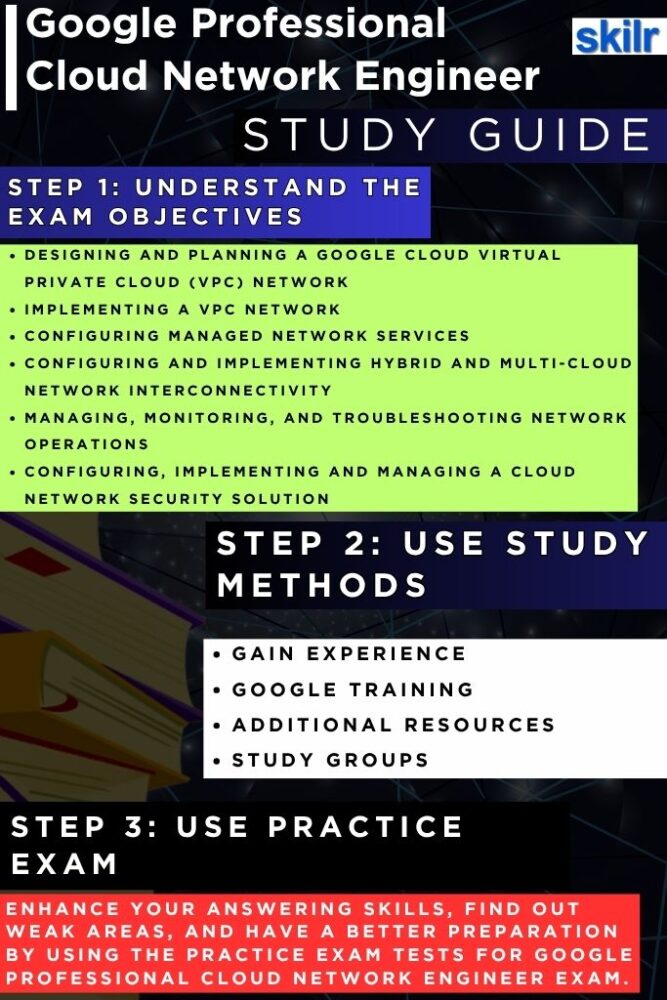
Step 1: Understand the Exam Objectives
Begin your preparation by reviewing the Google Professional Cloud Network Engineer exam guide to clearly understand the key objectives and competencies being evaluated. Familiarize yourself with the main domains, including network design, VPC implementation, hybrid connectivity, network security, and monitoring. This step ensures you focus your study plan on the skills and knowledge areas that directly align with the certification requirements.
Step 2: Gain Real-World Experience
Hands-on experience is essential for mastering Google Cloud networking. Spend time working on real or simulated GCP environments, where you can design and deploy Virtual Private Clouds (VPCs), set up hybrid connections using Cloud VPN and Interconnect, and configure load balancers and Cloud DNS. Practical exposure to these components strengthens your ability to apply concepts in real-world scenarios, which is critical for success in both the exam and professional practice.
Step 3: Expand Your Knowledge with Training
Enroll in Google Cloud’s recommended training courses. These structured programs help you deepen your understanding of core networking principles, automation strategies, and performance optimization techniques. Supplement your learning with Qwiklabs or Skill Boost labs to gain guided, hands-on experience across key networking services and configurations. However, for this exam the training path include:
– Network Engineer Training Path
This learning path offers a carefully structured selection of on-demand courses, interactive labs, and skill badges designed to build real-world, hands-on expertise with Google Cloud technologies that are essential for success in the Network Engineer role.
Step 4: Join Study Groups and Peer Discussions
Collaborate with other learners by joining online study groups, discussion forums, and community meetups focused on Google Cloud certifications. Sharing experiences, solving scenario-based challenges, and exchanging preparation tips with peers can provide new perspectives and help clarify complex topics. Active participation also helps reinforce learning through discussion and practical problem-solving.
Step 5: Test Your Knowledge with Practice Exams
Before scheduling your certification, take mock tests and practice quizzes to evaluate your readiness. These tests simulate the real exam environment, helping you identify areas that require further improvement. Analyze your results to focus on weaker topics such as hybrid connectivity, network performance, or troubleshooting. Regular self-assessment boosts confidence and ensures that you are fully prepared for the exam day.
Step 6: Explore Additional Resources and Documentation
Complement your preparation with official Google Cloud resources, including the Google Cloud documentation and Google Cloud solutions library. These materials provide in-depth discussions on networking architecture, deployment models, and best practices for design and security. Reviewing real-world implementation guides and case studies helps bridge the gap between theoretical learning and practical application—enhancing your ability to design, manage, and optimize Google Cloud networks effectively.
