

The Google Professional Cloud Security Engineer certification validates an individual’s ability to design, implement, and manage secure workloads and infrastructure on Google Cloud. It demonstrates a deep understanding of security best practices, compliance standards, and risk management principles essential for protecting enterprise environments.
A certified Cloud Security Engineer is responsible for developing and maintaining secure solutions using Google Cloud security technologies. This includes implementing Identity and Access Management (IAM), defining organizational resource hierarchies and policies, ensuring data protection, configuring network security defenses, monitoring threats, automating security operations, securing AI workloads, protecting the software supply chain, and enforcing regulatory compliance across systems.
– What the Exam Evaluates
The Professional Cloud Security Engineer exam assesses your ability to:
- Configure and manage access controls effectively.
- Secure communication channels and establish strong boundary protections.
- Implement robust data protection mechanisms.
- Manage operational security and monitoring processes.
- Support compliance and regulatory requirements across cloud environments.
– Prerequisites
There are no mandatory prerequisites for this certification.
– Recommended Experience
It is recommended that candidates have:
- 3+ years of industry experience, including
- At least 1 year designing and managing secure solutions using Google Cloud Platform (GCP).
– Who Should Take the Exam
This certification is ideal for:
- Cloud Security Engineers looking to validate their expertise in securing GCP environments.
- Cloud Architects and Infrastructure Engineers who want to strengthen their understanding of Google Cloud’s security capabilities.
- Security Analysts, Compliance Officers, and DevSecOps professionals aiming to specialize in Google Cloud security frameworks.
- IT professionals responsible for protecting data, networks, and workloads in multi-cloud or hybrid environments.
Exam Details
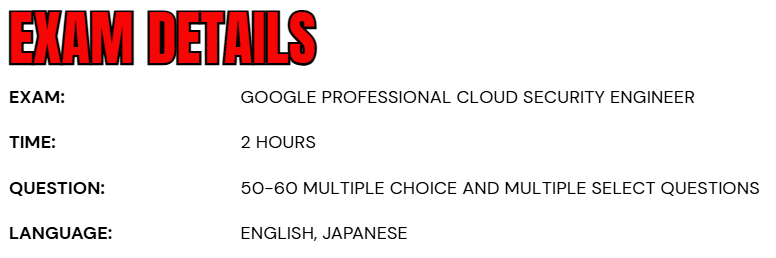
- The Google Professional Cloud Security Engineer exam is designed to evaluate your ability to design, develop, and manage secure infrastructure and workloads on Google Cloud.
- The total duration of the exam is 2 hours, providing ample time to carefully assess each question and demonstrate your expertise in cloud security practices.
- The exam is available in English and Japanese, ensuring accessibility for candidates across different regions.
- It consists of approximately 50–60 multiple-choice and multiple-select questions, testing both conceptual understanding and practical application of Google Cloud security principles.
- Candidates have the flexibility to choose their preferred exam delivery method.
- You can either take the online-proctored exam from a remote location after reviewing and meeting the online testing requirements, or opt for the onsite-proctored exam at an authorized testing center near you.
- This flexibility allows professionals to select the most convenient and comfortable environment for their certification journey.
Course Outline
The exam covers the following topics:
Topic 1: Understand About Configuring access (25%)
1.1 Managing Cloud Identity. Considerations include:
- Conguring Google Cloud Directory Sync and implement single sign-on (SSO) with a
- third-party identity provider. (Google Documentation: Set up Integration Connectors)
- Managing a super administrator account (Google Documentation: Super administrator account best practices, Creating and managing organizations)
- Automating the user lifecycle management process (Google Documentation: Object Lifecycle Management)
- Administering user accounts and groups programmatically (Google Documentation: Managing users programmatically)
- Configuring Workforce Identity Federation (Google Documentation: Configure Workforce Identity Federation)
1.2 Managing service accounts. Considerations include:
- Securing and protecting service accounts (including default service accounts) (Google Documentation: Best practices for using service accounts)
- Identification of scenarios requiring service accounts (Google Documentation: Understanding service accounts, Service accounts)
- Creating, disabling, and authorizing service accounts (Google Documentation: Disable and enable service accounts)
- Securing, auditing and mitigating the usage of service account keys (Google Documentation: Best practices for managing service account keys)
- Managing and creating short-lived credentials (Google Documentation: Create short-lived credentials for a service account)
- Configuring Workload Identity Federation (Google Documentation: Configure Workload Identity Federation with AWS or Azure)
- Managing service account impersonation (Google Documentation: Service account impersonation)
1.3 Managing authentication. Considerations include:
- Creating a password and session management policy for user accounts
- Setting up Security Assertion Markup Language (SAML) and OAuth (Google Documentation: Signing in users with SAML)
- Configuring and enforcing 2-step authentication (Google Documentation: Multi-factor authentication (MFA))
1.4 Managing and implementing authorization controls. Considerations include:
- Managing privileged roles and separation of duties with Identity and Access Management (IAM) roles and permissions (Google Documentation: Separation of duties and Identity and Access Management roles)
- Managing IAM and access control list (ACL) permissions (Google Documentation: Access control lists (ACLs))
- Granting permissions to different types of identities using IAM conditions and IAM deny policies (Google Documentation: IAM Overview)
- Defining access control at the organization, folder, project, and resource level using the principle of least privilege.
- Configuring Access Context Manager (Google Documentation: Access Context Manager Overview)
- Applying Policy Intelligence (Google Documentation: Policy Intelligence overview)
- Managing permissions through groups (Google Documentation: Manage access to projects, folders, and organizations)
- Identifying use cases and conguring Privileged Access Manager.
1.5 Defining resource hierarchy. Considerations include:
- Managing folders and projects at scale.
- Managing pre-built or custom organization policies for the organization, folders, and projects
- Using resource hierarchy for access control and permissions inheritance (Google Documentation: Using resource hierarchy for access control)
Topic 2: Learn about securing communications and establishing boundary protection (22%)
2.1 Designing and configuring perimeter security. Considerations include:
- Configuring network perimeter controls (e.g., Cloud Next Generation Firewall [Cloud NGFW] rules and policies, Identity-Aware Proxy [IAP], load balancers, and Certicate Authority Service). (Google Documentation: Setting up IAP for Compute Engine, Using IAP for TCP forwarding)
- Setting up application layer inspection on Cloud NGFW (e.g., layer 7).
- Differentiating between private and public IP addressing (Google Documentation: IP addresses)
- Configuring web application firewall (e.g., Google Cloud Armor) (Google Documentation: Google Cloud Armor preconfigured WAF rules overview)
- Deploying Secure Web Proxy (Google Documentation: Deploy a Secure Web Proxy instance)
- Configuring Cloud DNS security settings (Google Documentation: Manage DNSSEC configuration)
- Continually monitoring and restricting configured APIs (Google Documentation: Introduction to the Cloud Monitoring API)
2.2 Configuring boundary segmentation. Considerations include:
- Configuring security properties of a VPC network, VPC peering, Shared VPC, and firewall rules (Google Documentation: VPC Network Peering)
- Configuring network isolation and data encapsulation for N-tier applications
- Identifying use cases and conguring VPC Service Controls. (Google Documentation: Overview of VPC Service Controls)
2.3 Establishing private connectivity. Considerations include:
- Designing and configuring private connectivity between VPC networks and Google Cloud projects (Shared VPC, VPC peering, and Private Google Access for on-premises hosts) (Google Documentation: Configure Private Google Access for on-premises hosts)
- Designing and configuring private connectivity between data centers and and VPC network (e.g., HA VPN, Cloud Interconnect). (Google Documentation: Cloud Interconnect overview)
- Establishing private connectivity between VPC and Google APIs (Private Google Access, Private Google Access for on-premises hosts, restricted Google access, Private Service Connect) (Google Documentation: Configuring Private Google Access, Private access options for services)
- Using Cloud NAT to enable outbound traffic (Google Documentation: Cloud NAT overview)

Topic 3: Understand about ensuring data protection (23%)
3.1 Protecting sensitive data and preventing data loss. Considerations include:
- Conguring Sensitive Data Protection (SDP) (e.g., discovering and redacting personally identiable information (PII), conguring pseudonymization and format preserving encryption).
- Restricting access to Google Cloud data services (e.g., BigQuery, Cloud Storage, and Cloud SQL datastores).
- Securing secrets with Secret Manager Secret Manager overview)
- Protecting and managing compute instance metadata About VM metadata)
3.2 Managing encryption at rest, in transit, and in use. Considerations include:
- Identifying use cases for Google default encryption, customer-managed encryption keys (CMEK), and Cloud External Key Manager (EKM) (Google Documentation: Encrypt disks with customer-supplied encryption keys, Customer-Supplied Encryption Keys, Customer managed encryption keys (CMEK))
- Determining when to use soware and hardware keys
- Creating and managing encryption keys for CMEK and EKM (e.g., key rotation and revocation, key import). (Google Documentation: Customer-managed encryption keys (CMEK))
- Applying encryption methods to various use cases. (Google Documentation: Encryption in transit)
- Configuring object lifecycle policies for Cloud Storage (Google Documentation: Object Lifecycle Management)
- Enabling Confidential Computing (Google Documentation: Confidential VM)
3.3 Securing AI workloads. Considerations include:
- Implementing security and privacy controls for AI/ML systems to protect against unintentional exploitation of data or models. (Google Documentation: Preventing Data Exfiltration)
- Determining security requirements for IaaS-hosted and PaaS-hosted training models.
- Implementing security controls for Vertex AI.
Topic 4: Learn about managing operations (19%)
4.1 Automating infrastructure and application security. Considerations include:
- Automating security scanning for Common Vulnerabilities and Exposures (CVEs) through a continuous integration and delivery (CI/CD) pipeline (Google Documentation: Automatically scan workloads for known vulnerabilities)
- Configuring Binary Authorization to secure GKE clusters or Cloud Run (Google Documentation: Enable Binary Authorization for Cloud Run)
- Automating virtual machine and container image creation (e.g., hardening, maintenance, VM patch management).
- Managing policy and dri detection at scale (e.g., cloud security posture management, custom organization policies and custom modules for Security Health Analytics).
4.2 Configuring logging, monitoring, and detection. Considerations include:
- Configuring and analyzing network logs (Cloud Next Generation Firewall [Cloud NGFW], VPC flow logs, Packet Mirroring, Cloud Intrusion Detection System [Cloud IDS], Log Analytics). (Google Documentation: VPC Flow Logs, Cloud IDS)
- Designing an effective logging strategy
- Logging, monitoring, responding to, and remediating security incidents (Google Documentation: Data incident response process)
- Designing secure access to logs (Google Documentation: Best practices for Cloud Audit Logs)
- Exporting logs to external security systems (Google Documentation: Scenarios for exporting Cloud Logging: Compliance requirements)
- Configuring and analyzing Google Cloud audit logs and data access logs (Google Documentation: Enable Data Access audit logs)
- Configuring log exports (log sinks and aggregated sinks) (Google Documentation: Collate and route organization- and folder-level logs to supported destinations)
- Configuring and monitoring Security Command Center (Google Documentation: Configure Security Command Center services)
Topic 5: Understand supporting compliance requirements (11%)
5.1 Adhering to regulatory and industry standards requirements for the cloud. Considerations include:
- Determining technical needs relative to compute, data, network, and storage.
- Evaluating the shared responsibility model. (Google Documentation: Shared responsibilities and shared fate on Google Cloud)
- Conguring security controls within cloud environments to support compliance requirements (e.g., Assured Workloads, organizational policies, Access Transparency, Access Approval, regionalization of data and services).
- Determining the Google Cloud environment in scope for regulatory compliance.
- Mapping compliance requirements to Google Cloud services and security controls (e.g., network and access segmentation, audit log coverage).
Google Professional Cloud Security Engineer Exam FAQs
Exam Policies
The Google Cloud Certification Program follows well-defined exam policies to ensure a fair, transparent, and consistent testing experience for all candidates. These policies cover both pre-exam and post-exam procedures, including certification maintenance, renewal, and retake guidelines.
– Maintaining Google Cloud Certification
All Google Cloud certifications are valid for two years from the date you earn them. To maintain an active certification status, you must recertify before your certification expires. You can attempt recertification starting 60 days prior to your certification’s expiration date. Any attempt to recertify before this 60-day eligibility window may result in:
- Rejection of the exam attempt
- Forfeiture of any paid exam fees
- Possible revocation of your existing certification(s)
- Potential suspension from the Google Cloud Certification Program
Staying certified ensures that your knowledge and skills remain current with Google Cloud’s evolving technologies, tools, and best practices.
– Google Cloud Exam Retake Policy
- If you do not pass the exam on your first attempt, you must wait at least 14 days before retaking it.
- If you do not pass on your second attempt, the waiting period increases to 60 days before your next try.
- After a third unsuccessful attempt, you must wait 365 days (one year) before you can retake the exam again.
Google Professional Cloud Security Engineer Exam Study Guide
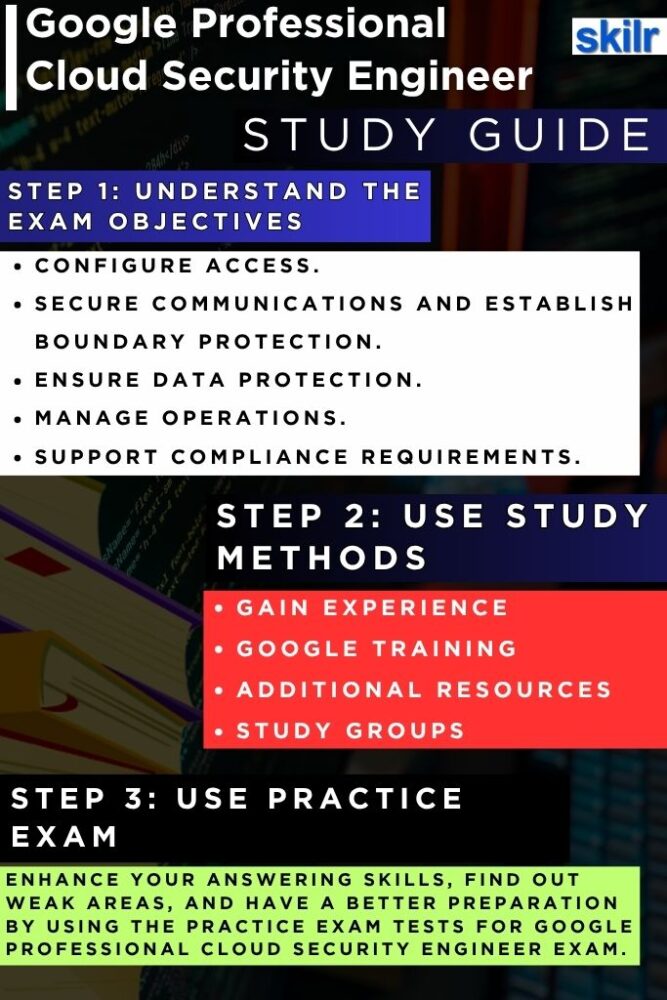
Step 1: Understand the Exam Structure and Objectives
Begin your preparation by thoroughly reviewing the official Google Professional Cloud Security Engineer exam guide. Familiarize yourself with the exam domains, key objectives, and weighting of each section. This will help you identify the topics that require deeper study, such as identity and access management (IAM), network security, data protection, incident response, compliance, and security automation. Understanding the exam format—50–60 multiple-choice or multiple-select questions within 2 hours—will also help you manage your time effectively during the test.
Step 2: Gain Real-World Hands-On Experience
Practical experience is essential for mastering Google Cloud security concepts. Work directly with Google Cloud Platform (GCP) services such as Cloud IAM, VPC, Cloud Key Management Service (KMS), Cloud Armor, Security Command Center, and Cloud Audit Logs. Try implementing real-world scenarios like securing workloads, configuring network boundaries, encrypting data at rest and in transit, and managing access permissions. This hands-on exposure will strengthen your problem-solving ability and deepen your understanding of GCP’s security ecosystem.
Step 3: Expand Your Skills with Official Training
Leverage Google Cloud’s official learning and training resources to build both foundational and advanced knowledge. Enroll in training paths such as:
– Security Engineer Learning Path
A Security Engineer is responsible for designing, implementing, and continuously monitoring an organization’s security infrastructure to safeguard sensitive data from cyber threats. This learning path offers a carefully curated series of on-demand courses, interactive labs, and skill badges that provide practical, hands-on experience with key Google Cloud technologies essential for the Security Engineer role. Upon completing this path, you’ll be well-prepared to pursue the Google Professional Cloud Security Engineer certification and advance to the next stage of your cloud security career.
Step 4: Collaborate Through Study Groups and Communities
Join Google Cloud study groups, online communities, and forums to engage with other learners and certified professionals. Discussing exam topics, sharing practical insights, and solving sample problems collaboratively can greatly enhance your understanding. Platforms such as Reddit (r/googlecloud), Google Cloud Community, and LinkedIn groups offer active discussions where you can clarify doubts and learn from real industry experiences.
Step 5: Validate Your Knowledge with Practice Tests
Before taking the official exam, assess your readiness using practice tests and mock exams. These tests simulate the real exam environment and help you identify areas that need improvement. Analyze your performance carefully—focus on questions related to data protection, threat detection, incident management, and compliance enforcement. Consistent practice under timed conditions will improve both your confidence and accuracy.
Step 6: Explore Additional Resources and In-Depth Materials
For deeper insights, review official Google Cloud documentation, case studies, and solution architectures. Explore in-depth discussions on key security concepts, including zero trust frameworks, identity federation, service account management, AI workload protection, and software supply chain security. Google’s technical blogs, Cloud Architecture Center, and Security Foundations Blueprint are valuable resources that offer real-world guidance and best practices used by leading organizations.
