
The Salesforce Certified Education Cloud Consultant credential validates the expertise of professionals who design, implement, and optimize Salesforce Education Cloud solutions for educational institutions. These consultants work closely with customers to build scalable, maintainable systems that support student lifecycle management, enrollment processes, engagement workflows, and institutional operations.
Certified Education Cloud Consultants bring a blend of technical knowledge and industry understanding, enabling them to translate education-specific business needs into effective Salesforce solutions. Their role often includes guiding institutions through best practices, leading implementation efforts, and ensuring long-term platform success.
– Prerequisite
Before attempting the Education Cloud Consultant exam, candidates must first earn the Salesforce Administrator certification. This ensures that candidates have a strong foundation in core Salesforce features, security, automation, data management, and platform configuration.
– What the Education Cloud Consultant Does
A Salesforce Education Cloud Consultant is responsible for:
- Designing end-to-end solutions tailored to education sector workflows
- Configuring and deploying Education Cloud features such as EDA, Admissions Connect, and Student Success Hub
- Optimizing core Salesforce applications like Sales Cloud, Service Cloud, Account Engagement, Marketing Cloud, CRM Analytics, and Experience Cloud
- Ensuring cross-cloud compatibility and seamless operational efficiency
- Managing data migration, integrations, and environment strategy
- Advising institutions on governance, lifecycle management, and best practices
Consultants should be able to troubleshoot configuration issues, manage stakeholder expectations, and drive projects from discovery to deployment.
– Recommended Experience and Background
Candidates for this certification typically have:
Professional Experience
- 2+ years working with the Salesforce Platform
- 1+ year of hands-on Salesforce implementation experience in the education sector
- Practical involvement in at least one Education Cloud project
- Prior work in partner or consultancy environments (recommended)
Technical & Functional Skills
- Strong analytical and problem-solving capabilities
- Solid understanding of cloud computing, internet technologies, data models, and database concepts
- Basic knowledge of integrations and system connectivity
- Familiarity with institutional processes, student lifecycle management, and education systems
- Awareness of SDLC practices and change management principles
- Understanding of Salesforce environment strategy and iterative builds
- Working knowledge of the Salesforce for Education product suite
– Key Abilities Expected from Certified Consultants
Certified professionals should be able to:
- Install, configure, and tailor Education Cloud and related managed packages
- Recommend the right combination of Salesforce products for each institution
- Maintain operational continuity between Education Cloud and core clouds
- Understand integration patterns, compatibility considerations, and best practices
- Perform data migration tasks into an Education Cloud environment
- Assess third-party Salesforce apps for education use cases
- Work with Salesforce license models and community/open-source solutions
– Areas Where Candidates May Need Support
Some aspects of the platform may require assistance or deeper learning, such as:
- Designing complex integration architectures
- Implementing Marketing Cloud, Account Engagement, or Experience Cloud
- Applying Einstein AI and CRM Analytics capabilities
- Managing large data volumes and advanced data operations
– What Is Not Required for the Exam
This exam does not evaluate or expect:
- Apex or custom code development
- Creation or delivery of training programs
- Consultant-level certifications in Marketing Cloud, Einstein, CRM Analytics, Account Engagement, or Nonprofit Cloud
- Deep hands-on expertise in advanced Experience Cloud deployments
– Who Should Take the Salesforce Education Cloud Consultant Exam
This certification is ideal for:
- Consultants working with schools, colleges, universities, EdTech, or training institutions
- Business analysts supporting Salesforce implementations in education
- Solution, application, or technical architects responsible for designing Education Cloud systems
- Project managers or program managers overseeing education-sector Salesforce deployments
- Developers or system analysts who want to transition into a consultant role
- Professionals aiming to specialize in Education Cloud or expand their Salesforce consulting portfolio
Exam Details
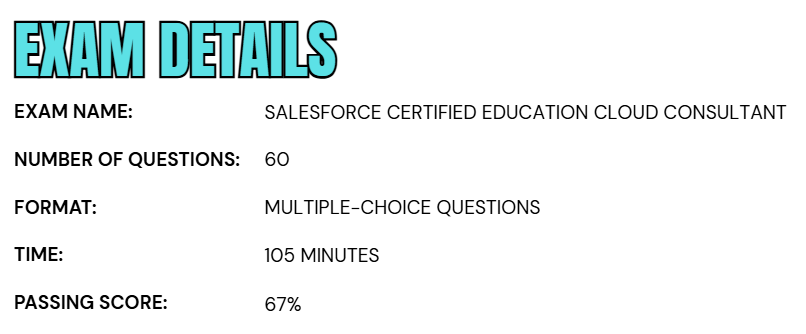
- The Salesforce Certified Education Cloud Consultant Exam consists of 60 scored multiple-choice questions, along with up to five additional unscored items included for research and evaluation purposes.
- Candidates are given 105 minutes to complete the exam, a duration that already accounts for the presence of these non-scored questions.
- To earn the certification, test-takers must achieve a minimum passing score of 67%.
- The exam is available in two formats: it can be taken onsite at an authorized testing center or through a remotely proctored online session.
- During the exam, no external materials—digital or printed—are permitted, ensuring a closed-book testing environment.
- While responding to questions, candidates should consider the full range of Salesforce capabilities across both Lightning Experience and Salesforce Classic.
- Furthermore, Salesforce has incorporated a small number of unscored, randomly placed questions into various certification exams to evaluate new content; these items do not affect the final score but are included in addition to the main 60 questions.
Course Outline
The Salesforce Certified Education Cloud Consultant Exam is designed to verify a candidate’s understanding and practical skills across the objective areas listed here.
1. Overview of Domain Expertise: 18%
- Determining the solution set that satisfies customer requirements (marketing and engagement, recruitment and admissions, student experience, and advancement and alumni relations).
- Explaining the Education Cloud solution for K-12 customers.
2. Learn about Education Cloud Configuration: 22%
- Discuss the capabilities and considerations of Education Cloud, including compatibility with other Salesforce products and features.
- Installing and configuring Salesforce for Education solutions.
3. Understand Implementation Strategies and Best Practices: 18%
- Facilitating a successful implementation (plan, gather requirements, design, build, test, document, deploy, and optimize).
- Illustrating governance, change management, staffing, implementation strategies, deployment considerations, and adoption best practices including community resources for long-term solution success.
4. Overview of Solution Design: 19%
- Evaluating the similarities, differences, and relationships between Salesforce for Education solutions account model considerations and standard Salesforce Account-Contact data models.
- Designing an appropriate and scalable solution for education customers.
- Locating community and open-source solutions and resources.
- Deciding when to use Education Cloud, other Salesforce solutions, community open source solutions, and third-party applications.

5. Learn about Integration and Data Management: 16%
- Evaluating integration considerations for connecting systems in an Education Cloud implementation.
- Explaining data management considerations (data usage, forecasting, large data volumes, migrations in Education Cloud).
6. Understand Analytics: 7%
- Distinguishing between reporting solutions in Education Cloud.
- Demonstrating when a data analytics solution is appropriate.
Salesforce Certified Education Cloud Consultant Exam FAQs
Salesforce Certification Exam Policy
The Salesforce Certification Exam Policy outlines the official procedures for scheduling, modifying, and completing any Salesforce certification exam. These guidelines apply uniformly to all candidates, whether they choose to take the test online under remote supervision or in person at an authorized testing center. The policy is designed to uphold exam security, maintain fairness, and ensure that every candidate has a consistent, reliable, and professional testing experience.
Exams at Authorized Testing Centers
Candidates opting to take their exam at a Pearson VUE testing center may reschedule or cancel their appointment directly through their Pearson VUE account, provided the request is submitted at least 48 hours before the scheduled start time. Requests made after this window are typically not accepted. If a candidate fails to appear at the testing center without rescheduling in time, the appointment is classified as a no-show, and the full exam fee is forfeited.
Online Proctored Exam Appointments
For candidates testing remotely via online proctoring, Pearson VUE allows changes or cancellations up to 24 hours before the exam. Any modifications requested after the 24-hour cutoff are generally denied. Missing the online exam session without updating the appointment within the permitted timeframe results in a missed exam, and the candidate loses the entire exam fee.
Salesforce Exam Candidate Code of Conduct
All Salesforce certification candidates must uphold the highest standards of professionalism, honesty, and ethical behavior throughout the exam process. By scheduling an exam, candidates agree to the Salesforce Credential and Certification Program Agreement, which outlines expectations for responsible preparation and compliant test-taking.
Candidates are expected to:
- Use only authorized Salesforce learning materials
- Participate ethically within the Trailblazer Community
- Follow all testing, security, and proctoring instructions
Any attempt to access, share, or distribute real exam questions, use unauthorized aids, or disregard proctor directions is strictly prohibited. Violations may result in serious consequences, including score cancellation, temporary or permanent certification suspension, or permanent removal from the Salesforce Certification Program.
Salesforce Certified Education Cloud Consultant Exam Study Guide
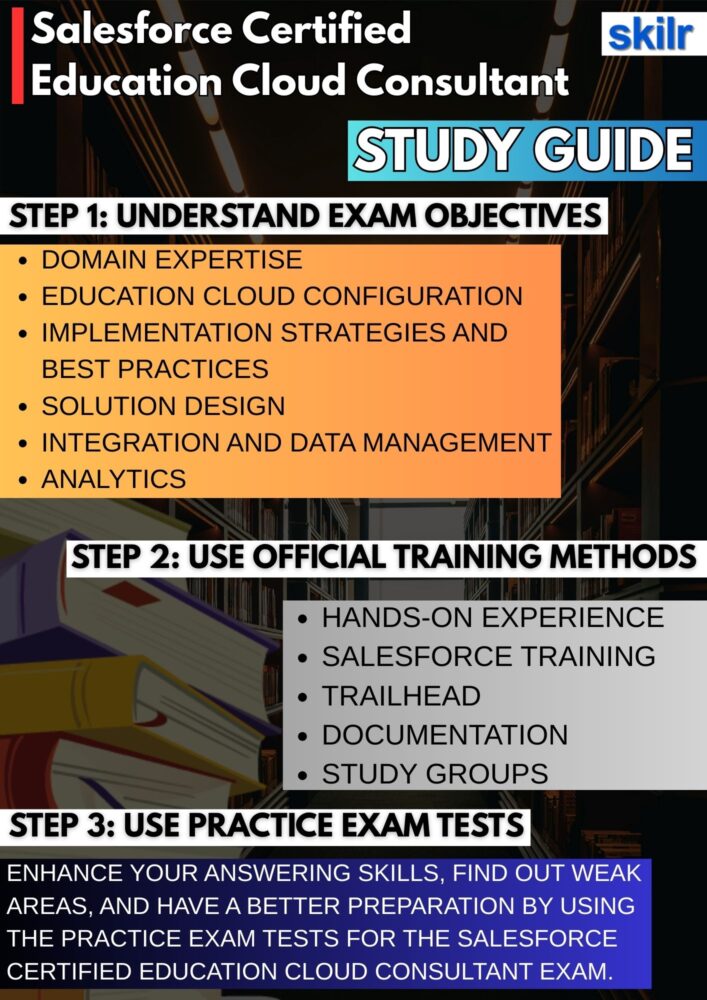
1. Understand the Exam Guide
Begin your preparation by carefully studying the official Salesforce Education Cloud Consultant Exam Guide. This document outlines the structure of the exam, the number and types of questions, the scoring criteria, and the weight assigned to each objective area. Taking the time to understand these components ensures that you know exactly what to expect on exam day.
It also helps you identify which topics require deeper focus, such as Education Cloud data models, integration basics, student lifecycle management, and solution design principles. The exam guide functions as the blueprint for your study plan, allowing you to align your preparation with Salesforce’s expectations.
2. Combine Hands-On Experience with Formal Training
Hands-on experience plays a central role in preparing for this certification. Working directly with Education Cloud, EDA, Admissions Connect, Student Success Hub, and related Salesforce features gives you a practical understanding of how institutions use the platform. Alongside real-world experimentation, completing official Salesforce training courses—whether self-paced or instructor-led—helps reinforce your knowledge with structured guidance.
Training programs often cover complex scenarios you may not encounter during day-to-day practice, ensuring a strong conceptual foundation. When combined, practical work and formal training provide the technical proficiency and confidence needed to solve exam-style problems.
3. Skill Up Through Trailhead Learning Paths
Trailhead remains one of the most powerful learning tools for Salesforce certifications. By completing modules, projects, and Trailmixes specifically designed for Education Cloud and related products, you reinforce both conceptual knowledge and practical skills. Trailhead’s interactive approach helps you understand institutional workflows, data relationships, automation capabilities, and customization options.
Many modules simulate real education scenarios, enabling you to apply theoretical knowledge in a guided environment. Regularly engaging with Trailhead content ensures that you stay current on new features, platform updates, and best practices recommended by Salesforce.
4. Gain Practical Experience to Expand Your Expertise
Beyond basic practice, actively seeking out deeper implementation opportunities significantly improves your readiness. This may include working with sandbox environments, participating in volunteer projects for educational institutions, or building end-to-end sample solutions such as enrollment processes, advising systems, and success plans.
The more exposure you have to real or simulated Education Cloud implementations, the better equipped you become to interpret requirements, make architecture decisions, and troubleshoot issues—skills that are frequently tested in the exam. Practical experience strengthens analytical thinking and ensures that you can apply theoretical knowledge to real-world challenges.
5. Learn Through Study Groups, Communities, and Trailhead Academy
Engaging with others preparing for the same certification can accelerate your learning. Study groups, whether local or virtual, offer opportunities to discuss complex topics, compare notes, and gain perspectives from peers with different levels of experience. Participating in Trailblazer Community groups gives you access to expert guidance, community-led content, and discussions around best practices for Education Cloud.
Additionally, Trailhead Academy provides instructor-led sessions, workshops, and bootcamps that offer structured, expert-driven preparation. These communities and programs help you stay motivated, clarify doubts, and gather insights that are often missed when studying alone.
6. Use Practice Tests to Assess Your Preparedness
Taking practice exams is a crucial step in evaluating your readiness. Mock tests simulate the timing, difficulty, and style of the real exam, helping you become comfortable with the testing format. Reviewing your performance on these tests highlights areas where you need additional study and familiarizes you with the reasoning required to eliminate incorrect answers.
Practice tests also help you develop time management strategies, ensuring that you can complete the exam within the allotted timeframe. Repeated exposure to exam-style questions builds confidence and reduces anxiety as the actual test day approaches.
7. Review Salesforce Documentation, Tip Sheets, and User Guides
Completing your preparation with official Salesforce documentation ensures you understand features exactly as Salesforce defines them. Documentation such as product guides, implementation manuals, release notes, and tip sheets provides in-depth explanations of Education Cloud capabilities, technical requirements, and configuration options.
These materials often clarify nuances that appear in exam questions, particularly those related to compatibility, security, integrations, and environment strategy. Regularly reviewing these sources keeps your knowledge accurate and up to date, especially in a constantly evolving platform like Salesforce.
