
The Salesforce Certified Platform Administrator II certification is designed for experienced Salesforce Administrators who have mastered the art of managing and optimizing the Salesforce environment. This advanced-level credential validates a professional’s ability to configure, manage, and extend Salesforce applications beyond standard functionality, applying expert-level skills to meet complex business needs.
This exam builds on the foundation of the Salesforce Certified Platform Administrator I credential. While the first certification focuses on essential administrative tasks and maintaining Salesforce implementations, the Administrator II certification emphasizes advanced configuration, automation, and optimization strategies to drive efficiency and scalability across the Salesforce ecosystem.
– Who Should Take the Exam
This certification is ideal for professionals who:
- Have extensive hands-on experience as Salesforce Administrators.
- Have completed the Administer, Extend, and Automate Salesforce (ADX211) course from Salesforce or an authorized training provider.
- Are proficient in applying best practices, troubleshooting complex administrative issues, and leveraging advanced platform features.
- Seek to validate their expertise in handling sophisticated Salesforce configurations, automations, and business process customizations.
– Ideal Candidate Profile
The ideal candidate for the Salesforce Certified Platform Administrator II exam is someone who:
- Possesses a deep understanding of Salesforce’s full suite of applications, tools, and features.
- Can perform advanced administrative functions such as automation, data quality management, and environment configuration.
- Is adept at leveraging Salesforce capabilities to address business challenges and streamline processes.
- Continuously explores new platform functionalities and can assess their relevance to business operations.
– Key Skills and Expertise Expected
A qualified candidate should be able to:
- Manage Data Access and Security: Define record and field-level access controls aligned with business requirements.
- Customize the Data Model: Create custom objects, fields, and establish suitable relationship types.
- Configure Cloud Applications: Set up and manage both Sales Cloud and Service Cloud applications effectively.
- Forecasting and Knowledge Management: Implement forecasting, Salesforce Knowledge, and entitlement processes.
- Maintain Data Quality: Assess, cleanse, and ensure data integrity using built-in Salesforce tools.
- Handle Environments: Understand sandbox capabilities and use available tools to move and manage data across environments.
- Advanced Reporting and Dashboards: Build custom report types, joined reports, and dynamic dashboards using filters, snapshots, and cross-filters.
- Automation Mastery: Create Flows, Workflow Rules, Approval Processes, and Formula Fields to automate and optimize business processes.
– Why Pursue This Certification
Achieving the Salesforce Certified Platform Administrator II credential distinguishes you as a top-tier Salesforce professional capable of driving innovation and operational excellence. It demonstrates your ability to manage complex Salesforce environments, implement automation efficiently, and align Salesforce functionalities with evolving business strategies.
Exam Details
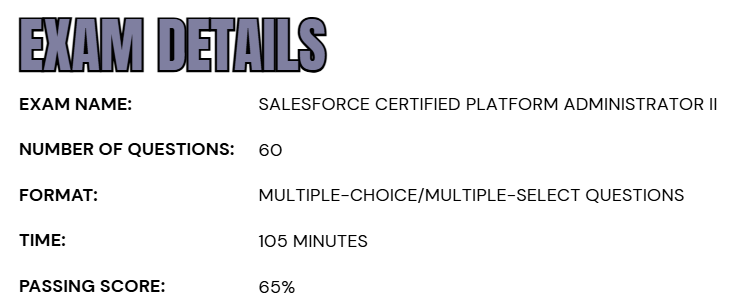
- The Salesforce Certified Platform Administrator II exam consists of 60 multiple-choice and multiple-select questions, along with up to five unscored questions that do not impact the final result.
- Candidates are given 105 minutes to complete the exam and must achieve a minimum passing score of 65% to earn the certification.
- The exam can be taken either onsite at an authorized testing center or through an online proctored environment, offering flexibility based on the candidate’s preference.
- During the test, no hard-copy or online reference materials are permitted, ensuring a fair assessment of each participant’s knowledge and hands-on expertise.
- To be eligible for this advanced-level certification, candidates must first hold the Salesforce Certified Platform Administrator credential, which serves as the foundational prerequisite before attempting the Platform Administrator II exam.
Course Outline
The Salesforce Platform Administrator II exam evaluates a candidate’s proficiency and practical expertise across specific administrative objectives that are:
1. Understand Security and Access: 20%
- Given a scenario, determining the implications to record and field data access (Sharing model, controlled by parent, grant access by hierarchies, dashboard and report folders access, email folder access, Territory Management).
- Comparing and contrasting the capabilities of custom profiles, permission sets, and delegated administration.
- Given a scenario, determining the implications of user authentication.
- Comparing and contrasting the capabilities of a complex business model (Person accounts, Account, Contacts, and Contact to multiple Accounts).
2. Learn About Objects and Applications: 19%
- Given a scenario, determining the appropriate solution to enhance or extend objects (master-detail, lookup, junction object, related list, record type, Schema Builder, and Object Creator).
- Given a scenario, determining the appropriate solution to enhance or extend the UI/UX with applications (App Manager, Lightning App Builder, Dynamic Forms, standard Lightning page components, Console, and Lightning page analyze button).
3. Understand Auditing and Monitoring: 10%
- Given a scenario, determining the appropriate tools for monitoring and troubleshooting system activity (debug log, set up audit trail).
- Explaining how to ensure sensitive data is set up to support a business/legal/compliance use case in production and sandbox environments.
- Explaining how to review and troubleshoot security settings including pending updates that may change system access.
4. Overview of Cloud Applications: 11%
- Describing the features of Salesforce which enable Sales users to conduct the sale process, including products, price books, schedules, orders, and quotes.
- Distinguishing and understanding the implications and capabilities of Forecasting and Territory Management.
- Explaining how to create and maintain Salesforce Knowledge (article record types, data categories).
- Explaining how to create and maintain service entitlements and entitlement processes.
- Describing the features of Salesforce which enable interaction between support agents and customers (Chat, Case Feed, Service Cloud Console, Experience Cloud sites, Omni-Channel).
- Given a scenario, understanding the standard Salesforce suite of products that enable extending the core platform.
5. Understand Data and Analytics Management: 13%
- Explaining the tools and best practices for assessing, improving, and enriching data quality (data types, validation, managing duplicates, enriching, archiving).
- Given a scenario, determining the appropriate analytic tools to meet complex reporting requirements (custom report types, reporting snapshots, complex charting, custom summary formulas, bucketing, joined reports, cross filters, dynamic dashboards, dashboard filters).
- Understanding methods to connect to, access, backup/restore, or archive data outside of the Salesforce Platform (big objects, data warehouse, external objects, data lakes, third-party solutions, and Salesforce Connect).
- Given a scenario, identifying the appropriate tools and methods for importing data into Salesforce (data import wizard, data loader, and external ID).

6. Learn about Environment Management and Deployment: 7%
- Describing the options available to move metadata between environments (change sets, sandboxes, and AppExchange – managed/unmanaged).
- Describing the capabilities and best practices for using change sets to move metadata between environments.
7. Learn Process Automation: 20%
- Given a complex scenario, determining the solution using the best tool or combination of tools to solve a business problem.
- Given a scenario, identifying the appropriate tool or method for troubleshooting declarative automation.
- Given a scenario, explaining the capabilities and limitations of each declarative automation tool.
- Understanding the implications of the order of execution when using automation tools.
Salesforce Certified Platform Administrator II Exam FAQs
Salesforce Exam Candidate Code of Conduct
Every individual pursuing a Salesforce Certification must uphold the highest standards of integrity, fairness, and professionalism as outlined in the Salesforce Credential and Certification Program Agreement. This commitment ensures a transparent and trustworthy certification process for all participants.
Candidates are expected to prepare responsibly by using official Salesforce training materials, engaging with the Trailblazer Community, and strictly adhering to all testing guidelines and program policies. Maintaining ethical conduct not only protects personal credibility but also preserves the value and reputation of Salesforce certifications globally.
Any form of misconduct or unethical behavior—including the sharing of confidential exam content, seeking or offering unauthorized assistance, or breaching certification policies—is strictly forbidden. Violations of these principles may result in severe disciplinary actions such as exam invalidation, credential suspension or revocation, and permanent exclusion from the Salesforce Certification Program and its professional community.
Salesforce Exam Policy
The Salesforce Exam Policy outlines important guidelines for rescheduling, canceling, and attending certification exams—whether taken online or at a physical testing center. Adhering to these policies helps ensure a smooth and fair examination experience for all candidates.
- Onsite (Testing Center) Exams
- Candidates who choose to take their exam at a Pearson VUE testing center may reschedule or cancel their appointment up to 48 hours before the scheduled exam time through their Pearson VUE account. Requests made after this period are generally not accepted. Failure to appear for the exam without prior notice will be marked as a no-show, resulting in the loss of the full exam fee.
- Online Proctored Exams
- For candidates opting for an online proctored exam, rescheduling or canceling is allowed up to 24 hours before the scheduled start time via Pearson VUE at no extra cost. Any modifications made after the 24-hour deadline may not be accommodated, and failure to comply with this policy may lead to the forfeiture of the exam fee.
Salesforce Certified Platform Administrator II Exam Study Guide
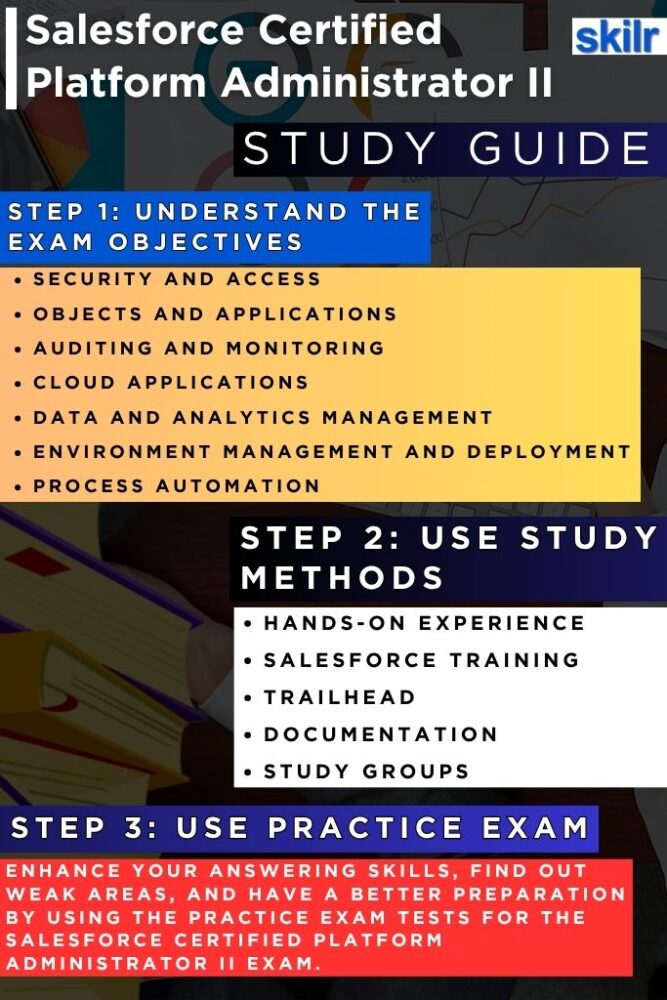
1. Gain Practical, Hands-On Experience
Hands-on experience is the cornerstone of success in this exam. Spend time working directly within Salesforce environments—either in your organization’s setup or through sandbox environments—to practice real-world administrative tasks. Focus on advanced topics such as automation using Flows, record-level security, user management, and data quality maintenance. Gain experience configuring Sales Cloud, Service Cloud, and Knowledge Management, and learn to build custom reports and dashboards that support business decision-making. Real-world exposure helps you understand not only how to configure Salesforce but why certain approaches are more effective for specific scenarios.
2. Complete Salesforce Training Courses
Enrolling in official Salesforce training programs provides structure and depth to your preparation. The course is specifically designed for candidates aiming for the Platform Administrator II credential. Offered by Salesforce University and authorized training partners, this course focuses on complex configuration tasks, automation strategies, and system optimization best practices. Expert-led sessions also simulate practical business problems, allowing you to apply theoretical concepts in realistic situations. Completing this course ensures you cover all major exam objectives while developing professional-level administrative skills. It includes:
– Administer, Extend, and Automate Salesforce – ADX211
ADX211 is a 4-day expert-led training program designed to help experienced Salesforce Administrators go beyond the basics and master advanced capabilities. Learn how to extend Salesforce with custom objects, build dynamic Lightning apps, and design complex automation flows that solve real-world business challenges. Gain hands-on experience in enhancing productivity with advanced reports, dashboards, and data management techniques.
Led by certified Salesforce professionals, this course equips you with strategic insights, practical skills, and proven best practices to take your admin expertise to the next level. Ideal for certified Salesforce Platform Administrators or professionals with 6+ months of admin experience, it also serves as a key preparation step toward the Salesforce Certified Platform Administrator II certification.
3. Skill Up Through Trailhead
Salesforce Trailhead remains the most valuable self-paced learning platform for certification preparation. It offers interactive learning modules, guided projects, and real-world simulations tailored for administrators. Focus on trails such as Advanced Admin, Automation Champion, and Data Management Specialist. Completing superbadges like Process Automation Specialist and Security Specialist demonstrates your applied knowledge and boosts your credibility as a Salesforce expert. Trailhead’s gamified approach makes learning both engaging and practical, helping you reinforce complex concepts through hands-on challenges.
4. Review Official Documentation and Release Notes
Salesforce evolves constantly, introducing new features and improvements in its Spring, Summer, and Winter releases. Regularly reviewing Salesforce documentation, release notes, and implementation guides helps you stay current with platform changes that could impact the exam. Understanding new capabilities, deprecations, and updates to automation, reporting, and security tools ensures your knowledge remains aligned with Salesforce’s latest best practices. This proactive approach also prepares you for real-world administrative work, where staying up to date is essential.
5. Join Study Groups and the Trailblazer Community
Collaborating with other Salesforce professionals can greatly enhance your understanding of advanced topics. Join the Trailblazer Community, local user groups, or online study circles to exchange insights, discuss tricky exam areas, and learn from experienced administrators. These communities often share valuable exam tips, real-world examples, and case-based discussions that extend beyond textbook material. Engaging with peers keeps your motivation high and helps clarify doubts through shared learning experiences.
6. Take Practice Exams and Mock Tests
Before sitting for the actual exam, take practice tests to evaluate your readiness. Reliable resources such as Trailhead Academy and Focus on Force provide realistic mock exams that reflect the Salesforce exam format. These tests help you identify weak areas, manage time effectively, and become familiar with question patterns. After each practice attempt, review explanations thoroughly—understanding why each answer is correct or incorrect will significantly strengthen your conceptual clarity.
7. Revise and Reinforce Before the Exam
As you approach your exam date, consolidate everything you’ve learned. Review high-priority topics like automation, reporting, and data management, and revisit challenging areas from your practice tests. Summarize key formulas, configuration options, and best practices in personal notes for quick reference. Focus on understanding business use cases, as many exam questions are scenario-based. A calm, confident review in the final days helps reinforce your expertise and ensures you’re ready for success.
