

The Salesforce Certified Platform Administrator credential validates your ability to configure, manage, and optimize Salesforce environments to meet business needs. It is ideal for professionals who already have hands-on experience with Salesforce and are dedicated to helping their organizations leverage its features and capabilities to the fullest.
This certification assesses your understanding of the Sales, Service, and Collaboration Clouds, including the applications, features, functions, and configuration options available to administrators.
– Certification Path
The Salesforce Certified Platform Administrator program consists of two certification levels:
- Salesforce Certified Platform Administrator
- Focuses on the core features and functionalities used to manage and maintain a Salesforce implementation.
- Ideal for administrators responsible for daily configuration, user management, and business process automation.
- Salesforce Certified Platform Administrator II
- Designed for advanced administrators who have mastered Salesforce configuration and maintenance.
- Validates expertise in applying best practices, using advanced features, and solving complex business challenges through platform customization.
– Who Should Take the Exam
The Salesforce Certified Platform Administrator exam is ideal for:
- Individuals with at least 6 months of hands-on experience as a Salesforce Administrator.
- Professionals responsible for managing users, data, and security settings within Salesforce.
- Candidates with a general understanding of Salesforce features and end-user capabilities.
- Administrators who can maintain a Salesforce organization, meet business requirements, and perform administrative tasks using current Salesforce features.
- Those seeking to establish or advance a career in Salesforce administration, system management, or CRM operations.
– Key Skills Measured
The exam evaluates your ability to:
- Configure and manage Salesforce environments efficiently.
- Understand end-user functionality and system capabilities.
- Implement and maintain best practices for security, automation, and data management.
- Support business processes through customization and optimization of the Salesforce platform.
Exam Details
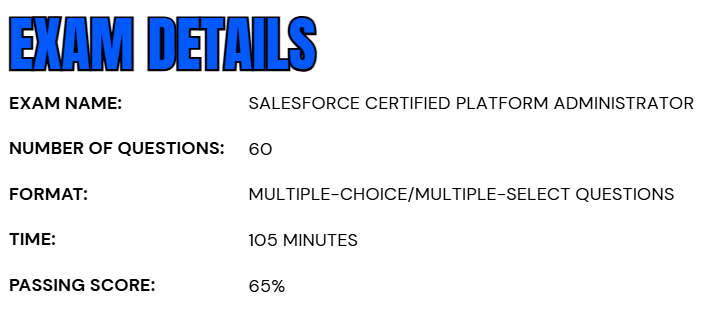
- The Salesforce Certified Platform Administrator exam is a comprehensive assessment consisting of 60 multiple-choice and multiple-select questions, along with up to five unscored questions that do not impact the final result.
- Candidates are given 105 minutes to complete the test, requiring a minimum passing score of 65% to earn the credential.
- The exam can be taken in either a proctored onsite testing center or through an online proctored environment, allowing candidates flexibility in scheduling and location.
- During the exam, no hard-copy or online reference materials are permitted, ensuring that all responses reflect the candidate’s personal knowledge and understanding of Salesforce administration.
- While there are no formal prerequisites to take the exam, it is highly recommended that candidates complete relevant Salesforce training courses or have hands-on experience with the platform. This preparation helps ensure familiarity with the system’s configuration, management, and feature optimization needed to perform effectively as a Salesforce Platform Administrator.
Course Outline
The Salesforce Certified Platform Administrator exam evaluates a candidate’s ability to apply practical knowledge and administrative skills across key functional areas of the Salesforce platform. Successful candidates are expected to have hands-on experience managing Salesforce environments and to demonstrate proficiency in configuring, maintaining, and optimizing the platform’s features and capabilities to support business operations effectively.
1. Learn About Configuration and Setup: 20%
- Describing the information found in the company settings (for example, company settings fiscal year, business hours, currency management, default settings).
- Distinguishing and understanding the administration of declarative configuration of the user interface (for example, UI settings, app menu, list views, global actions, Lightning App Builder).
- Given a scenario, demonstrating the proper setup and maintenance of users.
- Explaining the various organization Security Controls (for example, Setup Audit Trail, Login Hours, Session Settings).
- Given a user request scenario, applying the appropriate security controls based on the features and capabilities of the Salesforce sharing model (for example, public groups, org-wide default, sharing: roles, subordinates, hierarchy, report and dashboard folders).
- Given a scenario, determining the appropriate use of a custom profile or permission set using the various profile settings and permissions.
2. Understand About Object Manager and Lightning App Builder: 20%
- Describing the standard object architecture and relationship model (for example, standard object, parent/child, master detail/lookup/junction relationships, and record types).
- Explaining how to create, delete, and customize fields and page layouts on standard and custom objects, and know the implications of deleting fields.
- Given a scenario, determining how to create and assign page layouts, record types, and business processes for custom and standard objects.
3. Understand Sales and Marketing Applications: 12%
- Given a scenario, identifying the capabilities and implications of the sales process (for example, sales process, opportunity, path, and forecast impact).
- Given a scenario, applying the appropriate sales productivity features using opportunity tools (for example, dashboards, lead scoring, Einstein opportunity scoring, and home page assistant).
- Describing the capabilities of lead automation tools and campaign management (for example, leads, lead convert, lead assignment rules, campaign and campaign members).
4. Learn About Service and Support Applications: 11%
- Describing the capabilities of case management (for example, case, case assignment rules, and queues).
- Given a scenario, identifying how to automate case management (for example, support process, case auto-response rules, and case escalation).

5. Understand Productivity and Collaboration: 7%
- Describing the capabilities of activity management.
- Describing the features of Chatter.
- Describing the capabilities of the Salesforce mobile app.
- Identifying use cases for AppExchange applications.
6. Learn About Data and Analytics Management: 14%
- Describing the considerations when importing, updating, transferring, mass deleting, exporting, and backing up data.
- Describing the capabilities and implications of data validation tools.
- Describing the options available when creating or customizing a report or report type.
- Describing the impact of the sharing model on reports.
- Describing the options available when creating and modifying dashboards (for example, dashboard components, data sources, chart types, Subscribing, running user).
7. Understand Workflow/Process Automation: 16%
- Given a scenario, identifying the appropriate automation solution based on the capabilities of the tool.
- Describing capabilities and use cases for Flow.
- Describing capabilities and use cases for the approval process.
Salesforce Certified Platform Administrator Exam FAQs
Salesforce Exam Candidate Code of Conduct
All individuals pursuing a Salesforce certification are required to adhere to the Credential and Certification Program Agreement, which ensures the highest standards of fairness, transparency, and exam integrity. Candidates are strongly encouraged to prepare using official Salesforce study materials, participate in the Trailblazer Community, and follow all established testing policies and ethical guidelines. Any suspicious or unethical behavior should be immediately reported.
Engaging in unauthorized or dishonest practices—including sharing confidential exam content, obtaining unapproved assistance, or violating program rules—is strictly forbidden. Such actions can lead to serious penalties, including exam cancellation, suspension or revocation of credentials, and permanent disqualification from the Salesforce Certification Program and its affiliated communities.
Salesforce Exam Policy
Onsite (Testing Center) Exams
Candidates taking their exam at a Pearson VUE testing center may reschedule or cancel their appointment up to 48 hours before the scheduled start time through their Pearson VUE account. Requests made after this window may not be accepted. Failure to appear for the exam without prior notice will be considered a no-show, and the exam fee will be forfeited.
Online Proctored Exams
For those opting for an online proctored session, exams can be rescheduled or canceled up to 24 hours before the scheduled time at no additional cost via Pearson VUE. Any changes requested after this period may not be accommodated. These policies are designed to maintain flexibility for candidates while upholding the integrity and professionalism of the Salesforce Certification Program.
Salesforce Certified Platform Administrator Exam Study Guide
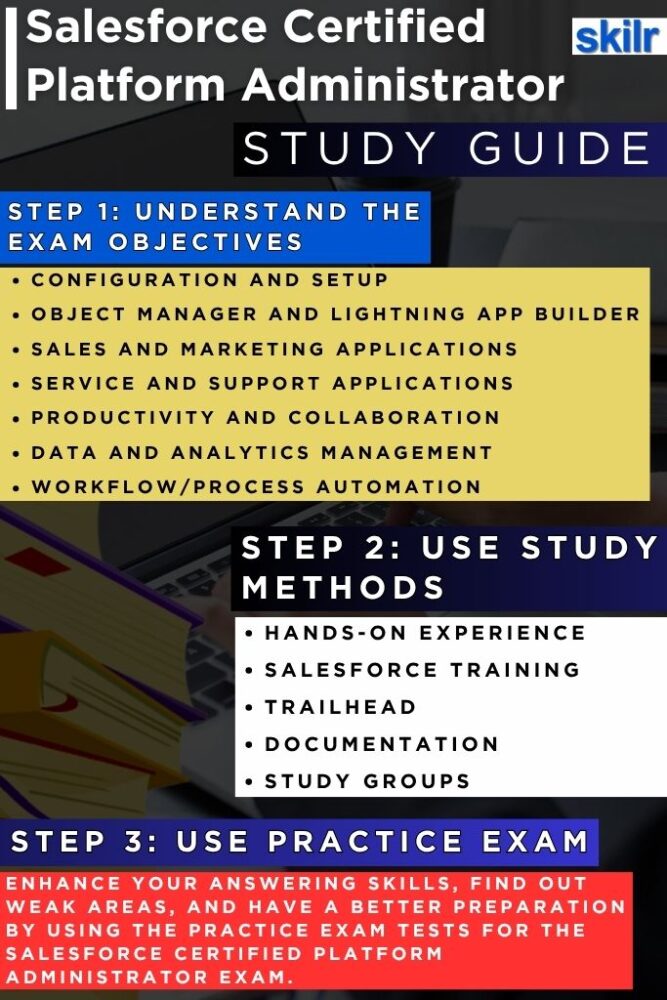
1. Gain Hands-On Experience
Practical experience is the most valuable aspect of Salesforce exam preparation. Candidates should spend significant time working directly within a Salesforce environment, exploring real-world administrative tasks such as user management, role hierarchies, data security, workflow automation, report and dashboard creation, and system configuration. Building sandbox environments for experimentation allows you to understand how various Salesforce features interact in a live setting. The more you explore real use cases—like setting up custom objects, managing permissions, and optimizing data quality—the better equipped you’ll be to handle scenario-based exam questions that mirror on-the-job responsibilities.
2. Complete Official Salesforce Training Courses
Salesforce offers official instructor-led and self-paced courses specifically designed for administrator-level certifications. Enrolling in these programs provides structured learning aligned with the exam objectives and exposes you to industry best practices. These courses cover all major topics tested in the exam. These sessions not only strengthen your conceptual foundation but also help clarify complex topics like data validation, security models, and process automation. Completing such courses demonstrates professional commitment and enhances your confidence before attempting the exam. However, the course for this exam includes:
– Course CRT101
CRT101 is a one-day, instructor-led course designed to help candidates strengthen their understanding of core Salesforce concepts and exam objectives. The course covers key areas such as configuration and setup, Object Manager and Lightning App Builder, sales and service applications, data management, analytics, and workflow automation. Participants will also work through practice questions to assess their readiness and boost confidence for the Salesforce Administrator certification exam.
This course is ideal for individuals preparing for the Salesforce Certified Administrator exam who have at least six months of hands-on Salesforce experience. It’s best suited for those who already understand the core concepts from the Salesforce Administrator Exam Guide and want focused, expert-led review and practice before taking the certification exam.
3. Skill Up with Trailhead Modules
Trailhead, Salesforce’s official learning platform, is an essential preparation resource. It offers interactive modules, guided trails, and hands-on challenges designed to reinforce theoretical knowledge through real-world tasks. Start with the “Admin Beginner” trail and gradually progress to “Admin Intermediate” and “Admin Advanced” levels. Each module combines guided explanations, hands-on exercises, and knowledge checks to help you master platform administration step-by-step. Completing relevant Trailmixes—curated sets of modules—can significantly improve your understanding and earn you Trailhead badges that validate your growing expertise.
4. Review Salesforce Documentation and Release Notes
Salesforce continuously evolves, with three major updates each year—Spring, Summer, and Winter releases. Reviewing the official Salesforce documentation and release notes helps ensure that you’re familiar with new platform capabilities, UI enhancements, and deprecated features. Many exam questions are influenced by these updates, so staying informed gives you a competitive advantage. Pay special attention to documentation related to security, automation tools, data management, and user interface customization. Keeping up-to-date with the Salesforce Help Portal also reinforces your understanding of administrative tasks and troubleshooting best practices.
5. Learn from Experts and Join Study Communities
Networking with other learners and certified professionals can make a huge difference in your preparation journey. Join the Trailhead Community, local Salesforce User Groups, and online discussion forums where you can ask questions, share study materials, and learn from others’ experiences. Many certified experts conduct virtual study sessions, webinars, and mentorship programs that provide insights into real exam scenarios. Engaging in these communities helps you stay motivated, clarify complex topics, and learn practical tips that aren’t always covered in training materials. Collaboration often accelerates learning and helps you build valuable professional connections in the Salesforce ecosystem.
6. Use Recommended Self-Study Materials
In addition to official Salesforce resources, use recommended third-party study materials such as certification guides, video tutorials, and whitepapers from trusted learning providers. Books like “Salesforce Certified Administrator Study Guide” and various online platforms offer structured resources that align closely with exam objectives. These materials typically include visual aids, quizzes, and explanations that help you retain key information. Creating personal notes, flashcards, and summary sheets from these materials can help during revision and final exam preparation. Some of the material includes:
- Trailmix: Preparing for Your Salesforce Platform Administrator Credential
- Trail: Studying for the Platform Administrator Certification Exam
- Superbadge:
7. Take Practice Tests and Mock Exams
Before sitting for the official exam, evaluate your readiness by attempting practice tests and timed mock exams. These simulate the actual testing environment and allow you to assess your speed, accuracy, and conceptual understanding. Review every question carefully—especially those you answered incorrectly—to identify knowledge gaps. Focus on understanding why an answer is correct rather than memorizing it. Reliable platforms like Trailhead’s practice quizzes are great for this purpose. Regularly taking mock exams helps you become comfortable with Salesforce’s question patterns, improves your time management skills, and boosts your confidence for the actual test day.
