
The Salesforce Certified Platform App Builder certification validates an individual’s expertise in designing, building, and deploying custom applications using the declarative (no-code) tools available within the Salesforce Lightning Platform. This credential showcases your ability to create scalable business solutions without relying on traditional programming.
Certified professionals are expected to demonstrate proficiency in managing data models, application security, process automation, and user interface customization to meet diverse business needs.
– Key Knowledge Areas
To successfully pass the Salesforce Platform App Builder exam, candidates should have a strong understanding of:
- Designing data models, business logic, user interfaces, and security for custom applications.
- Customizing Salesforce applications for mobile devices.
- Creating and managing reports and dashboards for data-driven insights.
- Deploying custom applications and managing change across environments.
– Who Should Take the Exam
This certification is ideal for individuals who:
- Have 6 months to 1 year of experience building applications on the Salesforce Lightning Platform or similar technology platforms.
- Work as App Builders, Business Analysts, Salesforce Administrators, or Consultants aiming to expand their expertise in declarative app development.
- Are familiar with Salesforce license types, customization options, and mobile capabilities.
- Possess knowledge of deployment strategies, change management, and application lifecycle management within Salesforce.
The exam is best suited for those who want to prove their ability to design effective, user-friendly applications that support business processes — without needing to write code.
Exam Details
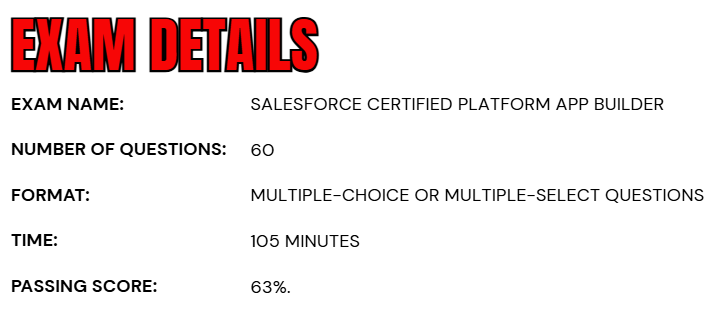
- The Salesforce Certified Platform App Builder exam consists of 60 multiple-choice or multiple-select questions, along with up to five unscored questions that are included for research purposes and do not affect your final result.
- Candidates are given a total of 105 minutes to complete the exam.
- To achieve certification, you must earn a minimum passing score of 63%.
Course Outline
The Salesforce Platform App Builder Exam evaluates a candidate’s expertise and practical abilities across key objective areas. Successful candidates are expected to have hands-on experience building custom applications on the Salesforce Lightning Platform and to demonstrate effective use and understanding of the features and functionalities outlined in the exam objectives.
1. Overview of Salesforce Fundamentals: 23%
- Given a scenario, identifying the boundaries of declarative customization and the use cases for programmatic customization.
- Identifying common scenarios for extending an org using the AppExchange.
- Applying features and capabilities available to restrict and extend object, record, and field access.
- Given a set of business requirements, determine the appropriate sharing solution.
- Identifying the features and capabilities available when creating reports, report types, and dashboards.
- Given a set of requirements, determining the appropriate global, object-specific actions and layouts to optimize the Salesforce mobile user experience.
- Describing the customizations and use cases for Chatter.
3. Understand Data Modeling and Management: 22%
- Given a scenario, determining the appropriate data model.
- Given a scenario, explaining the capabilities of the various relationship types and the implications of each on record access, user interface, and reporting.
- Given a scenario, determining the considerations when selecting or changing a field data type.
- Explain the capabilities and considerations of the Schema Builder.
- Given a scenario, determine the options and considerations when importing and exporting data, including the capabilities of external data sources.
3. Learn About Business Logic and Process Automation: 28%
- Given a scenario, demonstrating the use of formula fields to meet stated business requirements.
- Given a scenario, determining the capabilities, use cases, and implications of roll-up summary fields.
- Given a scenario, demonstrate the use of validation rules to meet stated business requirements.
- Given a scenario, determining the capabilities and use cases for approval processes.
- Given a scenario, determining the tool or action needed to meet business requirements.
- Given a set of business requirements, recommending a solution to automate business processes while avoiding errors in automation.

4. Understand User Interface: 17%
- Describing the user interface customization options.
- Demonstrating the capabilities and use cases for custom buttons, links, and actions.
- Given a scenario, determine the declarative options available for incorporating Lightning components in an application.
- Describing the programmatic customizations available for incorporating custom Lightning components in an application.
5. Learn About App Deployment: 10%
- Given a set of business requirements, recommending a solution for key milestones and considerations when managing the application lifecycle and various types of sandboxes.
- Given a use case, demonstrate knowledge, viability, and troubleshooting when using change sets.
- Describing the use cases and considerations when using unmanaged and managed packages.
- Given a scenario, determine the appropriate deployment plan.
Salesforce Certified Platform App Builder Exam FAQs
Salesforce Exam Candidate Code of Conduct
All individuals seeking a Salesforce certification must comply with the Credential and Certification Program Agreement, which upholds the principles of fairness, transparency, and exam integrity. Candidates are encouraged to prepare through official Salesforce learning resources, engage in the Trailblazer Community, and conduct themselves with professionalism and honesty throughout the certification process.
Any form of misconduct or unethical activity—such as sharing confidential exam content, seeking or providing unauthorized assistance, or violating Salesforce exam policies—is strictly prohibited. Such actions can result in severe consequences, including exam invalidation, credential suspension or revocation, and permanent disqualification from the Salesforce Certification Program. Maintaining the credibility of the certification ecosystem depends on every candidate’s adherence to these standards.
Salesforce Exam Policy
The Salesforce Exam Policy defines key procedures for scheduling, rescheduling, canceling, and attending certification exams, whether conducted online or at a physical testing center. Following these guidelines ensures a consistent and equitable experience for all participants.
Onsite (Testing Center) Exams
Candidates taking their exam at a Pearson VUE testing center may reschedule or cancel their appointment up to 48 hours prior to the scheduled exam time through their Pearson VUE account. Requests made after this deadline are typically not accepted. Failure to appear for the exam without prior notification will result in a no-show status and forfeiture of the full exam fee.
Online Proctored Exams
For those opting for an online proctored exam, rescheduling or cancellation is permitted up to 24 hours before the scheduled start time via Pearson VUE at no additional cost. Any changes requested after this timeframe may not be accommodated, and non-compliance with this policy could lead to loss of the exam fee.
Salesforce Certified Platform App Builder Exam Study Guide
Step 1: Gain Hands-On Experience with the Lightning Platform
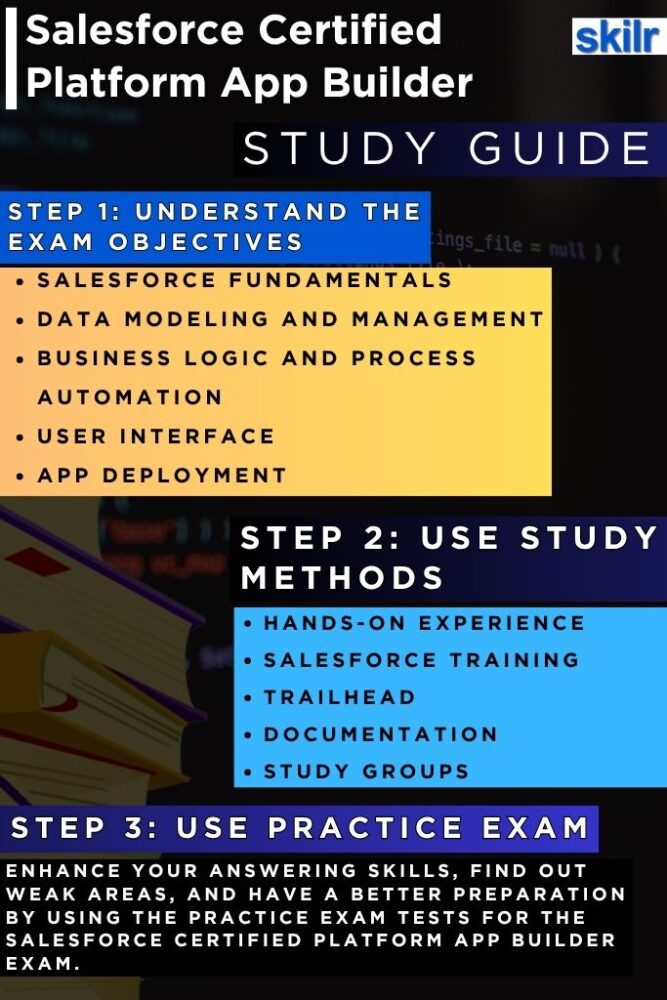
The foundation of success in the Salesforce Certified Platform App Builder exam lies in gaining extensive, hands-on experience with the Salesforce Lightning Platform. Candidates should spend considerable time creating, customizing, and deploying applications using declarative tools such as Flow Builder, Process Builder, Schema Builder, and App Builder. Experimenting with different business scenarios helps solidify your understanding of how data models, business logic, and automation work together to create efficient business solutions. Real-world practice also familiarizes you with Salesforce’s interface, enabling you to apply your skills more effectively during the exam and in professional environments.
Step 2: Complete Official Salesforce Training Courses
To complement your practical experience, enrolling in official Salesforce training programs is highly recommended. Salesforce offers structured courses through Trailhead Academy and instructor-led programs that are aligned with the exam objectives. These courses cover essential topics such as data modeling, application security, UI customization, and process automation. In addition to theoretical lessons, the training includes interactive exercises and use-case-driven discussions that enhance your problem-solving skills. Expert-led courses also provide insights into best practices and design principles that are frequently tested in the certification exam.
Step 3: Strengthen Your Skills on Trailhead
Trailhead, Salesforce’s interactive learning platform, serves as a comprehensive and engaging way to build your expertise. By completing modules, trails, and projects specifically related to the Platform App Builder path, you can deepen your conceptual knowledge while gaining guided, hands-on practice. Trailhead also simulates real-world challenges that mirror exam-style scenarios, helping you understand how to apply Salesforce tools in a business context. Earning badges not only tracks your progress but also boosts your confidence as you prepare for the exam.
Step 4: Deep Dive into Salesforce Documentation
A thorough review of official Salesforce documentation, implementation guides, and release notes is essential for staying up to date with the latest platform features and enhancements. Salesforce frequently introduces updates that affect declarative tools, automation processes, and reporting functionalities. Familiarizing yourself with these changes ensures you can answer exam questions based on the current platform version. Additionally, documentation provides valuable details on configuration limits, deployment considerations, and security models—topics that are often tested in scenario-based questions.
Step 5: Engage with the Salesforce Community
Connecting with other professionals through the Trailblazer Community, online study groups, and discussion forums can significantly enhance your preparation. These communities are rich sources of practical knowledge, offering insights from certified professionals who share their experiences, study strategies, and real-world use cases. Active participation in discussions helps clarify complex topics, exposes you to diverse problem-solving approaches, and keeps you motivated throughout your preparation journey. Collaborative learning environments often reveal nuances that self-study alone might overlook.
Step 6: Take Practice Tests and Mock Exams
Before scheduling the final exam, it is crucial to evaluate your readiness through practice tests and mock exams. These assessments simulate the real exam format and help you identify both your strengths and areas that need improvement. Reviewing your performance on these tests allows you to focus your revision on weaker topics and refine your test-taking strategy. Practice exams also help you build familiarity with the question style—especially scenario-based and multi-select questions—and improve your ability to manage time effectively within the 105-minute exam window.
Step 7: Review, Revise, and Plan Strategically
In the final stage of preparation, dedicate time to consolidating all the knowledge and experience you have gained. Create a focused revision plan that emphasizes critical concepts such as data modeling, process automation, user interface design, and security. Reviewing key Trailhead modules, Salesforce documentation, and notes from your training sessions ensures that your understanding is both comprehensive and current. Avoid learning new material in the last few days; instead, reinforce your strengths and practice applying concepts holistically. A calm, well-structured review phase will help you approach the Salesforce Certified Platform App Builder Exam with confidence and clarity.
