
The Salesforce Certified Slack Administrator credential validates your expertise in configuring, managing, and optimizing Slack to drive collaboration, streamline communication, and boost productivity within an organization. This certification focuses on both the user-facing functionalities and the administrative controls that allow organizations to tailor Slack to their specific business needs.
As a Slack Administrator, you are responsible for leveraging Slack’s powerful features—such as channel management, app integrations, and workspace configurations—to create a secure, efficient, and user-friendly environment that aligns with company policies and enhances team efficiency.
Who Should Take the Exam
The Salesforce Certified Slack Administrator exam is ideal for individuals who manage or oversee Slack environments within their organizations. It is best suited for professionals who:
- Possess hands-on experience in configuring and managing Slack for teams of various sizes.
- Are responsible for defining Slack policies, security settings, and workspace architecture.
- Understand user provisioning, permissions, and governance processes.
- Can design and implement effective channel structures and approval workflows.
- Are involved in ensuring data security, compliance, and smooth user adoption.
Knowledge Area
Candidates are expected to have at least six months of practical experience as a Slack Administrator and should demonstrate a strong understanding of key areas, including:
- Administrative roles and permissions
- Slack workspace and enterprise architecture
- User lifecycle management and provisioning
- Settings and policy configuration
- App management and approval processes
- Channel structure optimization
- Data protection and process design
- Strategies for user engagement and adoption
This certification is particularly valuable for IT administrators, collaboration specialists, and system administrators who aim to validate their ability to optimize Slack as part of the Salesforce ecosystem and enhance organizational communication efficiency.
Exam Details
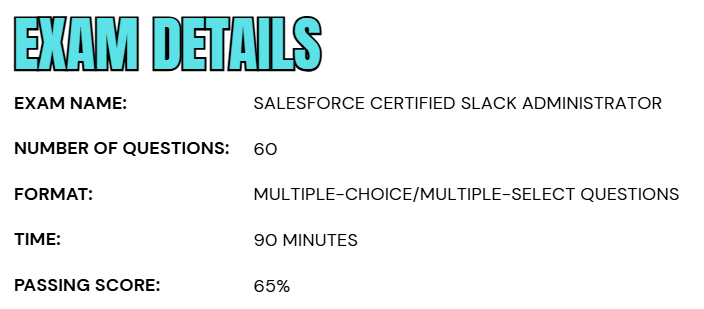
- The Salesforce Certified Slack Administrator exam consists of 60 multiple-choice or multiple-select questions designed to evaluate your knowledge and hands-on expertise in managing and configuring Slack environments effectively.
- Candidates are given 90 minutes to complete the exam, and a minimum passing score of 65% is required to earn the certification.
- The exam can be taken either onsite at a proctored testing center or through a secure online proctored environment, offering flexibility to accommodate different preferences and schedules.
- During the exam, no external resources—such as hard-copy notes or online materials—are permitted, ensuring a fair and standardized testing experience.
- There are no formal prerequisites for taking the Salesforce Certified Slack Administrator exam, making it accessible to professionals who wish to validate their skills in Slack administration and strengthen their credentials within the Salesforce ecosystem.
Course Outline
The Salesforce Certified Slack Administrator exam evaluates a candidate’s expertise and practical understanding across the following key knowledge areas and skill objectives.
1. Understand the Fundamentals: 9%
- Summarizing the key privileges and responsibilities of each Slack user role.
- Identifying the unique features of each Slack paid plan.
- Identifying the common responsibilities of Slack Admin and Owner roles.
- Identifying workspace and org-level settings and dashboards.
2. Learn About Workspace Administration: 9%
- Determining when to create a workspace to meet the needs of an organization.
- Managing the workspace creation and approval process.
- Choosing a workspace visibility setting that meets the needs of the members and organization.
- Preparing an Enterprise Grid design that meets the needs of the members and organization.
- Recommending how to consolidate workspaces.
3. Understand Channel and User Group Administration: 28%
- Set up and administer Slack channels.
- Recommending when to use a channel, a direct message (DM), or a group DM.
- Recommending when to use a public or private channel.
- Recommend when to use multi-workspace channels.
- Administering channel posting permissions.
- Given a business case, recommending when to share a channel with an outside organization.
- Demonstrating how to manage connections, channels, and DMs with outside organizations.
- Establishing channel-naming guidelines and set recommended prefixes to meet the needs of an organization.
- Administering policies to manage the status or state of channels (for example, delete, archive, and convert).
- Recognizing when to use and how to set up Slack user groups.
4. Understand User Lifecycle Management: 14%
- Implementing the best authentication option based on the Slack plan and an organization’s requirements.
- Recommending a process for new account creation for different use cases.
- Recommending when to use a system for cross-domain identity management (SCIM) versus just-in-time (JIT) to provision users.
- Recommend a process for getting new users into the right workspace(s) and channels.
- Demonstrating the two ways full member accounts can be deactivated (manual deactivation versus SCIM deprovisioning).
- Creating a guest user request and approval process.
5. Learn About App Administration: 10%
- Summarizing the value of interoperability for decision makers and end users.
- Using Workflow Builder to automate routine tasks and manual business processes.
- Understanding the App installation process.
- Set up and manage an app-approval process.

6. Explore Security: 15%
- Identifying Slack product security features and settings to meet an organization’s security needs.
- Describing how Slack prioritizes security governance, risk management, and compliance and identify examples of each.
- Describe product features that manage access and mobile devices to meet specific business needs.
- Recommending product features that protect and manage sensitive data to meet specific business needs.
- Recommend product features that govern information to meet specific business needs.
- Recommending when to audit user activity in Slack.
7. Learn About Enabling Slack Success: 15%
- Developing a vision and identify goals for Slack at an organization.
- Using the analytics dashboard to track Slack usage.
- Make recommendations based on analytics data (for example, channel archival, work with Slack Champions, publish a Slack etiquette guide).
- Building a Slack team to maintain a workspace or org based on best practices.
- Enabling admins to promote Slack as the Digital HQ for their organization.
- Promoting ongoing member enablement and engagement with specific programs and resources.
Salesforce Certified Slack Administrator Exam FAQs

Salesforce Exam Candidate Code of Conduct
Salesforce is committed to maintaining the integrity and credibility of its certification program. All candidates must comply with the Salesforce Credential and Certification Program Agreement, ensuring fairness and professionalism throughout the exam process.
Participants are expected to prepare using official Salesforce resources like Trailhead modules, trailmixes, exam guides, and Trailhead Academy courses. They should also engage responsibly with the Trailblazer Community and follow all exam rules—whether testing online or at a center. Any suspicious or unethical activity must be reported to the Credential Security team.
Prohibited actions include sharing or using actual exam content, receiving unauthorized help, or breaching the certification agreement in any form. Non-compliance may lead to serious consequences such as exam cancellation, suspension, permanent bans, loss of certifications, and removal from the Salesforce Credentialing Program.
Salesforce Exam Policy
The Salesforce Exam Policy outlines the essential rules for scheduling, rescheduling, canceling, and attending certification exams, whether taken online or at a testing center, to ensure a fair and consistent experience for all candidates. For onsite exams at Pearson VUE testing centers, candidates may modify or cancel their appointment up to 48 hours before the scheduled time through their Pearson VUE account. Late requests are generally not accepted, and failure to attend without notice results in a no-show status and forfeiture of the exam fee.
For online proctored exams, rescheduling or cancellation is allowed up to 24 hours before the exam start time at no additional cost. Requests made after this deadline may not be approved, and missing the exam or violating policy terms can lead to loss of the exam fee.
Salesforce Certified Slack Administrator Exam Study Guide
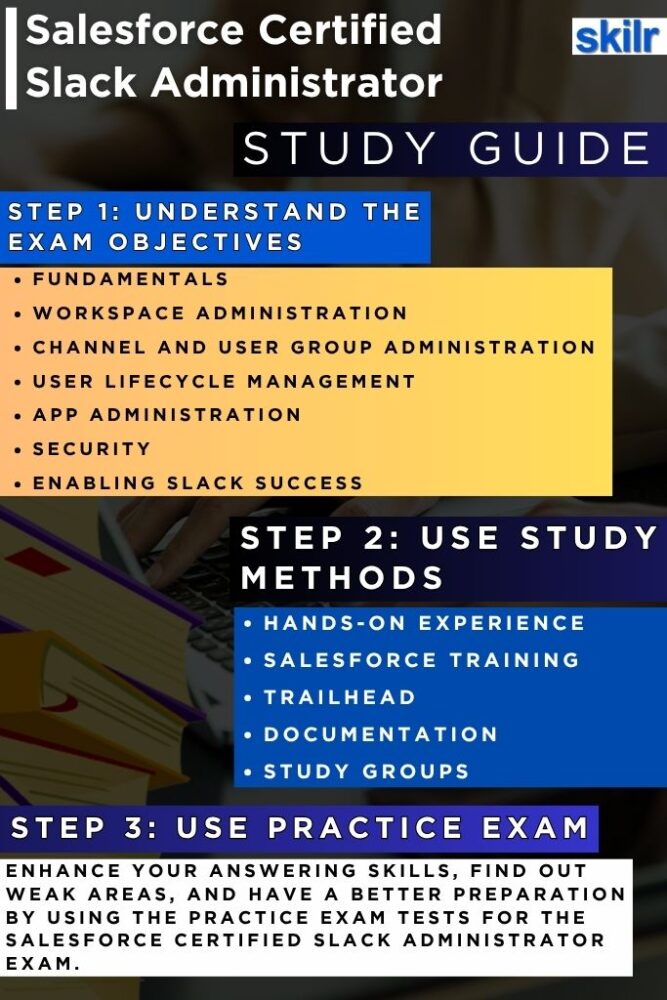
1. Build a Strong Foundation Through Hands-On Experience
Begin your preparation by gaining practical experience with Slack’s administrative features and tools. Work extensively with workspace configurations, user permissions, channel structures, and app integrations to understand how Slack operates across different organizational environments. This hands-on experience allows you to identify and solve real-world challenges related to governance, security, and workflow optimization. The more time you spend managing Slack workspaces, the stronger your grasp will be on both its technical setup and strategic functionality.
2. Complete Salesforce and Slack Training Programs
Enroll in Salesforce and Slack-approved training courses to develop a comprehensive understanding of the platform. Trailhead Academy offers structured, expert-led sessions that cover essential topics such as Slack architecture, user provisioning, app management, and security administration. These programs help you bridge knowledge gaps and align your preparation with the core competencies evaluated in the certification exam. Completing formal training ensures that your skills meet Salesforce’s professional standards for certified administrators.
3. Strengthen Your Knowledge with Trailhead Learning Modules
Enhance your learning journey by leveraging Trailhead, Salesforce’s official interactive platform. Trailhead offers a series of trails, modules, and trailmixes dedicated to Slack administration and Salesforce integration. These guided learning paths combine theoretical explanations with practical exercises, allowing you to apply concepts immediately. Trailhead’s interactive structure helps you master Slack’s configuration, automation features, and best practices while tracking your progress toward certification readiness.
4. Collaborate with Study Groups and the Trailblazer Community
Join Slack Administrator study groups and the Trailblazer Community to deepen your understanding through collaboration and shared learning. Interacting with peers and certified professionals allows you to gain different perspectives, clarify doubts, and access insider tips about the exam. Engaging in discussions, webinars, and group study sessions also helps you stay motivated and updated on Slack’s latest administrative enhancements. The Trailblazer Community is particularly valuable for real-world insights and mentorship from experienced administrators.
5. Review Official Slack Documentation and Resources
Thoroughly explore the Slack Help Center, Slack for Admins page, Slack glossary, and Slack Resources Library to supplement your study materials. These official sources provide detailed explanations, Tip Sheets, and User Guides covering every aspect of Slack administration—from configuration and data security to workspace management and policy design. Familiarity with these resources ensures that your knowledge remains accurate, up to date, and aligned with current platform capabilities.
6. Take Practice Tests and Mock Exams
Assess your readiness through practice exams and mock tests that simulate the real certification experience. These tests allow you to evaluate your performance under timed conditions, recognize recurring question patterns, and identify weaker areas that require further review. Regularly analyzing your results helps refine your strategy, improve accuracy, and boost your confidence ahead of the official exam.
7. Revise and Consolidate Your Learning
In the final phase of your preparation, dedicate focused time to revision and reinforcement. Revisit essential topics such as security policies, workflow automation, and user adoption strategies, ensuring you have a holistic understanding of Slack’s administrative framework. Reviewing real-world scenarios, release notes, and case studies can help you connect theory with practice. Consistent study, hands-on experience, and disciplined revision together form the foundation for success in the Salesforce Certified Slack Administrator Exam.
