
The Salesforce Experience Cloud Consultant certification is intended for professionals who work closely with customers to design, configure, and deliver digital experiences using Salesforce’s Experience Cloud platform. This credential validates an individual’s ability to build scalable, maintainable, and user-centric Experience Cloud solutions using Salesforce’s declarative tools and best practices.
Certified consultants are expected to help organizations create robust digital experiences—such as partner portals, customer communities, self-service hubs, and engagement platforms—that drive long-term business value. Furthermore, this certification demonstrates your expertise in implementing Salesforce Experience Cloud applications. It affirms your capability to:
- Gather customer requirements and translate them into practical Experience Cloud solutions
- Configure, customize, and troubleshoot Experience Cloud sites
- Optimize usability through branding, personalization, and access control
- Ensure scalability, security, and long-term maintainability
– Prerequisites
To qualify for the Salesforce Experience Cloud Consultant exam, candidates must first hold the Salesforce Certified Platform Administrator credential. Additionally, Salesforce recommends that candidates have:
- At least six months of hands-on experience working with Experience Cloud
- Practical exposure to building or administering Experience Cloud sites
- Strong facilitation, problem-solving, and consulting skills
- The ability to troubleshoot platform issues and guide customers effectively
– Typical Job Roles
Professionals who pursue this certification often work in roles such as:
- Salesforce Consultant or Senior Consultant
- Solution Architect or Technical Architect
- Delivery Manager or Director
- Business Analyst, Business Consultant, or Functional Architect
- Salesforce Developer
- Experience Cloud Designer
- Engagement Manager or Experience Site Manager
- Salesforce Administrator
– Key Skills and Capabilities Validated
Certified Experience Cloud Consultants are expected to demonstrate proficiency in the following areas:
Experience Setup and Configuration
- Enabling Digital Experiences and selecting suitable templates
- Choosing appropriate external user licenses
- Configuring branding, page layouts, CMS content, and components in Experience Builder
- Setting up reputation levels, gamification, and Experience Workspaces
Personalization and Engagement
- Defining audiences and tailoring content accordingly
- Managing Topics and assigning Knowledge Articles
- Measuring adoption, engagement, and usage metrics
Access, Security, and Identity
- Understanding declarative sharing, visibility settings, and role best practices
- Creating sharing sets and external account relationships
- Provisioning external users, enabling self-registration, and configuring Social Sign-On
Business and Technical Enablement
- Supporting channel sales (PRM)
- Making reports and dashboards accessible within an Experience
- Managing public sites
- Migrating Experiences across environments
Knowledge of Capabilities and Limitations
- Understanding native features and identifying when custom solutions may be required
– Areas Where Candidates May Require Support
While candidates are not expected to master every technical area, they may need additional guidance in:
- Configuring Single Sign-On within Experience Cloud
- Understanding limitations of custom domains
- Applying effective change-management strategies for Experience deployments
- Setting up SEO
- Designing architectures involving multiple vs. single Experiences
- Working with Person Accounts
– Topics Not Required for the Exam
The exam does not require candidates to have expertise in:
- Advanced SEO strategy
- Knowledge implementation details
- Deep Service Cloud specialization
- HTML/CSS development
- Visual or interaction design
- End-user training or organizational change management
– Who Should Take the Salesforce Experience Cloud Consultant Exam?
This certification is ideal for professionals who:
- Work directly with clients or internal stakeholders to design and deliver digital experience solutions
- Have hands-on exposure to Experience Cloud setup, configuration, and site management
- Want to validate their ability to build partner portals, customer communities, self-service hubs, or other Experience Cloud sites
- Are aiming to advance their career in Salesforce consulting, architecture, or solution delivery
- Already hold a Salesforce Administrator credential and want to specialize further in Experience Cloud
Exam Details
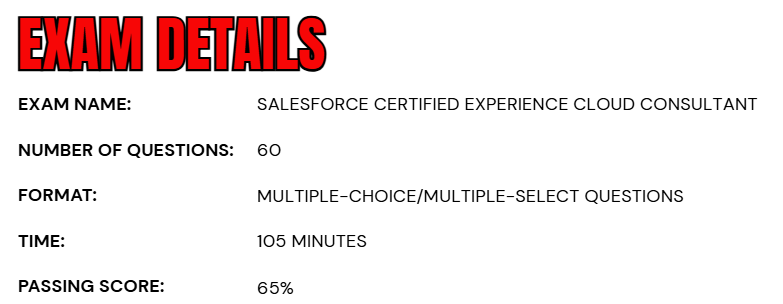
- The Salesforce Experience Cloud Consultant exam consists of 60 scored multiple-choice and multiple-select questions, along with five additional unscored questions that are included to assess future question performance.
- Candidates are given a total of 105 minutes to complete the exam, with the time allocation already adjusted to account for the presence of unscored items.
- To earn the credential, a candidate must achieve a minimum passing score of 65%.
- The exam can be taken either at an authorized testing center or through a secure online proctored environment.
- During the assessment, no external materials—printed or digital—are permitted, ensuring a fully closed-book testing experience.
- The unscored questions do not affect the final result and are randomly placed throughout the exam, making them indistinguishable from scored items.
Course Outline
The Salesforce Experience Cloud Consultant Exam evaluates a candidate’s proficiency across several key competency areas. Individuals taking the exam are expected to have practical, real-world experience with Experience Cloud and be able to demonstrate a solid understanding and applied expertise in all the topics outlined.
1. Learn about the Experience Cloud Basics: 8%
- Illustrating the reasons for creating or utilizing an Experience for a specific use case.
- Identifying most common personas for Experience Cloud.
- Assessing the common types of external accounts and how they are used in an Experience.
- Applying features and functions of Workspaces for building an Experience.
2. Understand Sharing, Visibility, and Licensing: 17%
- Given a scenario, setting the correct user visibility in an Experience.
- Given a scenario, set the correct object visibility in an Experience.
- Recommending the Declarative Sharing options that could be leveraged for an Experience.
- Given a scenario, implementing external account relationships for an Experience.
- Given a set of requirements, evaluating which external license type(s) to use.
- Given a scenario, determine a security model based on an Experience use case.
- Describing roles for external users.
3. Learn about Branding, Personalization, and Content: 15%
- Modifying an experience within the Experience Builder.
- Explaining the capabilities of Search within an Experience.
- Implementing Salesforce CMS content into an Experience.
- Given a scenario, make articles visible or accessible in an Experience.
4. Overview of Templates and Themes: 10%
- Given a scenario, selecting the appropriate theme for an Experience.
- Given a scenario, identifying the right Template for the Experience.
- Applying packaging, exporting, and importing a template.
- Assessing the use of lightning bolts in Experiences.

5. Learn about User Creation and Authentication: 13%
- Describing the different ways users can be created, such as manual, Data Loader, Self-Registration, and Just-in-Time (JIT) provisioning.
- Given a scenario, determine how to properly set up a user for an Experience.
- Describing options for Single Sign-On.
- Applying the steps for enabling partner and customer users for Experiences.
- Identifying how to grant users access to an Experience.
6. Understand Adoption and Analytics: 5%
- Applying the steps to set up Experience dashboards and insights.
- Analyzing and applying Experience Moderation features.
- Given a scenario, employing fundamental best practices for adoption and engagement.
7. Learn about Administration, Setup, and Configuration: 25%
- Applying the steps for implementing Channel Sales Partner Relationship Management (PRM).
- Describing the capabilities of different Experience deployments and migrations.
- Describing how to enable and activate an Experience.
- Given a scenario, recommending and implementing Delegated External User administration.
- Determining the steps to build a public Experience.
- Determining steps to configure and set up Topics.
- Applying ticketing and Service Cloud capabilities for Experience Cloud.
8. Understand Customization Considerations and Limitations: 7%
- Explaining limitations across all Experiences.
Salesforce Certified Experience Cloud Consultant Exam FAQs
Salesforce Certification Exam Policy
The Salesforce Certification Exam Policy outlines the official rules governing how candidates schedule, reschedule, cancel, and complete any Salesforce credentialing exam. These standards apply uniformly to all test-takers, whether they choose to sit for their exam in an online proctored session or at an authorized testing center. The purpose of the policy is to protect exam integrity, ensure consistent experiences across all testing formats, and maintain fairness for every participant.
Testing at Authorized Onsite Centers
Candidates who plan to take their exam at a Pearson VUE test center may modify or cancel their appointment through their Pearson VUE account, as long as the request is submitted at least 48 hours before the scheduled exam time. Changes requested beyond this deadline are typically declined. Failure to arrive for a scheduled onsite exam without making an approved change within the allowed timeframe results in a no-show status, and the full exam fee is forfeited.
Online Proctored Exam Sessions
For candidates choosing the remote testing option, Pearson VUE permits rescheduling or canceling an exam up to 24 hours before the session begins. Requests made after this point are generally not approved. Missing the online exam without proper rescheduling leads to the complete loss of the exam fee, mirroring the policy for onsite testing.
Salesforce Exam Candidate Code of Conduct
All individuals participating in the Salesforce Certification Program must adhere to strict standards of professionalism, integrity, and ethical behavior from exam registration through test completion. By booking an exam, candidates agree to the terms of the Salesforce Credential and Certification Program Agreement, which defines expectations for ethical preparation and compliant testing conduct.
Candidates are expected to use only authorized Salesforce learning resources, engage responsibly within the Trailblazer Community, and comply with all proctoring and security requirements. Prohibited actions—such as sharing or requesting actual exam questions, using unauthorized aids during testing, or disregarding proctor instructions—can lead to severe consequences including score invalidation, suspension or revocation of certifications, or permanent removal from the Salesforce Certification Program.
Salesforce Certified Experience Cloud Consultant Exam Study Guide
1. Understanding the Official Exam Guide
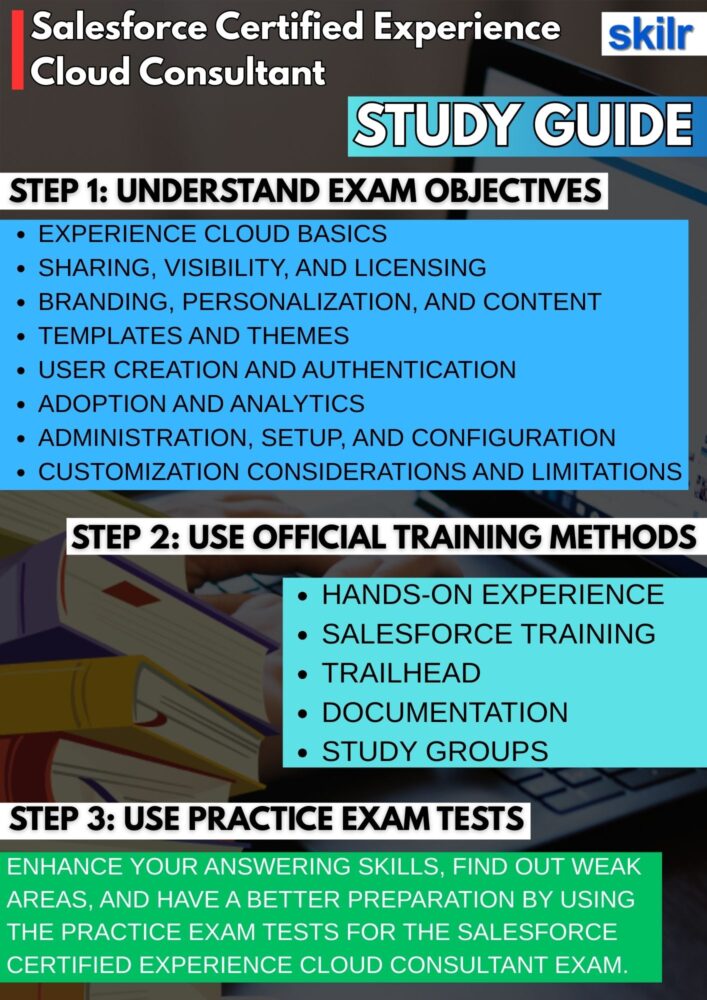
Every successful preparation strategy for the Salesforce Experience Cloud Consultant exam begins with a thorough understanding of the official Exam Guide. This document outlines the core competencies, topic weights, question distribution, and the overall structure of the assessment. By reviewing it closely, you gain clear insight into the skills Salesforce expects from certified consultants, including configuration expertise, implementation knowledge, and business scenario interpretation.
The guide acts as your roadmap, showing which concepts require deeper study and which areas you may already be comfortable with. It also clarifies how the exam is scored, the types of questions you will encounter, and the depth of practical knowledge required, enabling you to plan your preparation timeline effectively.
2. Building Knowledge Through Hands-On Experience and Formal Training
A well-rounded preparation approach combines both real-world experience and structured training resources. Because the Experience Cloud exam emphasizes practical application, spending time in sandboxes or working on client or internal projects allows you to develop genuine familiarity with the platform. Tasks such as building Experience Cloud sites, configuring templates, managing audiences, setting up external user profiles, and working with declarative sharing models will give you the confidence to handle scenario-based questions.
In parallel, Salesforce’s official training courses and guided learning paths offer a more structured understanding of best practices, architecture concepts, and implementation strategies. This dual approach ensures that your knowledge is not only theoretical but also grounded in practical execution.
3. Strengthening Expertise Through Trailhead Modules
Trailhead plays a vital role in preparing for this certification, offering guided modules, Trailmixes, and hands-on challenges designed specifically for the Experience Cloud ecosystem. Completing the relevant learning paths helps reinforce foundational concepts such as user access, site structure, personalization, and Experience Builder components.
Trailhead’s practical exercises enable you to perform real configurations while receiving instant feedback, helping you internalize the steps involved in common Experience Cloud tasks. In addition to individual modules, Salesforce often offers curated Trailmixes for certification preparation, which help streamline your learning journey and ensure that you cover every essential topic systematically.
4. Enhancing Competency Through Practical Implementation Work
Practical experience is the most valuable element of your preparation, as the exam heavily emphasizes real-world scenarios and troubleshooting. Setting up your own Experience Cloud site in a developer or sandbox environment allows you to experiment freely with features like login and registration flows, role hierarchy alignment for external users, custom branding, CMS integration, and site deployment. Working on simulated business scenarios enhances your ability to translate requirements into scalable solutions.
Experience with tasks such as configuring sharing sets, managing Knowledge Articles within communities, creating public pages, enabling multi-language support, and personalizing content for different audiences can significantly strengthen your problem-solving skills. The more hands-on practice you complete, the better equipped you will be to tackle complex case-based questions during the exam.
5. Engaging with Study Groups and the Salesforce Community
Connecting with other learners, mentors, and certified professionals can greatly enrich your learning experience. The Trailblazer Community offers an extensive network of groups dedicated to Experience Cloud, certification preparation, and Salesforce platform expertise. Participating in discussions, attending virtual meetups, and joining local community events allow you to learn from real implementation stories, clarify doubts, and keep up with new platform updates.
Trailhead Academy also offers expert-led courses and live sessions, providing structured guidance from instructors who have deep experience in Salesforce consulting. Collaborating with peers in study groups can help reinforce difficult concepts, share learning strategies, and accelerate overall progress.
6. Validating Your Knowledge Through Practice Tests
Practice exams are crucial for assessing your readiness and identifying areas that require additional study. These tests replicate the style, difficulty, and time pressure of the actual certification exam, helping you become comfortable with complex scenario-based questions. Taking multiple practice tests allows you to observe patterns in your strengths and weaknesses, refine your understanding of specific topics, and improve your ability to interpret Experience Cloud use cases accurately. Reviewing your answers, especially the incorrect ones, helps reinforce key concepts and ensures that you are not just memorizing content but truly understanding how Experience Cloud features should be applied in real situations.
7. Reviewing Salesforce Documentation, Tip Sheets, and User Guides
Salesforce’s official documentation remains one of the most valuable resources for preparing for this exam. The documentation offers deep technical detail on every Experience Cloud feature, including configuration steps, limitations, best practices, and architectural considerations. Tip Sheets and User Guides provide concise explanations of key capabilities such as audience targeting, template selection, site publishing, CMS integration, identity management, and security configurations.
Reviewing release notes also helps you stay current with new Experience Cloud enhancements, ensuring that your knowledge reflects Salesforce’s latest capabilities. This comprehensive review of documentation ensures that you understand not only how to configure the platform but also why certain design decisions are recommended in different business contexts.
