👇 SITEWIDE 50% OFF, REGISTER NOW👇
00
HOURS
00
MINUTES
00
SECONDS
USE COUPON
WEEKEND50
Coupon copied!
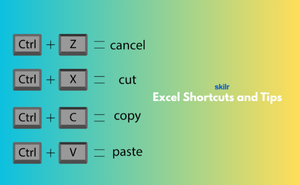
The Excel Shortcuts and Tips exam assesses candidates' proficiency in using keyboard shortcuts, productivity tips, and time-saving techniques in Microsoft Excel to enhance efficiency, speed up workflows, and improve productivity. Excel shortcuts and tips enable users to perform tasks more quickly and effectively, navigate Excel workbooks efficiently, and leverage hidden features and functionalities for optimal performance.
The Excel Shortcuts and Tips exam covers the following topics :-
Credentials that reinforce your career growth and employability.
Start learning immediately with digital materials, no delays.
Practice until you're fully confident, at no additional charge.
Study anytime, anywhere, on laptop, tablet, or smartphone.
Courses and practice exams developed by qualified professionals.
Support available round the clock whenever you need help.
Easy-to-follow content with practice exams and assessments.
Join a global community of professionals advancing their skills.
(Based on 499 reviews)
Data Analyst, Financial Analyst, Office Manager, Project Coordinator, Administrative Assistant
You will gain a deep understanding of Excel's time-saving features, shortcuts, and tips for improving efficiency in data management and analysis.
Anyone looking to improve their productivity with Excel, including business professionals, students, and data analysts.
Yes, there are freelance opportunities for Excel-related tasks, especially in data management, reporting, and analytics.
Yes, this exam is ideal for freshers who want to build a solid foundation in Excel and improve their job prospects in roles requiring data handling.
You will acquire the skills to navigate Excel quickly using shortcuts, edit and format data efficiently, and optimize workflows in Excel.

